appstorelogocleanWith so many paid-for and free apps available on the App Store these days, it's easy to reach a point where you have so many of them on your iPhone or iPad that a sizable proportion are simply forgotten about, and soon storage space starts to become an issue.

Fortunately, there's an easy way that you can keep tabs on which apps you use the most and which ones have basically become redundant to you, and are just adding needless clutter to your home screen and eating up storage. Follow the steps below to learn how it's done.

How to Identify and Delete Redundant iOS Apps

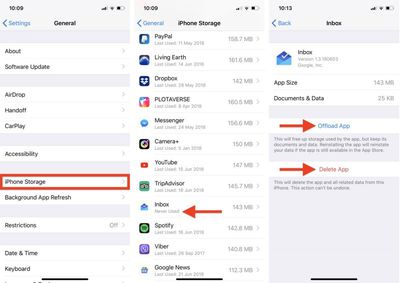
  1. Launch the Settings app on your iPhone or iPad.

  2. Tap General.

  3. Tap iPhone Storage.

  4. A list of all the apps (including stock apps) on your iOS device will load in order of size, with the largest apps listed first. Scroll down the list and look at the Last Used: date underneath the title of each app. If it's been several weeks or months since you opened an app, or it says Never Used, then consider uninstalling it – tap the app in the list.
    identify redundant ios apps

  5. Two uninstall options are presented on this screen. Tap Offload App to unload the app but preserve any documents and data (these are reinstated if you later reinstall the app) or tap Delete App to remove the app and all related data from your device.
If you tend to download a lot of apps that often get left unused, consider enabling the iPhone Storage menu recommendation to automatically Offload Unused Apps when you're low on storage. If you uninstall a purchased app but later decide that you want to use it (and it's still available in the App Store) simply follow the steps below.

How to Reinstall Deleted Apps

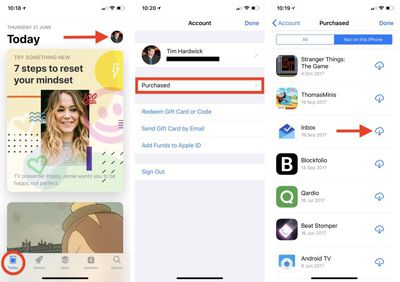
  1. Launch the App Store app on your iPhone or iPad.

  2. Tap the Today tab if it isn't selected already.

  3. Tap your circular profile photo at the top-right of the Today screen to access the account settings screen.

  4. Tap Purchased.
    restore deleted ios apps

  5. In the Purchased screen, tap the Not on this iPhone/iPad tab.

  6. Scroll through the list of purchased apps to find the one that you want to reinstate, and tap the cloud download icon next to it to re-download and install.
Related Forum: iOS 11

Top Rated Comments

amcomis Avatar
100 months ago
We need an easy way to clear the 'cache' in apps. I often want to KEEP the app. But delete the data. iOS offers the reverse. I want to keep the NY Times app, but I want to clear its 400mb of meaningless data. Of course, there is sometimes a clear cache option, but there often isnt and it should be in IOS
Score: 4 Votes (Like | Disagree)
Telos101 Avatar
100 months ago
I'm not sure how this article is about "redundant" apps? Unnecessary, maybe - but redundant?
The dictionary definition of redundant is "unnecessary or no longer useful; superfluous." Seems to fit the bill here, I'd say?
Score: 1 Votes (Like | Disagree)
69650 Avatar
100 months ago
I often download free apps for possible future use because you can’t add apps to your wish list anymore.
Score: 1 Votes (Like | Disagree)
timmyh Avatar
100 months ago
I've changed redundant to unnecessary in the title to avoid any potential for confusion.
Score: 1 Votes (Like | Disagree)
riverfreak Avatar
100 months ago
I wish Apple would add some way to permanently delete apps from your account. Even if you delete them from your phone, they still end up reappearing in the App Store purchased list or if the developer makes some minor update to bump its revision history.

Aside from that, this is a really good tip! I didn’t know you could delete from the storage settings page.
Score: 1 Votes (Like | Disagree)
usarioclave Avatar
100 months ago
When did Apple finally add the "last used" information? People have been asking for that for years. Nice to know!
Score: 1 Votes (Like | Disagree)

Popular Stories

Apple Logo Zoomed

Tim Cook Teases Plans for Apple's Upcoming 50th Anniversary

Thursday February 5, 2026 12:54 pm PST by
Apple turns 50 this year, and its CEO Tim Cook has promised to celebrate the milestone. The big day falls on April 1, 2026. "I've been unusually reflective lately about Apple because we have been working on what do we do to mark this moment," Cook told employees today, according to Bloomberg's Mark Gurman. "When you really stop and pause and think about the last 50 years, it makes your heart ...
wwdc sans text feature

Apple Rumored to Announce New Product on February 19

Thursday February 5, 2026 12:22 pm PST by
Apple plans to announce the iPhone 17e on Thursday, February 19, according to Macwelt, the German equivalent of Macworld. The report, citing industry sources, is available in English on Macworld. Apple announced the iPhone 16e on Wednesday, February 19 last year, so the iPhone 17e would be unveiled exactly one year later if this rumor is accurate. It is quite uncommon for Apple to unveil...
Finder Siri Feature

Why Apple's iOS 26.4 Siri Upgrade Will Be Bigger Than Originally Promised

Friday February 6, 2026 3:06 pm PST by
In the iOS 26.4 update that's coming this spring, Apple will introduce a new version of Siri that's going to overhaul how we interact with the personal assistant and what it's able to do. The iOS 26.4 version of Siri won't work like ChatGPT or Claude, but it will rely on large language models (LLMs) and has been updated from the ground up. Upgraded Architecture The next-generation...
maxresdefault

Apple Shows Off a Key Reason to Upgrade to the iPhone 17

Saturday February 7, 2026 9:26 am PST by
Apple today shared an ad that shows how the upgraded Center Stage front camera on the latest iPhones improves the process of taking a group selfie. "Watch how the new front facing camera on iPhone 17 Pro takes group selfies that automatically expand and rotate as more people come into frame," says Apple. While the ad is focused on the iPhone 17 Pro and iPhone 17 Pro Max, the regular iPhone...
iOS 26

iOS 26.3 and iOS 26.4 Will Add These New Features to Your iPhone

Tuesday February 3, 2026 7:47 am PST by
While the iOS 26.3 Release Candidate is now available ahead of a public release, the first iOS 26.4 beta is likely still at least a week away. Following beta testing, iOS 26.4 will likely be released to the general public in March or April. Below, we have recapped known or rumored iOS 26.3 and iOS 26.4 features so far. iOS 26.3 iPhone to Android Transfer Tool iOS 26.3 makes it easier...