
How to Identify and Remove Unnecessary Apps on Your iPhone and iPad - MacRumors
Skip to Content

How to Identify and Remove Unnecessary Apps on Your iPhone and iPad

by

appstorelogocleanWith so many paid-for and free apps available on the App Store these days, it's easy to reach a point where you have so many of them on your iPhone or iPad that a sizable proportion are simply forgotten about, and soon storage space starts to become an issue.

Fortunately, there's an easy way that you can keep tabs on which apps you use the most and which ones have basically become redundant to you, and are just adding needless clutter to your home screen and eating up storage. Follow the steps below to learn how it's done.

How to Identify and Delete Redundant iOS Apps

  1. Launch the Settings app on your iPhone or iPad.

  2. Tap General.

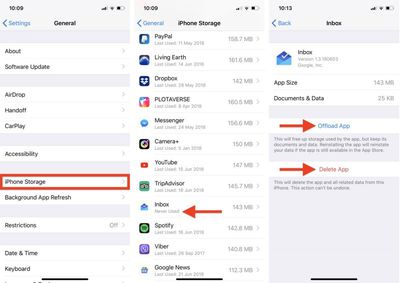
  3. Tap iPhone Storage.

  4. A list of all the apps (including stock apps) on your iOS device will load in order of size, with the largest apps listed first. Scroll down the list and look at the Last Used: date underneath the title of each app. If it's been several weeks or months since you opened an app, or it says Never Used, then consider uninstalling it – tap the app in the list.
    identify redundant ios apps

  5. Two uninstall options are presented on this screen. Tap Offload App to unload the app but preserve any documents and data (these are reinstated if you later reinstall the app) or tap Delete App to remove the app and all related data from your device.
If you tend to download a lot of apps that often get left unused, consider enabling the iPhone Storage menu recommendation to automatically Offload Unused Apps when you're low on storage. If you uninstall a purchased app but later decide that you want to use it (and it's still available in the App Store) simply follow the steps below.

How to Reinstall Deleted Apps

  1. Launch the App Store app on your iPhone or iPad.

  2. Tap the Today tab if it isn't selected already.

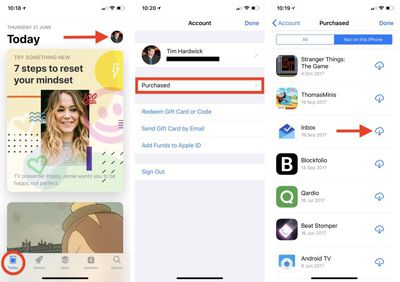
  3. Tap your circular profile photo at the top-right of the Today screen to access the account settings screen.

  4. Tap Purchased.
    restore deleted ios apps

  5. In the Purchased screen, tap the Not on this iPhone/iPad tab.

  6. Scroll through the list of purchased apps to find the one that you want to reinstate, and tap the cloud download icon next to it to re-download and install.
Related Forum: iOS 11

Top Rated Comments

103 months ago
We need an easy way to clear the 'cache' in apps. I often want to KEEP the app. But delete the data. iOS offers the reverse. I want to keep the NY Times app, but I want to clear its 400mb of meaningless data. Of course, there is sometimes a clear cache option, but there often isnt and it should be in IOS
Score: 4 Votes (Like | Disagree)
ILikeAllOS Avatar
103 months ago
We need an easy way to clear the 'cache' in apps. I often want to KEEP the app. But delete the data. iOS offers the reverse. I want to keep the NY Times app, but I want to clear its 400mb of meaningless data. Of course, there is sometimes a clear cache option, but there often isnt and it should be in IOS
No need for that.
iOS automatically deletes the cache for apps on your phone if you try to download/store something and there isn't enough space. This behavior has existed for years in iOS; possibly since the first version?
Score: 1 Votes (Like | Disagree)
69650 Avatar
103 months ago
I often download free apps for possible future use because you can’t add apps to your wish list anymore.
Score: 1 Votes (Like | Disagree)
103 months ago
When did Apple finally add the "last used" information? People have been asking for that for years. Nice to know!
Score: 1 Votes (Like | Disagree)
riverfreak Avatar
103 months ago
I wish Apple would add some way to permanently delete apps from your account. Even if you delete them from your phone, they still end up reappearing in the App Store purchased list or if the developer makes some minor update to bump its revision history.

Aside from that, this is a really good tip! I didn’t know you could delete from the storage settings page.
Score: 1 Votes (Like | Disagree)
timmyh Avatar
103 months ago
I've changed redundant to unnecessary in the title to avoid any potential for confusion.
Score: 1 Votes (Like | Disagree)

Popular Stories

Apple Event Logo

Apple's Next Era Begins September 1

Thursday May 7, 2026 10:36 am PDT by
Apple recently announced that Tim Cook will be stepping down as CEO later this year, after 15 years of leading the company. Effective September 1, Apple's hardware engineering chief John Ternus will become the company's next CEO, while Cook will become executive chairman of Apple's board of directors. In his new role, Apple said Cook will assist with "certain aspects" of the company,...
Instagram Feature 2

PSA: Instagram Encrypted Messaging Ends on Friday, May 8

Tuesday May 5, 2026 8:24 am PDT by
Instagram will remove end-to-end encryption for direct messages between users from May 8, 2026. When the date comes around, Meta will potentially be able to see the contents of all messages between users on the social media platform. Encrypting messages has been an optional feature in Instagram since 2023, but in March of this year the social media platform quietly updated a help page to say ...
macbook neo launch day

Apple May Drop Base $599 MacBook Neo as Chip, DRAM Costs Climb

Thursday May 7, 2026 4:55 am PDT by
Apple is considering dropping the cheapest MacBook Neo configuration as one possible response to the rising cost of building the popular laptop, according to Taiwan-based tech columnist and former Bloomberg reporter Tim Culpan. The Neo currently starts at $599 for a 256GB model, with a 512GB version at $699. Writing in his latest Culpium newsletter, Culpan says cutting the entry-level...