

Apple in July 2021 began offering beta firmware for the AirPods Pro, with the software available for Apple Developer program members.
AirPods Pro firmware betas are limited to developers and are quite tricky to install, with an installation guide available below.
Note: Installing the firmware in an unauthorized way can put the AirPods Pro into an unusable state that necessitates an out-of-warranty repair, so non-developers should not attempt to install the software.
Install the AirPods Pro Firmware Profile on iPhone
- On your iPhone, go to the Apple Developer website, log in, and navigate to the downloads section.
- Tap on the carrot in the upper right corner and then tap on "More."
- Scroll down to "AirPods Pro beta" and tap on "View Details."
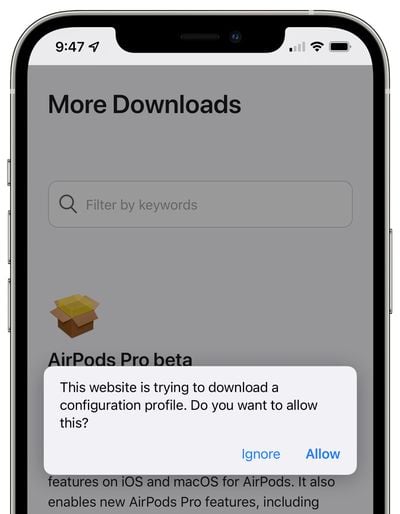
- Tap on the iOSAirPodsProSeed.mobileconfig configuration profile.
- Tap on "Allow" to install it, and select the iPhone.

- Open up the Settings app and tap on "Profile Downloaded," then tap on "Install" and enter your passcode.
- Tap on "Install" again then tap on "Done."
Connect AirPods Pro to iPhone
- With the AirPods Pro near the iPhone, open up the AirPods Pro case.
- The AirPods Pro should pair automatically to the iPhone.
Use Xcode to Allow AirPods Pro to Receive Beta Software
- Make sure you have the latest beta version of Xcode installed. It can be downloaded from the Apple Developer website.
- After installing the AirPods Pro firmware configuration profile and then connecting the AirPods Pro to the iPhone, connect the iPhone to a Mac with the appropriate USB to Lightning cable.
- Launch the Xcode beta app. You don't actually need to do anything with the Xcode app beyond opening it up.
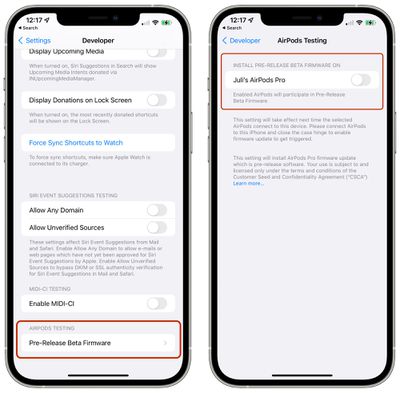
- On the iPhone, open up the Settings app, tap on the Developer section, and choose Pre-Release Beta Firmware.
- Locate the AirPods Pro in the list of paired devices.
- Tap to turn on automatic beta software updates for the appropriate AirPods Pro in the list.
Install the Beta Firmware
After tapping to turn on software updates, tap on "Agree" to agree to Apple's Legal Consent form. From there, your AirPods Pro will be ready to receive the firmware.
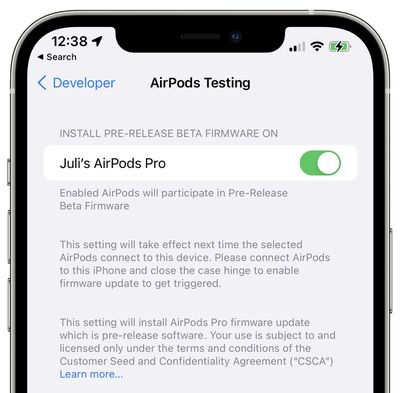
Firmware installation is not automatic and it can take up to 24 hours for the beta firmware to be installed on AirPods Pro after opting in.
To get the firmware to install, Apple says that the AirPods should be connected to the iPhone and then the case hinge should be closed to trigger the update.
You can check to see if your AirPods Pro have been updated with the new firmware by connecting them, tapping into the "Bluetooth" section of the Settings app and tapping on the "i" button. The number under version will let you know which update you have installed.
Removing AirPods Pro Firmware
- Open up the Settings app.
- Tap on General.
- Tap on "Profiles & Device Management."
- Tap "AirPods Pro Firmware Profile."
- Tap "Remove Profile."
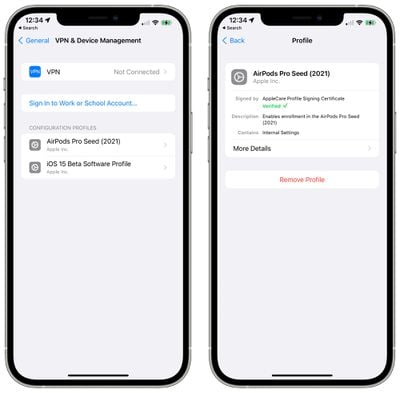
Once you uninstall the profile, the AirPods Pro will not receive new beta software updates, but will continue to have beta software installed until the next release of nonbeta software is available.
AirPods Firmware Warnings
After installing beta firmware on the AirPods Pro, there is no way to downgrade to a release version of the firmware.
Apple says that once the AirPods Pro firmware has been installed, it's important not to put un-updated earbuds into the charging case because they may be updated with the firmware.
As mentioned above, Apple also warns that attempting to install the AirPods Pro firmware in an unauthorized manner could put the AirPods in an unusable state, which would necessitate an out-of-warranty repair.



















Top Rated Comments
I get it. It generates traffic. But it’s misleading to the average consumer/reader.
I wonder how many devices out there have been bricked, and how much data has been lost, due to the incessant pushing of beta software.
I see there’s a “Note” in this article. That’s good. Generally, there should be a disclaimer or a warning early on in the article. That warning shouldn’t be buried a few paragraphs down. A lot of websites do that, and include a declaimer deep within the article.
And I agree, unless you know that you have a very specific need for this, just don't.