How to Install the macOS Monterey Public Beta - GeekWebGuides
Skip to Content

How to Install the macOS Monterey Public Beta

by

Apple has made a macOS 12 Monterey beta available for its public beta testing group, letting public beta testers try out the software before it launches this fall.
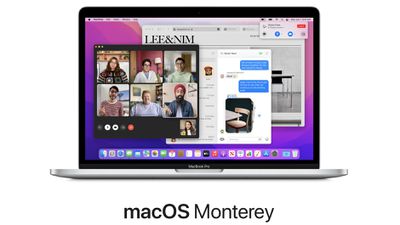
macos monterey beta
The ‌macOS Monterey Public Beta is available to anyone with a compatible Mac and it does not require a developer account. This guide walks you through some simple steps on installing the beta software.

Before downloading the update, it's worth noting that Apple does not recommend installing the macOS Monterey Public Beta on your main Mac, so if you have a secondary machine, use that. This is beta software, and there are often bugs and issues that pop up that can prevent software from working properly or cause other problems.

It's also worth noting that there are some major design changes to Safari that take some adjusting to, so you may want to avoid committing to the beta usage experience until you've tried it out.

macOS Monterey Compatibility

macOS Monterey is compatible with many of the Macs that were able to run macOS Big Sur, but it drops support for some older MacBook Air and iMac models from 2013 and 2014. The Macs below can run the software.

  • ‌iMac‌ - Late 2015 and later
  • ‌iMac‌ Pro - 2017 and later
  • ‌MacBook Air‌ - Early 2015 and later
  • MacBook Pro - Early 2015 and later
  • Mac Pro - Late 2013 and later
  • Mac mini - Late 2014 and later
  • MacBook - Early 2016 and later

Make a Time Machine Backup

Before you upgrade to the Monterey beta, you should make sure to make a backup using Apple's Time Machine backup feature with an external drive.

If you want to revert back to your previous setup after testing macOS Monterey or if you run into a bug and need to backtrack, you'll need to reinstall macOS Big Sur (or your prior OS) and a backup can be helpful for reverting.

Enroll in the Beta Software Program

Installing macOS Big Sur requires enrolling your Mac in Apple's free Apple Beta Software Program. Follow these steps to do so.
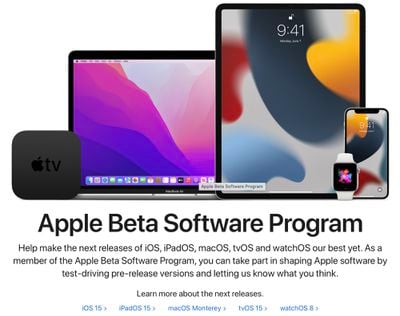
apple beta program

  1. Visit the Apple Beta Software Program website in a browser on your Mac.
  2. Click on the blue Sign up button or, if you're already a member, click sign in.
  3. Enter your Apple ID and password and then a two-factor authentication code if verification is required.
  4. Agree to the Apple Beta Software Program terms and conditions.
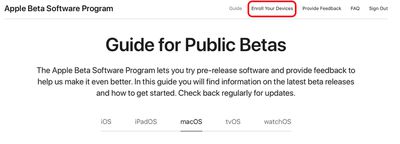
  5. Once signed in and at the Guide for Public Betas page, scroll up to the top and click on "Enroll Your Devices" then click on "macOS." publicbetaenrolldevices

Downloading and Installing the macOS Monterey Beta

After you've enrolled in the public beta testing program, you're able to download macOS Monterey.

  1. After selecting the macOS section on the beta website, scroll down to "Enroll your Mac" and click on "Download the macOS Public Beta Access Utility option."
  2. If you get a popup asking if you want to allow downloads on "beta.apple.com" click on "Allow."
  3. Unless you've changed where files download, the beta installer (macOSPublicBetaAccessUtility.dmg) will show up in your downloads folder. Locate it and double click on it to open it up.
  4. Double click on the .pkg file inside to run the installer.
  5. You may see a warning advising you to back up your Mac with Time Machine. Either stop here and back up, or, if you've already done so, Click OK and then click Continue.
  6. Click Continue again and then click on Agree to accept Apple's software license agreement, then click on "Install." Enter your admin password if prompted.
  7. Once the installer has completed the download, the System Preferences Software Update panel will open automatically and display the ‌macOS Monterey‌ Beta download. Click on Upgrade Now to download the public beta software when prompted. It will take some time to download the file, and when the download is complete, your Mac should restart.
  8. After a restart, the macOS Monterey installer should launch automatically. If it does not, it can be found in the applications folder.
  9. From here, click "Continue" and walk through the steps as instructed, agreeing to the terms and conditions and making sure you've performed a backup.
  10. Select the drive that you want to install the public beta on. You can choose your main drive or a partition that you've created.
  11. Click Install, enter your administrator password, and click OK, then click Restart or wait for your Mac to reboot automatically.

After your Mac restarts, the Monterey installation process will begin. It takes some time for the update to install, but when the installation is finished and your Mac boots up again, it will be running the Monterey public beta.

macOS Monterey introduces a long list of new features like Universal Control for using a mouse across multiple iPads and Macs and a new FaceTime experience with sharing features for watching movies and listening to music with friends. We have a full list of everything new in macOS Monterey in our dedicated roundup.


Related Forum: macOS Monterey

Top Rated Comments

PowerMacBook Avatar
69 months ago
Not on my FANTASTIC mid-2012 MacBook Pro (just like Big Sur btw).
So please ship the new Mx MacBook Pro soonest!
Like this mid 2012 - I'll buy the most expensive biggest best etc and then see you again in 2030...
I'm almost thinking about suggesting they should make a kind of movie about this one: has been in over 30 countries, and still going strong! Should be a heck of advertisement.
But then again, maybe they don't want customers like me, only buying a laptop every 9-10 years?
Score: 7 Votes (Like | Disagree)
69 months ago

Wondering if this is the last Intel macOS. :rolleyes:
They are still selling computers with Intel chips, so I would hope that the next few OSs will also run on them. If I bought a new computer today and next year's operating system update didn't work on it I'd be pretty upset....
Score: 6 Votes (Like | Disagree)
GadgetBen Avatar
69 months ago
I've had the Dev Beta on my secondary Intel MacBook Air since release and it runs everything without a crash, restart on wake, or a bounce in the dock.

I'm taking the jump and putting this on my main Intel Mac.

Yes, this early Beta really is that good. By far the most stable release I have encountered.
Score: 6 Votes (Like | Disagree)
PsykX Avatar
69 months ago

Wondering if this is the last Intel macOS. :rolleyes:
Of course not.

They're just about to release a new Intel Mac Pro apparently. People will shell out thousands to get their hands on it, so it better be supported all the way up to 2028.
Score: 4 Votes (Like | Disagree)
ivan86 Avatar
69 months ago

Ill try this in a Parallels VM. I want to see what it’s like to use the new Safari. Not a fan!
You can change it back to “old” look in settings.
Score: 4 Votes (Like | Disagree)
69 months ago

They are still selling computers with Intel chips, so I would hope that the next few OSs will also run on them. If I bought a new computer today and next year's operating system update didn't work on it I'd be pretty upset....
Last time around, Apple shipped the final PowerPC Macs with Tiger 10.4.2. They got Leopard 10.5.x and that was their lot. Snow Leopard 10.6 was Intel only.

The difference then was Apple wasn't on a yearly schedule for new major OS releases. The final PowerPCs shipped in 2005 and Snow Leopard shipped in 2009. It's anyone's guess whether Apple sticks to 4 years or one more major release over that, which the final hardware shipped with.
Score: 4 Votes (Like | Disagree)

Popular Stories

iPhone Duo Trio

Here's What Apple's Apps Look Like on the iPhone Duo

Tuesday October 20, 2026 11:12 am PDT by
With just three days to go until the iPhone Duo is released, Apple is getting ready for the launch. Behind the scenes, the App Store now has screenshots of Apple's built-in apps running on the Duo. We've seen some apps in marketing materials, but images of the ones we haven't seen give us an idea of what it will be like using the iPhone Duo day to day. Many apps are shown in landscape...
Apple Creator Studio iWork suite

Apple Pulls Keynote, Pages and Numbers From App Store [Update: Back]

Thursday October 22, 2026 11:01 am PDT by
Apple has temporarily removed Keynote, Pages, and Numbers from the App Store, just after releasing an update that added iPhone Duo support and a new Intelligent Assistant. It is not clear if the apps were removed intentionally, or if it is a bug. Apple has not said when the apps will be reinstated, but if it was in error, they should return soon. Update: The Mac versions are back without...
M5 MacBook Pro

RIP, MacBook Ultra

Monday October 19, 2026 9:37 am PDT by
Apple today sent out invites for an experience in Los Angeles on Wednesday, October 28, and the "Pro and tell" tagline on the invitation likely means that the rumored MacBook models with touch-enabled OLED displays will stick with MacBook Pro branding instead of the once-rumored "MacBook Ultra" name. The long-rumored "iPhone Ultra" ended up being named iPhone Duo, so speculation that Apple...
Latest Stories
iPhone Duo Says 'Hello' to You Personally
19 minutes ago
iPhone Duo: How to Skip the Swipe Up After Touch ID
34 minutes ago
Where to Buy iPhone Duo Today: Stores, Pickup, and Wait Times
2 hours ago
MacBook Neo Helps Apple Outpace Rivals as Market Declines
6 hours ago
Happy 25th Anniversary, iPod
7 hours ago
iPhone Duo Demand Reportedly Exceeds Apple's Expectations
9 hours ago
iPhone Duo Launch Begins as First Orders Reach Customers
15 hours ago
1Password for Agents Keeps Your Passwords Hidden From AI
16 hours ago
iPhone Duo 24 Hours Later: Your Questions Answered
17 hours ago
Apple's iWork Apps Get 'Intelligent Assistant' and iPhone Duo Support
18 hours ago
Apple is Apparently Considering a Slightly Larger iPhone Duo
18 hours ago
Giant iPhone Duo Displays Coming to Four Apple Stores
19 hours ago
Apple Pulls Keynote, Pages and Numbers From App Store [Update: Back]
20 hours ago
Apple Updates More Apps With iPhone Duo Support
20 hours ago
Apple Will Label Apps 'Made for iPhone Duo' in App Store
23 hours ago
Amazon Takes $49 Off iPad With Prices Starting at $399.99
23 hours ago
F1 on Apple TV Now Available in Dolby Atmos
1 day ago
Apple Reveals More Than 50 Apps That Will Be Updated for iPhone Duo
1 day ago
Apple Blocks Certificates That Could Help Attackers Fake Websites
1 day ago
Giant iPhone Duo Installations Spotted at Apple Fifth Avenue
1 day ago
iPhone Duo 2 Prototypes Include Under-Display Face ID
1 day ago
Tesla App Gains iPad and iPhone Duo Support
1 day ago
Apple Reportedly Boosts iPhone Duo Orders by 44%
1 day ago
Fortnite Returning to Australian App Store After Court Ruling
1 day ago
Apple Ordered to Open iPhone to Rival App Stores in Australia
1 day ago
Apple Suppliers Face Hurdles Cutting Circuit Board Emissions
1 day ago
Things Updated for iPhone Duo With Adaptive Layout
1 day ago
Simplicity and Siri AI Are HomeView's Killer Features, Apple Says
1 day ago
iPhone Duo Reviewers Really Miss Face ID
2 days ago
Does the iPhone Duo Run Hot? Here's What Reviews Found
2 days ago