

Apple has released the first public beta of macOS Catalina, the next major version of its Mac operating system due to launch in the fall. The availability of the public beta means Mac users don't need to be part of the Apple Developer Program to be able to download and test the software. This article shows you how it's done.
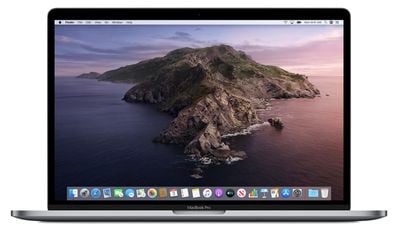
macOS Catalina is a major update that introduces a range of new features including cross-platform app support for third-party apps, no more iTunes, iPad as a second screen functionality, Screen Time, and more.
But before you get too excited, a word of warning: We don't recommend installing the macOS Catalina Public Beta on your main Mac. The stability of beta software cannot be guaranteed, as it often contains bugs and issues that have yet to be ironed out, so you're better off using a test machine to avoid any potential data loss.
Will macOS Catalina Run on My Mac?
Every Mac that can run macOS Mojave will run macOS Catalina, with the exception of the mid-2010 and mid-2012 Mac Pro models, which will not be getting the update. The full list of compatible Mac models is as follows:
- MacBook (Early 2015 or newer)
- MacBook Air (Mid 2012 or newer)
- MacBook Pro (Mid 2012 or newer)
- Mac mini (Late 2012 or newer)
- iMac (Late 2012 or newer)
- iMac Pro (2017)
- Mac Pro (Late 2013)
Bear in mind that if you decide you want to revert back to your previous setup after testing the Catalina beta, you will need to erase the beta partition and perform a new macOS Mojave installation.
Enroll in the Apple Beta Software Program
To install the macOS Catalina public beta, you need to enroll your Mac in the free Apple Beta Software Program.
- Visit the Apple Beta Software Program website in a browser on your Mac.
- Click the Sign up button, or sign in if you are already a member.
- Enter your Apple ID credentials and click the Sign in button, and input your two-factor authentication code if requested.
- Agree to the Apple Beta Software Program terms and conditions if necessary.
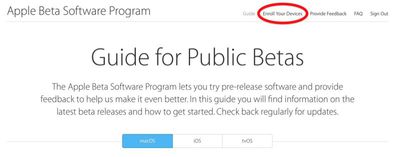
- On the Guide for Public Betas screen, click Enroll Your Devices above the top line. Alternatively, with the Mac tab selected, scroll down to the Get Started section and click enroll your device.

Download the macOS Catalina Public Beta
After enrolling in the Apple Beta Software Program, you need to grab the profile installer and run it on your Mac. Here's how:
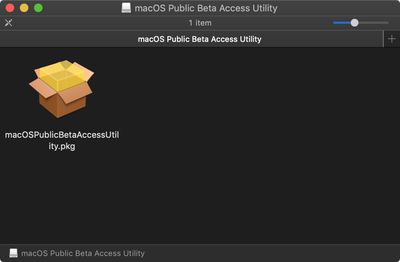
- In the same Enroll Your Devices section on the beta site's Mac tab, click the profile button under where it says Download macOS public beta access utility, and wait for the file to download.
- Open the downloaded file in your Downloads window and double-click the package to run the installer.
- A dropdown prompt may appear advising you to back up your Mac. Assuming you've already backed up, click OK and then click Continue. If not, click OK and then Cancel, and back up now.
- Click Continue and then Agree to accept the software license agreement, then click Install.
- Enter your admin password if prompted.
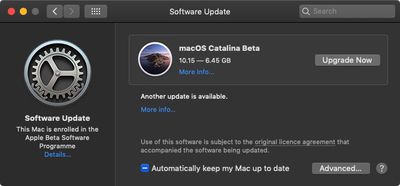
- When the installer has completed the download, the System Preferences Software Update panel should open automatically and show you that the macOS Catalina Beta download is available. Click Upgrade Now to download the public beta software. When the download is complete, your Mac should restart automatically.
Install the macOS Catalina Public Beta
If the macOS Mojave installer doesn't automatically open upon restart, launch it from your Applications folder using the Finder.
- Click Continue at the bottom of the installer.
- Click Continue at the bottom once you've finished backing up, or if you already performed a backup.
- Click Agree to accept the terms and conditions and then click Agree again to confirm.
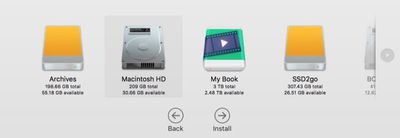
- Select the drive on which you want to install the public beta.
- Click Install, enter your administrator password, and click OK.
- Click Restart, or wait for your Mac to reboot automatically.
And that's it. Your Mac should now be running the macOS Catalina Public Beta. For a complete picture of all of the new features you can expect to see when macOS Catalina is released in the fall, make sure to check out our full macOS Catalina roundup.



















Top Rated Comments
Thanks to @tywebb13 ('https://forums.macrumors.com/threads/apple-seeds-second-beta-of-macos-catalina-to-developers.2186251/members/tywebb13.690974/')
https://forums.macrumors.com/threads/apple-seeds-second-beta-of-macos-catalina-to-developers.2186251/page-2#post-27468848