How to Use WhatsApp on iPad - GeekWebGuides
Skip to Content

How to Use WhatsApp on iPad

by

Despite strong competition from the likes of Telegram and Signal, WhatsApp remains the most popular mobile messaging platform by a mile, connecting over a billion active users around the world every day.

Whatsapp Feature
As a smartphone app, WhatsApp messages are principally exchanged between iPhones and Android phones, but WhatsApp is known to be developing an iPad app that would increase the number of active devices on the chat platform.

While the iPad app has yet to to launch, it is already possible to use WhatsApp on an ‌iPad‌ via the web without the iPhone associated with your account having to be connected to the internet. Keep reading to learn how it works.

WhatsApp on iPad

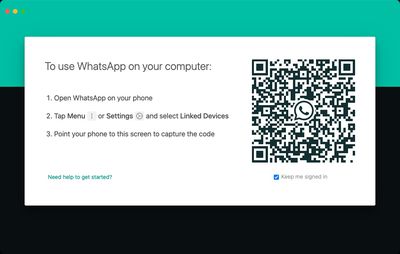
Previously, the WhatsApp mobile app was required to authenticate an account used on another device, such as a computer, and it used a QR code to link a user account to a web browser. While that initial link is still required, the connected phone that has the WhatsApp app on it is no longer required once the link has been made, which means you can continue to use WhatsApp on your ‌iPad‌ without needing your smartphone.

The following steps show you how to link your WhatsApp account to your ‌iPad‌ using the service's new Multi-Device support, currently in beta.

  1. Launch WhatsApp on your iPhone.
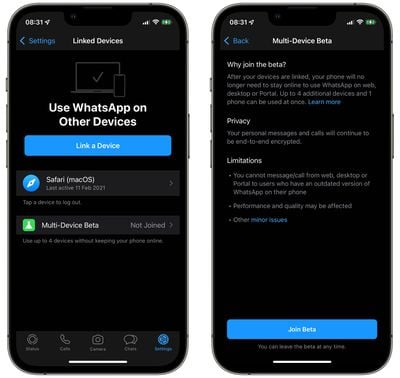
  2. Select Settings -> Linked Devices.
  3. Tap Multi-Device Beta, then tap the blue Join Beta button.
  4. Tap Back and select Link a Device on the previous screen.
    whatsapp multi device support

  5. On your ‌iPad‌, open Safari or another web browser and go to web.whatsapp.com, then scan the QR code that appears using your iPhone.
    whatsapp

After following these steps your device will be linked to your WhatsApp account, and you'll be able to access WhatsApp on your ‌iPad‌ to send and receive messages and view chat threads, without needing to rely on your phone being connected to the internet.

Bear in mind that it's not currently possible to delete WhatsApp messages or conversation threads from your ‌iPad‌. It's also worth noting that you won't get new message notifications on your ‌iPad‌ when you're not using the web app. On the plus side, personal calls and messages remain end-to-end encrypted across devices.

If you don't use your iPhone for over 14 days, your ‌iPad‌ will be disconnected. Lastly, given that the feature is still in beta, WhatsApp cautions that the performance and quality of its service may be affected, although happily, users can leave the beta at any time.


Popular Stories

Whatsapp Feature

WhatsApp Now Lets Anyone Join Calls, No Account Needed

Wednesday October 14, 2026 7:00 am PDT by
Popular Meta chat app WhatsApp today gained guest calling, a feature that lets users invite anyone to join a voice or video call, even if the invitee doesn't have a WhatsApp account. WhatsApp says everyone has access to free, end-to-end encrypted calls with no time limits and support for up to 32 people at once. A guest joining a call needs permission from the call host, and guests will...
Whatsapp Feature

WhatsApp Developing In-App Browser for All Chat Links on iPhone

Tuesday October 20, 2026 9:15 pm PDT by
WhatsApp is developing an optional in-app browser for its iPhone app that would let users open any link shared in chats without leaving the app, according to WABetaInfo. A new "In-app browser" option under Settings and Chats would let users enable the feature or continue opening links in their default browser. Users would also be able to clear cookies, cache, and other browsing data. The...
iPhone Duo Trio

Here's What Apple's Apps Look Like on the iPhone Duo

Tuesday October 20, 2026 11:12 am PDT by
With just three days to go until the iPhone Duo is released, Apple is getting ready for the launch. Behind the scenes, the App Store now has screenshots of Apple's built-in apps running on the Duo. We've seen some apps in marketing materials, but images of the ones we haven't seen give us an idea of what it will be like using the iPhone Duo day to day. Many apps are shown in landscape...
Latest Stories
iPhone Duo Demand Reportedly Exceeds Apple's Expectations
2 hours ago
iPhone Duo Launch Begins as First Orders Reach Customers
8 hours ago
1Password for Agents Keeps Your Passwords Hidden From AI
8 hours ago
iPhone Duo 24 Hours Later: Your Questions Answered
9 hours ago
Apple's iWork Apps Get 'Intelligent Assistant' and iPhone Duo Support
10 hours ago
Apple is Apparently Considering a Slightly Larger iPhone Duo
10 hours ago
Giant iPhone Duo Displays Coming to Four Apple Stores
11 hours ago
Apple Pulls Keynote, Pages and Numbers From App Store [Update: Back]
12 hours ago
Apple Updates More Apps With iPhone Duo Support
12 hours ago
Apple Will Label Apps 'Made for iPhone Duo' in App Store
15 hours ago
Amazon Takes $49 Off iPad With Prices Starting at $399.99
16 hours ago
F1 on Apple TV Now Available in Dolby Atmos
16 hours ago
Apple Reveals More Than 50 Apps That Will Be Updated for iPhone Duo
17 hours ago
Apple Blocks Certificates That Could Help Attackers Fake Websites
18 hours ago
Giant iPhone Duo Installations Spotted at Apple Fifth Avenue
19 hours ago
iPhone Duo 2 Prototypes Include Under-Display Face ID
19 hours ago
Tesla App Gains iPad and iPhone Duo Support
23 hours ago
Apple Reportedly Boosts iPhone Duo Orders by 44%
1 day ago
Fortnite Returning to Australian App Store After Court Ruling
1 day ago
Apple Ordered to Open iPhone to Rival App Stores in Australia
1 day ago
Apple Suppliers Face Hurdles Cutting Circuit Board Emissions
1 day ago
Things Updated for iPhone Duo With Adaptive Layout
1 day ago
Simplicity and Siri AI Are HomeView's Killer Features, Apple Says
1 day ago
iPhone Duo Reviewers Really Miss Face ID
1 day ago
Does the iPhone Duo Run Hot? Here's What Reviews Found
1 day ago
Apple Music's New Look is Now Live on Apple's Website
1 day ago
Anthropic Launches Claude Duet, a Proactive AI Agent
1 day ago
What 32,000 Folds Did to the iPhone Duo's Hinge
1 day ago
iPhone Duo's Hidden FaceTime Camera Takes 'Trash' Photos
1 day ago
iPhone Duo Has 'Edge Light' Feature That Debuted on Macs Last Year
2 days ago