
Messages in iOS 10: How to Install and Use Sticker Packs - MacRumors
Skip to Content

Messages in iOS 10: How to Install and Use Sticker Packs

by

In iOS 10, the simple Messages app you're familiar with has transformed from a bare bones texting platform into a fun, interactive communication service that takes advantage of games, apps, drawings, stickers, message effects, and more.

Following in the footsteps of apps like Facebook and Line, Apple is delving into stickers in a big way, giving iOS users new ways of expressing themselves. Like the real thing, Stickers in iOS can be stuck onto messages or images, or sent by themselves, and they can be resized, rotated, and stuck to other stickers for fun layering effects.


Installing Sticker Packs

Sticker packs can be installed as standalone applications through the iMessage App Store or they can be downloaded as add-ons to full iOS apps, but either way, getting them onto your device uses these steps.
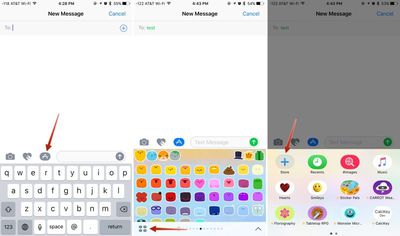
openingmessagesappstore

  1. Open an existing conversation thread in Messages or start a new conversation.
  2. Tap on the App Store icon next to the conversation box and then tap on the four dots to open your app drawer, which houses all installed apps.
  3. Tap the "+" icon to access the iMessage App Store.
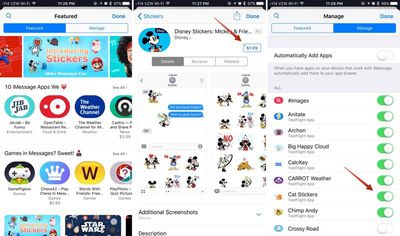
  4. In the "Featured" section, tap "Get" or and then "Install" to download a sticker pack, or tap on the purchase price to buy an pack that costs money. Passwords and Touch ID authentication are required, just as in the standard App Store.
  5. Tap on the "Manage" tab to install sticker packs (or other apps) that are available as iOS add-ons. Installation is done by setting the toggle to on (green), while removing an a sticker pack is done by turning the toggle off.

    messagesappstorestickers

  6. OPTIONAL: In the "Manage" tab, toggle on "Automatically Add Apps" to let all iOS apps that have an iMessage component install in Messages automatically.
  7. Click "Done." The newly installed sticker pack is now available in your app drawer. Access it by opening the app drawer (four dots icon) or swiping left or right through your installed apps.
Sticker Basics

Stickers are displayed in place of the iOS keyboard, just like emoji. Sending a sticker to someone is as simple as tapping it, which puts it in the message field. From there, tap the up arrow to send a sticker. It's simple, and essentially the same process as sending a standard text message or an emoji.
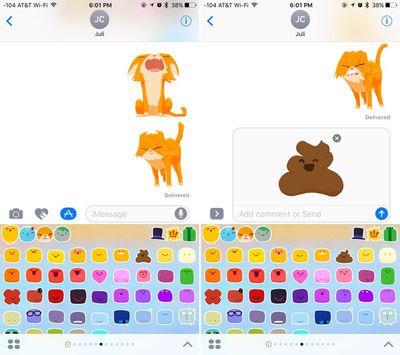
sendingstickers

Layering, Resizing, and Rotating Stickers

The neat thing about stickers is that they can be layered over incoming text messages, photos, GIFs, or other stickers, so you can use them to react to content your friends send you.
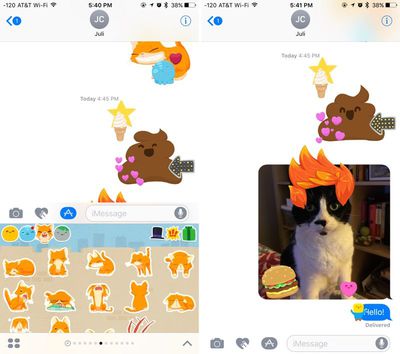
layeredstickers
Stickers must be placed on an incoming chat bubble of some sort and can't be placed randomly in the messages field, and stickers can only be added to other stickers after the first sticker has been sent, so it's not possible to layer multiple stickers together when composing a message.

To layer:

  1. Navigate to the sticker pack you want to use.
  2. Select a sticker. Instead of tapping it, place a finger on the sticker and drag it up to the messages window.
  3. Drag the sticker to where you want to place it on a message bubble, photo, or existing sticker.

You can put as many stickers as you like on a photo or an existing sticker, so you and your friends can take turns embellishing photos and creating sticker collages. Stickers from different sticker packs can be mixed together in one field — just swipe between packs to change stickers.

Stickers can be resized or rotated before they're placed, a feature that's especially useful when you want to accent a photo. To make stickers bigger or smaller, as you drag them up to the messages field to place them somewhere, add another finger to the screen and use pinch gesture to expand or contract them.
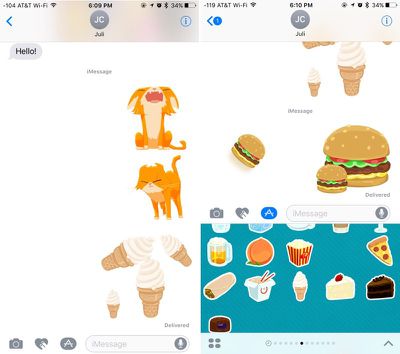
rotatedandresizedstickers
Rotating stickers is done in the same way. As you hold a sticker above the screen before placing it, use two fingers to twist it around, changing its orientation. Make sure not to let go when rotating or resizing, as removing your finger releases the sticker and it can no longer be edited.

Managing and Deleting Stickers

There are several gestures that can be used to manage your stickers. A single tap will display a sticker full screen, as will a 3D Touch press on the iPhone 6s and later.
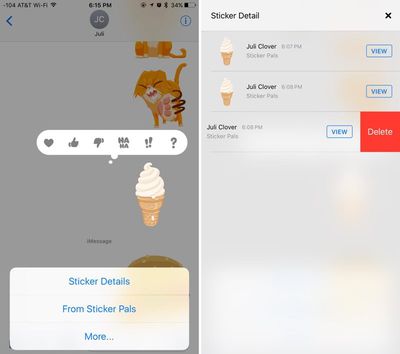
deletingstickers
Use a long press on a sticker to bring up your message reaction menu and a set of management options. This menu displays where a sticker is from so you can download the sticker pack from the iMessage App Store if it's not already installed, and it has tools for deleting layered stickers. To delete:

  1. Long press on a layered sticker or a sticker that's been placed on an incoming message or photo.
  2. Choose the "Sticker Detail" option. All stickers that have been placed on a particular photo, message, or initial sticker will be displayed.
  3. On the sticker you want to delete, swipe to the left and choose then tap the "Delete" button.
  4. The sticker is removed from your device and from the device of the person you were communicating with and you're now free to add additional stickers.

Sticker Compatibility

Stickers are only going to display appropriately on devices running iOS 10 and macOS Sierra, so sending stickers to friends who are using Android devices or older versions of iOS won't work quite the same. On these devices, stickers are simply displayed as an image or GIF might be displayed and all layering is ignored.

Sticker packs can be created using Xcode with no coding experience required, so not only are developers going to be coming out with sticker packs, but artists can make them too. Expect to see hundreds of available sticker packs in the near future in addition to the built-in Hearts, Smileys, Hands, and Classic Mac stickers made available by Apple.


Related Forum: iOS 10

Top Rated Comments

ArtOfWarfare Avatar
132 months ago
How do I remove all this garbage?

I'm fine with receiving it, but I want to send text messages and pictures and nothing else. How do I remove the apps button, the drawing button, and the voice button?

I don't think I'm at all alone in this. My wife, who uses Snapchat, doesn't want all this crap in her messaging app. If someone using snapchat doesn't want it, I can't imagine who does.

I feel like Apple risks losing a lot of people who will shift over to Skype or WeChat or something, just so they can have a simpler messaging experience.
Score: 7 Votes (Like | Disagree)
Traverse Avatar
132 months ago
Is there a way to hide this stuff? I think it's laughable that the text bar is only like 0.4" now
Score: 6 Votes (Like | Disagree)
Traverse Avatar
132 months ago
Already there are complaints complaints complaints :rolleyes:
Because not everyone likes it and there appears to be no easy way to hide it. It's too in your face.
Score: 3 Votes (Like | Disagree)
10littlebirds Avatar
132 months ago
iOS 9.3.5 (still installable - for a short time)

Does the text bar stay that short after you start typing?
No, the text bar expands as soon as you start typing. It's just a matter of getting used to seeing something different when you enter into a new text. You can also swipe left at the edge of the bar to hide camera/art/sticker options if it is distracting. I believe you have to do that with each new text though. Hope that helps.
Score: 2 Votes (Like | Disagree)
appledefenceforce Avatar
132 months ago
Already there are complaints complaints complaints :rolleyes:
Score: 2 Votes (Like | Disagree)
jonnysods Avatar
132 months ago
Is there a way to hide this stuff? I think it's laughable that the text bar is only like 0.4" now
I want to know too. Less is more for me, this change is kind of whacky and un-Apple like.
Score: 1 Votes (Like | Disagree)

Popular Stories

iPhone Duo Trio

Here's What Apple's Apps Look Like on the iPhone Duo

Tuesday October 20, 2026 11:12 am PDT by
With just three days to go until the iPhone Duo is released, Apple is getting ready for the launch. Behind the scenes, the App Store now has screenshots of Apple's built-in apps running on the Duo. We've seen some apps in marketing materials, but images of the ones we haven't seen give us an idea of what it will be like using the iPhone Duo day to day. Many apps are shown in landscape...
Apple Creator Studio iWork suite

Apple Pulls Keynote, Pages and Numbers From App Store [Update: Back]

Thursday October 22, 2026 11:01 am PDT by
Apple has temporarily removed Keynote, Pages, and Numbers from the App Store, just after releasing an update that added iPhone Duo support and a new Intelligent Assistant. It is not clear if the apps were removed intentionally, or if it is a bug. Apple has not said when the apps will be reinstated, but if it was in error, they should return soon. Update: The Mac versions are back without...
M5 MacBook Pro

RIP, MacBook Ultra

Monday October 19, 2026 9:37 am PDT by
Apple today sent out invites for an experience in Los Angeles on Wednesday, October 28, and the "Pro and tell" tagline on the invitation likely means that the rumored MacBook models with touch-enabled OLED displays will stick with MacBook Pro branding instead of the once-rumored "MacBook Ultra" name. The long-rumored "iPhone Ultra" ended up being named iPhone Duo, so speculation that Apple...
Latest Stories
iPhone Duo Launch Begins as First Orders Reach Customers
4 hours ago
1Password for Agents Keeps Your Passwords Hidden From AI
5 hours ago
iPhone Duo 24 Hours Later: Your Questions Answered
5 hours ago
Apple's iWork Apps Get 'Intelligent Assistant' and iPhone Duo Support
6 hours ago
Apple is Apparently Considering a Slightly Larger iPhone Duo
6 hours ago
Giant iPhone Duo Displays Coming to Four Apple Stores
7 hours ago
Apple Pulls Keynote, Pages and Numbers From App Store [Update: Back]
8 hours ago
Apple Updates More Apps With iPhone Duo Support
9 hours ago
Apple Will Label Apps 'Made for iPhone Duo' in App Store
12 hours ago
Amazon Takes $49 Off iPad With Prices Starting at $399.99
12 hours ago
F1 on Apple TV Now Available in Dolby Atmos
13 hours ago
Apple Reveals More Than 50 Apps That Will Be Updated for iPhone Duo
13 hours ago
Apple Blocks Certificates That Could Help Attackers Fake Websites
15 hours ago
Giant iPhone Duo Installations Spotted at Apple Fifth Avenue
15 hours ago
iPhone Duo 2 Prototypes Include Under-Display Face ID
16 hours ago
Tesla App Gains iPad and iPhone Duo Support
20 hours ago
Apple Reportedly Boosts iPhone Duo Orders by 44%
20 hours ago
Fortnite Returning to Australian App Store After Court Ruling
20 hours ago
Apple Ordered to Open iPhone to Rival App Stores in Australia
21 hours ago
Apple Suppliers Face Hurdles Cutting Circuit Board Emissions
21 hours ago
Things Updated for iPhone Duo With Adaptive Layout
21 hours ago
Simplicity and Siri AI Are HomeView's Killer Features, Apple Says
22 hours ago
iPhone Duo Reviewers Really Miss Face ID
1 day ago
Does the iPhone Duo Run Hot? Here's What Reviews Found
1 day ago
Apple Music's New Look is Now Live on Apple's Website
1 day ago
Anthropic Launches Claude Duet, a Proactive AI Agent
1 day ago
What 32,000 Folds Did to the iPhone Duo's Hinge
1 day ago
iPhone Duo's Hidden FaceTime Camera Takes 'Trash' Photos
1 day ago
iPhone Duo Has 'Edge Light' Feature That Debuted on Macs Last Year
1 day ago
Apple Support App Updated for iPhone Duo's Larger Display
1 day ago









































