
Photos in iOS 10: How to Edit Memories - MacRumors
Skip to Content

Photos in iOS 10: How to Edit Memories

by

Within the new Photos app in iOS 10, there's a tab called "Memories," which curates various photos and videos you've taken in the past into specific memory collections. Without any steps required on your part, Memories gives you an automatic homemade movie from these past family gatherings or vacations, but thanks to a few editing tools, you can also tweak each memory to your liking (note all steps are in portrait mode, although landscape is available).


Navigate to Photos to find the new "Memories" tab in the center of the app, where you can scroll through your personally curated list of memories and choose whichever one you wish to edit and share. Within each detailed memory view, you'll find a list of all the photos and videos contained in the memory (tap "Show all" to see more than a summary), the geographic location the pictures were taken, nearby photos, and related memories you might be interested in.

How To Memories 4

A few examples of Memories in the new Photos app

The last two options at the very bottom let you favorite the memory or delete it permanently. Although the "Select" option on this page might seem like an option to remove photos only from this memory, it should be noted that deleting any content through this method will delete it from your iPhone and iCloud Photo Library, not only the memory. Jump to the instructions for "complex memory editing" below to discover how to delete photos and videos only from the memory, as well as add more.

Simple Memory Editing

There's a wealth of customization features offered once you actually begin viewing your memories, which are outlined in the following steps:

How To Memories 2

  1. Tap on the carousel at the top of the memory's page to play it.
  2. Photos will begin playing the memory, so tap anywhere on the screen to bring up editing controls and tap the pause button.
  3. Choose the emotional theme to assign to your memory, like "Happy" or "Epic," by scrolling through the topmost editing tool.
  4. After deciding your theme, choose a short (~20 seconds), medium (~40 seconds), or long (~1 minute) video length. You may see only two, or even one, of these options, depending on the breadth of media Apple has included in your memory.
  5. If the memory is now to your liking, you can tap the Share extension in the bottom left corner to show your memory to friends and family via email, text message, AirPlay, Facebook, and more.

Complex Memory Editing

Memories allow for even more in-depth customization tools for anyone who truly wants to personalize each photo and video collection. There are a few interesting tools that let you tweak each memory, but since the potentially most common question surrounding memories will be how to add and remove photos from each collection, we'll detail that in the steps below:
How To Memories 5

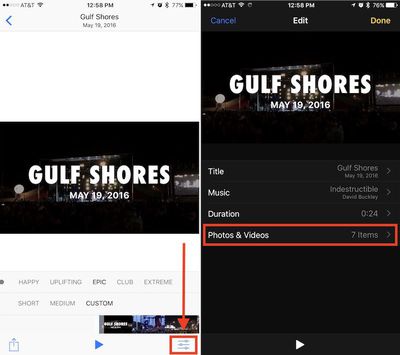
  1. When looking at the basic editing screen (with the emotion and length toggles), tap the editing slider button in the bottom right corner of the screen, and then tap "Photos & Videos."
  2. To delete a piece of media, find the photo or video in question by scrolling through the selector at the bottom of the screen.
  3. Simply tap the trash can icon at the bottom right of the menu to remove the image or video from this memory.
  4. To add a piece of media, tap the "+" icon at the bottom left of the menu.
  5. Here you'll see every item potentially available for inclusion in this memory, as curated by Apple.
  6. Tap any non-selected media to add it into the memory (you can also use this screen to remove content by deselecting its check mark).
  7. Tap "Done."

You can even edit any video in this section of the app by swiping through to find the desired video in the "Photos & Videos" menu, and then using the yellow toggle slider at the top of the screen to expand or shorten each clip. When you think you're done touching up the memory, tap the back arrow to return to the main edit screen.

In this section of Photos, you can also edit the title, duration, and even soundtrack of each memory. Additional song cues can be downloaded, and the app supports any song you have downloaded in your iTunes music library in order to add a bit more of a personalized flair. To officially save every alteration made to the memory, tap "Done" to travel back to the basic editing menu with the emotional themes and length toggles. Once again, here you can use the Share extension to spread your new memory to a wider audience.

Some limitations are placed in customizing memories, including the lack of support for streaming tracks from Apple Music. Otherwise, Apple's automatic algorithm of putting together interesting slideshows of old photos and videos is largely a simple, hassle-free experience, since most of the work is taken off of the user. Although not entirely clear, new memories show up in the Photos app every few days, curating new collections for you to peruse and share, and even ranking events like "Best of Last 3 Months" or "Best of the Year."

iOS 10 includes a host of new features, and MacRumors will be covering a number of them in guides and how-tos to help users getting their hands on the new operating system version for the first time become familiar with what's new. Check back for new articles and how-tos, and be sure to visit our forums for discussions on iOS 10, the new iPhone 7 and 7 Plus, and more.


Related Forum: iOS 10

Top Rated Comments

Porco Avatar
132 months ago
'How to Edit Memories' sounds like something out of that dystopian sci-fi novel I've forgotten the name of... At least, I think I forgot it... :eek:

Do iOS devices dream of electric sheep?
Score: 6 Votes (Like | Disagree)
132 months ago
"Personally curated" lol. Some algorithm guesstimates which photos to put in an album, gives it a meaninglessly generic name and invariably gets it somewhat or totally wrong so I have to manually edit it anyway.

Another junk feature.
It works well for me. Not 100% accurate but close enough. Sour grapes?
Score: 4 Votes (Like | Disagree)
132 months ago
Is there any estimate as to how long it takes Memories to do an initial scan? I realize it depends on how many photos it has to go through. Does the phone need to be plugged into a power source to scan?
Plugged in and turned off.
As it goes through the scan process you can turn phone back on and look at the photo apps and you will see progress screen with how many photos have been scanned so far.
But to continue with the scan it has to be plugged in and turned off.
Score: 2 Votes (Like | Disagree)
jonnysods Avatar
132 months ago
Man I just went to the memories section and used this. Made me a little sentimental watching how great the summer was. I don't pause enough to reflect these days!
Score: 2 Votes (Like | Disagree)
hippilessrich Avatar
130 months ago
Within the new Photos app in iOS 10, there's a tab called "Memories," which curates various photos and videos you've taken in the past into specific memory collections. Without any steps required on your part, Memories gives you an automatic homemade movie from these past family gatherings or vacations, but thanks to a few editing tools, you can also tweak each memory to your liking (note all steps are in portrait mode, although landscape is available).


Subscribe to the MacRumors YouTube channel ('https://www.youtube.com/user/macrumors?sub_confirmation=1') for more videos.
Navigate to Photos to find the new "Memories" tab in the center of the app, where you can scroll through your personally curated list of memories and choose whichever one you wish to edit and share. Within each detailed memory view, you'll find a list of all the photos and videos contained in the memory (tap "Show all" to see more than a summary), the geographic location the pictures were taken, nearby photos, and related memories you might be interested in.


A few examples of Memories in the new Photos app


The last two options at the very bottom let you favorite the memory or delete it permanently. Although the "Select" option on this page might seem like an option to remove photos only from this memory, it should be noted that deleting any content through this method will delete it from your iPhone and iCloud Photo Library, not only the memory. Jump to the instructions for "complex memory editing" below to discover how to delete photos and videos only from the memory, as well as add more.


Click here to read more... ('https://www.geekwebguides.com/how-to/ios-10-photos-edit-memories/')

Article Link: Photos in iOS 10: How to Edit Memories ('https://www.geekwebguides.com/how-to/ios-10-photos-edit-memories/')
How
[doublepost=1478868901][/doublepost]How do i delete this stupid memories crap off my iphone 6s ... i dont want it . All i want my phone to do i take a pic and put it in one folder all this other is a waste of my time ! Why do you always screw with phone i dont want any of your new **** .give me the option too turn all this **** off !
Score: 1 Votes (Like | Disagree)
mollyc Avatar
132 months ago
good to know, thanks. :)
Score: 1 Votes (Like | Disagree)

Popular Stories

iPhone Duo Trio

Here's What Apple's Apps Look Like on the iPhone Duo

Tuesday October 20, 2026 11:12 am PDT by
With just three days to go until the iPhone Duo is released, Apple is getting ready for the launch. Behind the scenes, the App Store now has screenshots of Apple's built-in apps running on the Duo. We've seen some apps in marketing materials, but images of the ones we haven't seen give us an idea of what it will be like using the iPhone Duo day to day. Many apps are shown in landscape...
Apple Creator Studio iWork suite

Apple Pulls Keynote, Pages and Numbers From App Store [Update: Back]

Thursday October 22, 2026 11:01 am PDT by
Apple has temporarily removed Keynote, Pages, and Numbers from the App Store, just after releasing an update that added iPhone Duo support and a new Intelligent Assistant. It is not clear if the apps were removed intentionally, or if it is a bug. Apple has not said when the apps will be reinstated, but if it was in error, they should return soon. Update: The Mac versions are back without...
M5 MacBook Pro

RIP, MacBook Ultra

Monday October 19, 2026 9:37 am PDT by
Apple today sent out invites for an experience in Los Angeles on Wednesday, October 28, and the "Pro and tell" tagline on the invitation likely means that the rumored MacBook models with touch-enabled OLED displays will stick with MacBook Pro branding instead of the once-rumored "MacBook Ultra" name. The long-rumored "iPhone Ultra" ended up being named iPhone Duo, so speculation that Apple...
Latest Stories
iPhone Duo Demand Reportedly Exceeds Apple's Expectations
1 hour ago
iPhone Duo Launch Begins as First Orders Reach Customers
7 hours ago
1Password for Agents Keeps Your Passwords Hidden From AI
8 hours ago
iPhone Duo 24 Hours Later: Your Questions Answered
9 hours ago
Apple's iWork Apps Get 'Intelligent Assistant' and iPhone Duo Support
10 hours ago
Apple is Apparently Considering a Slightly Larger iPhone Duo
10 hours ago
Giant iPhone Duo Displays Coming to Four Apple Stores
11 hours ago
Apple Pulls Keynote, Pages and Numbers From App Store [Update: Back]
12 hours ago
Apple Updates More Apps With iPhone Duo Support
12 hours ago
Apple Will Label Apps 'Made for iPhone Duo' in App Store
15 hours ago
Amazon Takes $49 Off iPad With Prices Starting at $399.99
16 hours ago
F1 on Apple TV Now Available in Dolby Atmos
16 hours ago
Apple Reveals More Than 50 Apps That Will Be Updated for iPhone Duo
17 hours ago
Apple Blocks Certificates That Could Help Attackers Fake Websites
18 hours ago
Giant iPhone Duo Installations Spotted at Apple Fifth Avenue
19 hours ago
iPhone Duo 2 Prototypes Include Under-Display Face ID
19 hours ago
Tesla App Gains iPad and iPhone Duo Support
23 hours ago
Apple Reportedly Boosts iPhone Duo Orders by 44%
23 hours ago
Fortnite Returning to Australian App Store After Court Ruling
1 day ago
Apple Ordered to Open iPhone to Rival App Stores in Australia
1 day ago
Apple Suppliers Face Hurdles Cutting Circuit Board Emissions
1 day ago
Things Updated for iPhone Duo With Adaptive Layout
1 day ago
Simplicity and Siri AI Are HomeView's Killer Features, Apple Says
1 day ago
iPhone Duo Reviewers Really Miss Face ID
1 day ago
Does the iPhone Duo Run Hot? Here's What Reviews Found
1 day ago
Apple Music's New Look is Now Live on Apple's Website
1 day ago
Anthropic Launches Claude Duet, a Proactive AI Agent
1 day ago
What 32,000 Folds Did to the iPhone Duo's Hinge
1 day ago
iPhone Duo's Hidden FaceTime Camera Takes 'Trash' Photos
1 day ago
iPhone Duo Has 'Edge Light' Feature That Debuted on Macs Last Year
2 days ago








































