
Apple made waves last year when it completely redesigned how the lock screen functions on iOS 10 by removing the iPhone's well-known "Slide to Unlock" instruction from the screen. The improvements allowed for a more seamless unlocking experience on iPhones that supported Raise to Wake and Touch ID, and with iOS 11 that process isn't changing (although there are still ways to get around it thanks to Accessibility options).

The main change in iOS 11's lock screen is how the new software deals with notifications and the methods you'll have to go through in finding a push notification you might have missed.

Finding Notifications in iOS 11's Lock Screen
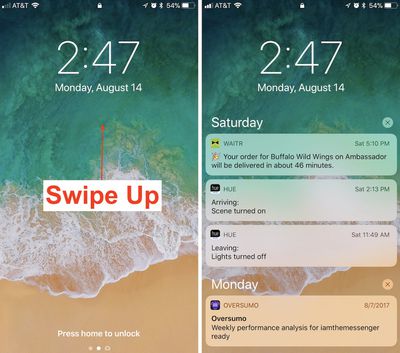
how to cover sheet 4

  1. Awaken your iPhone by using Raise to Wake or tapping the lock button.
  2. Swipe up from the middle of the screen to find a list of notifications, and continue scrolling for older notifications.
  3. On any one notification, swipe left-to-right to open it directly.
  4. Or, swipe right-to-left to "view" or "clear" it.

Accessing the New Cover Sheet
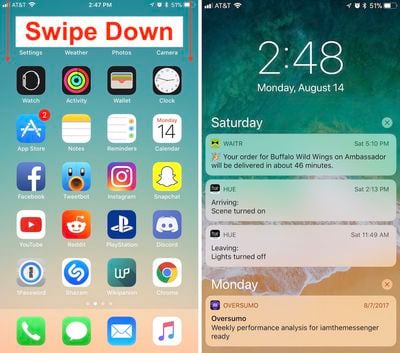
how to cover sheet 3

  1. Unlock your iPhone.
  2. Swipe down from the top edge of the screen to bring up the all-new Cover Sheet.
  3. You can interact with notifications as before, and 3D Touch the "x" to clear them all.
  4. Swipe left-to-right (avoiding notifications) to enter the Today section and find your widgets.
  5. Back on the notification screen, swipe right-to-left to enter the Camera.
  6. Swipe up from the very bottom edge of the screen or press the home button to dismiss the Cover Sheet.

With Cover Sheet, the "Notification Center" of iOS 10 has been replaced with a screen that looks visually just like your lock screen, and functions essentially the same way. Notifications are displayed in reverse chronological order, starting with the latest unseen notifications, continuing with "Earlier Today" if you have any missed notifications from the past 24 hours, and then extending into previous days.

Those who purchase an iPhone X later in the year should also note that the redesigned iPhone will house Cover Sheet in its own unique area. When the iPhone X is unlocked, instead of swiping down from the top edge of the smartphone, you'll have to swipe down from the top left ear to bring up your notifications.

Related Forum: iOS 11

Top Rated Comments

roland.g Avatar
110 months ago
So everyone start using iOS 11. Swipe down for Cover Sheet and up for Control Center.

Ok. Now you've got your iPhone X a month or 5 later. Do the opposite. Hmm...
Score: 9 Votes (Like | Disagree)
jeremiah256 Avatar
110 months ago
The ease, discoverability, and standardization of iOS is, or was, one of the main points I’d bring up when asked about the difference between iOS and Android. This isn’t helping.
Score: 6 Votes (Like | Disagree)
Neepman Avatar
110 months ago
Changes all so stupidly unnecessary. Looking forward to all the calls from my more senior relatives trying to talk them through this.
Score: 4 Votes (Like | Disagree)
itsmilo Avatar
110 months ago
The fact that we need an article explaining how to access something that is supposed to be so simple speaks volumes of today’s iOS.

“When I look for good design, I look for something which is easy to use, approachable, friendly, you can use it without a manual, it’s fun.”

- Scott Forstall

Please bring that guy back. I don’t even want to hear anyone bring up skeumorphism, either, that is irrelevant. I didn’t hear anyone complaining about using their iOS devices and how bad, lacking detail, laggy, and inconsistent things were from iOS 1-6 (apart from some lacking features) to the widespread extent we have today.
Multitasking on iPad is the most confusing thing ever. I dont think anyone i know will even be aware of its existence to be honest. So much swiping and flipping around
Score: 4 Votes (Like | Disagree)
Superhappytree Avatar
110 months ago
The fact that we need an article explaining how to access something that is supposed to be so simple speaks volumes of today’s iOS.

“When I look for good design, I look for something which is easy to use; approachable; friendly; you can use it without a manual; it’s fun.”

- Scott Forstall

Please bring that guy back. I don’t even want to hear anyone bring up skeumorphism, either, that is irrelevant. I didn’t hear anyone complaining about using their iOS devices and how bad, lacking detail, laggy, and inconsistent things were from iOS 1-6 (apart from some lacking features) compared to the widespread extent we have today.
Score: 3 Votes (Like | Disagree)
Ds6778 Avatar
110 months ago
This was one of the dumbest changes in iOS 11. Change just for the sake of it.
Score: 3 Votes (Like | Disagree)

Popular Stories

maxresdefault

Apple Shows Off a Key Reason to Upgrade to the iPhone 17

Saturday February 7, 2026 9:26 am PST by
Apple today shared an ad that shows how the upgraded Center Stage front camera on the latest iPhones improves the process of taking a group selfie. "Watch how the new front facing camera on iPhone 17 Pro takes group selfies that automatically expand and rotate as more people come into frame," says Apple. While the ad is focused on the iPhone 17 Pro and iPhone 17 Pro Max, the regular iPhone...
Finder Siri Feature

Why Apple's iOS 26.4 Siri Upgrade Will Be Bigger Than Originally Promised

Friday February 6, 2026 3:06 pm PST by
In the iOS 26.4 update that's coming this spring, Apple will introduce a new version of Siri that's going to overhaul how we interact with the personal assistant and what it's able to do. The iOS 26.4 version of Siri won't work like ChatGPT or Claude, but it will rely on large language models (LLMs) and has been updated from the ground up. Upgraded Architecture The next-generation...
wwdc sans text feature

Apple Rumored to Announce New Product on February 19

Thursday February 5, 2026 12:22 pm PST by
Apple plans to announce the iPhone 17e on Thursday, February 19, according to Macwelt, the German equivalent of Macworld. The report, citing industry sources, is available in English on Macworld. Apple announced the iPhone 16e on Wednesday, February 19 last year, so the iPhone 17e would be unveiled exactly one year later if this rumor is accurate. It is quite uncommon for Apple to unveil...
apple wallet drivers license feature iPhone 15 pro

Apple Says These 7 U.S. States Plan to Offer iPhone Driver's Licenses

Monday February 9, 2026 6:24 am PST by
In select U.S. states, residents can add their driver's license or state ID to the Apple Wallet app on the iPhone and Apple Watch, and then use it to display proof of identity or age at select airports and businesses, and in select apps. The feature is currently available in 13 U.S. states and Puerto Rico, and it is expected to launch in at least seven more in the future. To set up the...
14 inch MacBook Pro Keyboard

New MacBook Pros Could Now Arrive in March

Sunday February 8, 2026 6:02 am PST by
New MacBook Pro models with the M5 Pro and M5 Max chips could arrive as soon as Monday, March 2, according to Bloomberg's Mark Gurman. In today's "Power On" newsletter, Gurman said that the release of new MacBook Pro models is tied to the release of macOS Tahoe 26.3. The launch is said to be slated for as early as the week of March 2. He added that the M4 Pro and M4 Max models on sale today...















