
How to Find Notifications in iOS 11's New Lock Screen and Cover Sheet - MacRumors
Skip to Content

How to Find Notifications in iOS 11's New Lock Screen and Cover Sheet

by

Apple made waves last year when it completely redesigned how the lock screen functions on iOS 10 by removing the iPhone's well-known "Slide to Unlock" instruction from the screen. The improvements allowed for a more seamless unlocking experience on iPhones that supported Raise to Wake and Touch ID, and with iOS 11 that process isn't changing (although there are still ways to get around it thanks to Accessibility options).

The main change in iOS 11's lock screen is how the new software deals with notifications and the methods you'll have to go through in finding a push notification you might have missed.
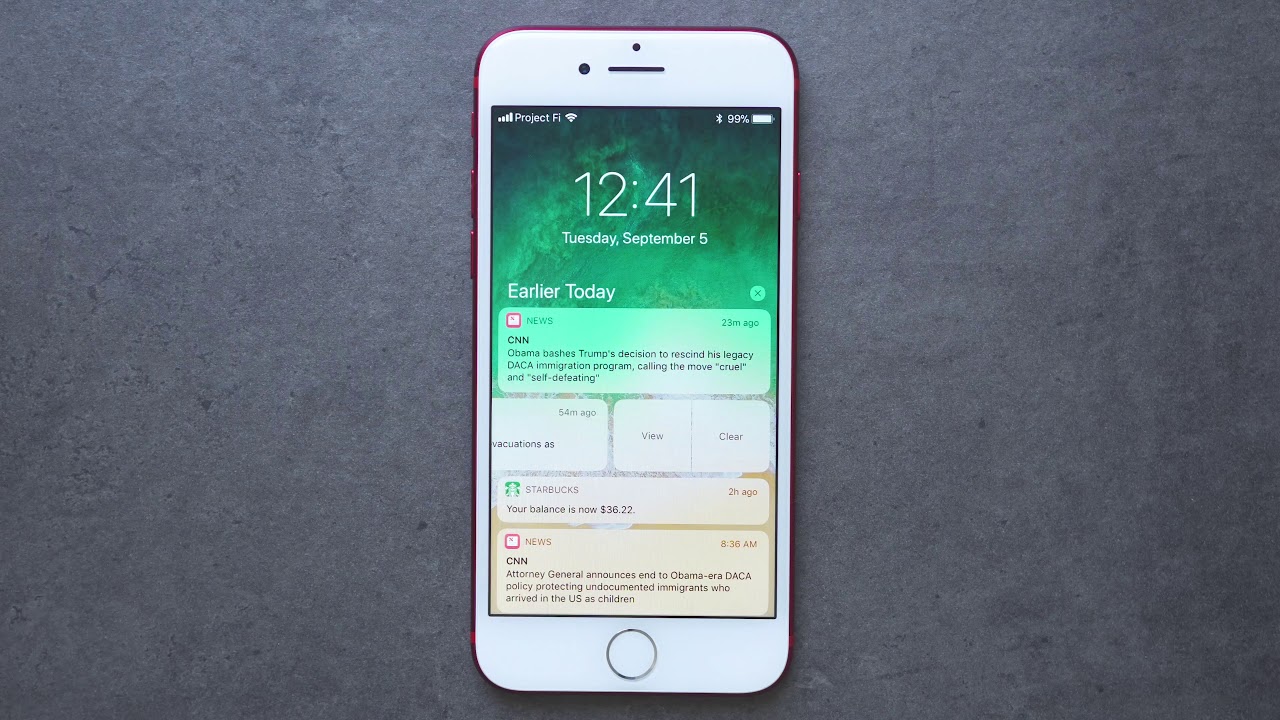
Finding Notifications in iOS 11's Lock Screen
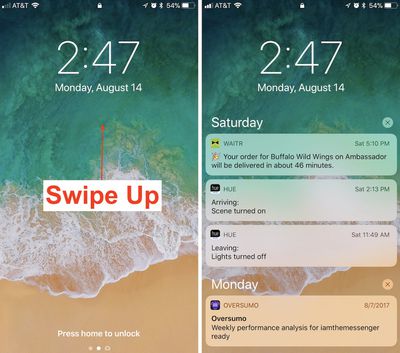
how to cover sheet 4

  1. Awaken your iPhone by using Raise to Wake or tapping the lock button.
  2. Swipe up from the middle of the screen to find a list of notifications, and continue scrolling for older notifications.
  3. On any one notification, swipe left-to-right to open it directly.
  4. Or, swipe right-to-left to "view" or "clear" it.

Accessing the New Cover Sheet
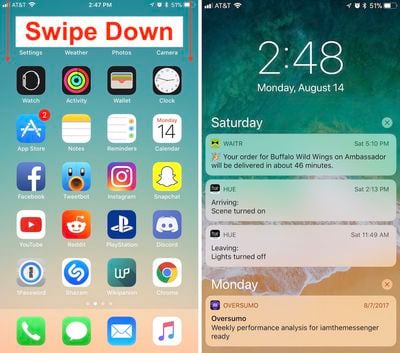
how to cover sheet 3

  1. Unlock your iPhone.
  2. Swipe down from the top edge of the screen to bring up the all-new Cover Sheet.
  3. You can interact with notifications as before, and 3D Touch the "x" to clear them all.
  4. Swipe left-to-right (avoiding notifications) to enter the Today section and find your widgets.
  5. Back on the notification screen, swipe right-to-left to enter the Camera.
  6. Swipe up from the very bottom edge of the screen or press the home button to dismiss the Cover Sheet.

With Cover Sheet, the "Notification Center" of iOS 10 has been replaced with a screen that looks visually just like your lock screen, and functions essentially the same way. Notifications are displayed in reverse chronological order, starting with the latest unseen notifications, continuing with "Earlier Today" if you have any missed notifications from the past 24 hours, and then extending into previous days.

Those who purchase an iPhone X later in the year should also note that the redesigned iPhone will house Cover Sheet in its own unique area. When the iPhone X is unlocked, instead of swiping down from the top edge of the smartphone, you'll have to swipe down from the top left ear to bring up your notifications.


Related Forum: iOS 11

Top Rated Comments

roland.g Avatar
119 months ago
So everyone start using iOS 11. Swipe down for Cover Sheet and up for Control Center.

Ok. Now you've got your iPhone X a month or 5 later. Do the opposite. Hmm...
Score: 9 Votes (Like | Disagree)
jeremiah256 Avatar
119 months ago
The ease, discoverability, and standardization of iOS is, or was, one of the main points I’d bring up when asked about the difference between iOS and Android. This isn’t helping.
Score: 6 Votes (Like | Disagree)
itsmilo Avatar
119 months ago
The fact that we need an article explaining how to access something that is supposed to be so simple speaks volumes of today’s iOS.

“When I look for good design, I look for something which is easy to use, approachable, friendly, you can use it without a manual, it’s fun.”

- Scott Forstall

Please bring that guy back. I don’t even want to hear anyone bring up skeumorphism, either, that is irrelevant. I didn’t hear anyone complaining about using their iOS devices and how bad, lacking detail, laggy, and inconsistent things were from iOS 1-6 (apart from some lacking features) to the widespread extent we have today.
Multitasking on iPad is the most confusing thing ever. I dont think anyone i know will even be aware of its existence to be honest. So much swiping and flipping around
Score: 4 Votes (Like | Disagree)
119 months ago
Changes all so stupidly unnecessary. Looking forward to all the calls from my more senior relatives trying to talk them through this.
Score: 4 Votes (Like | Disagree)
Superhappytree Avatar
119 months ago
The fact that we need an article explaining how to access something that is supposed to be so simple speaks volumes of today’s iOS.

“When I look for good design, I look for something which is easy to use; approachable; friendly; you can use it without a manual; it’s fun.”

- Scott Forstall

Please bring that guy back. I don’t even want to hear anyone bring up skeumorphism, either, that is irrelevant. I didn’t hear anyone complaining about using their iOS devices and how bad, lacking detail, laggy, and inconsistent things were from iOS 1-6 (apart from some lacking features) compared to the widespread extent we have today.
Score: 3 Votes (Like | Disagree)
Ds6778 Avatar
119 months ago
This was one of the dumbest changes in iOS 11. Change just for the sake of it.
Score: 3 Votes (Like | Disagree)

Popular Stories

iPhone Duo Trio

Here's What Apple's Apps Look Like on the iPhone Duo

Tuesday October 20, 2026 11:12 am PDT by
With just three days to go until the iPhone Duo is released, Apple is getting ready for the launch. Behind the scenes, the App Store now has screenshots of Apple's built-in apps running on the Duo. We've seen some apps in marketing materials, but images of the ones we haven't seen give us an idea of what it will be like using the iPhone Duo day to day. Many apps are shown in landscape...
Apple Creator Studio iWork suite

Apple Pulls Keynote, Pages and Numbers From App Store [Update: Back]

Thursday October 22, 2026 11:01 am PDT by
Apple has temporarily removed Keynote, Pages, and Numbers from the App Store, just after releasing an update that added iPhone Duo support and a new Intelligent Assistant. It is not clear if the apps were removed intentionally, or if it is a bug. Apple has not said when the apps will be reinstated, but if it was in error, they should return soon. Update: The Mac versions are back without...
M5 MacBook Pro

RIP, MacBook Ultra

Monday October 19, 2026 9:37 am PDT by
Apple today sent out invites for an experience in Los Angeles on Wednesday, October 28, and the "Pro and tell" tagline on the invitation likely means that the rumored MacBook models with touch-enabled OLED displays will stick with MacBook Pro branding instead of the once-rumored "MacBook Ultra" name. The long-rumored "iPhone Ultra" ended up being named iPhone Duo, so speculation that Apple...
Latest Stories
iPhone Duo Launch Begins as First Orders Reach Customers
2 hours ago
1Password for Agents Keeps Your Passwords Hidden From AI
3 hours ago
iPhone Duo 24 Hours Later: Your Questions Answered
3 hours ago
Apple's iWork Apps Get 'Intelligent Assistant' and iPhone Duo Support
4 hours ago
Apple is Apparently Considering a Slightly Larger iPhone Duo
4 hours ago
Giant iPhone Duo Displays Coming to Four Apple Stores
5 hours ago
Apple Pulls Keynote, Pages and Numbers From App Store [Update: Back]
6 hours ago
Apple Updates More Apps With iPhone Duo Support
7 hours ago
Apple Will Label Apps 'Made for iPhone Duo' in App Store
9 hours ago
Amazon Takes $49 Off iPad With Prices Starting at $399.99
10 hours ago
F1 on Apple TV Now Available in Dolby Atmos
11 hours ago
Apple Reveals More Than 50 Apps That Will Be Updated for iPhone Duo
11 hours ago
Apple Blocks Certificates That Could Help Attackers Fake Websites
12 hours ago
Giant iPhone Duo Installations Spotted at Apple Fifth Avenue
13 hours ago
iPhone Duo 2 Prototypes Include Under-Display Face ID
13 hours ago
Tesla App Gains iPad and iPhone Duo Support
17 hours ago
Apple Reportedly Boosts iPhone Duo Orders by 44%
18 hours ago
Fortnite Returning to Australian App Store After Court Ruling
18 hours ago
Apple Ordered to Open iPhone to Rival App Stores in Australia
18 hours ago
Apple Suppliers Face Hurdles Cutting Circuit Board Emissions
19 hours ago
Things Updated for iPhone Duo With Adaptive Layout
19 hours ago
Simplicity and Siri AI Are HomeView's Killer Features, Apple Says
20 hours ago
iPhone Duo Reviewers Really Miss Face ID
1 day ago
Does the iPhone Duo Run Hot? Here's What Reviews Found
1 day ago
Apple Music's New Look is Now Live on Apple's Website
1 day ago
Anthropic Launches Claude Duet, a Proactive AI Agent
1 day ago
What 32,000 Folds Did to the iPhone Duo's Hinge
1 day ago
iPhone Duo's Hidden FaceTime Camera Takes 'Trash' Photos
1 day ago
iPhone Duo Has 'Edge Light' Feature That Debuted on Macs Last Year
1 day ago
Apple Support App Updated for iPhone Duo's Larger Display
1 day ago









































