iOS 18: Get Rid of Website Distractions in Safari - MacRumors
Skip to Content

iOS 18: Get Rid of Website Distractions in Safari

by

Are you tired of pop-ups, banners, and autoplay videos interrupting your web browsing experience? With iOS 18 and iPadOS 18, Apple introduces a game-changing feature in Safari called Distraction Control. This powerful tool helps you focus on the content that matters by minimizing intrusive elements on webpages.

safari icon blue banner
In this tutorial, we'll walk you through how to use Distraction Control to streamline your browsing and reduce visual clutter. While it's not designed as an ad blocker, Distraction Control can significantly improve your reading experience by hiding static distractions.

Using the following steps, you'll be able to manage sign-in prompts, cookie notices, newsletter sign-ups, and more. Note that it's an opt-in feature for hiding elements on the page, and Apple says that nothing is hidden that is not proactively selected.

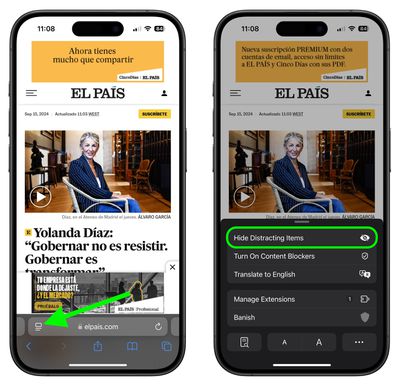
  1. In Safari, tap the Page menu in the left of the address bar.
  2. Select Hide Distracting Items.
    safari

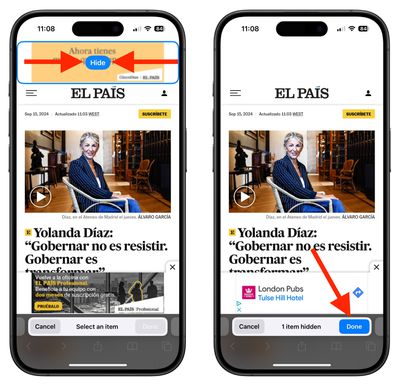
  3. Select the area on the page that you want to hide, then tap Hide.
  4. When you're finished selecting areas to hide, tap Done in the address bar.
    Monday 16 Sep 2024 16 37 39

When you re-visit a site on which you have distracting items hidden, you'll see an icon in the address bar that looks like an eye crossed out. If you tap the Page menu, you'll also see an option to Show Hidden Items that when selected will instantly reveal all hidden elements on the webpage.


Note that your Distraction Control settings remain on-device and will not sync from device to device, so you will need to hide website elements on each one of your Apple devices.


Tag: Safari

Popular Stories

imac video apple feature

Apple Released Yet Another New Product Today

Friday March 20, 2026 2:39 pm PDT by
Apple has unveiled a whopping nine new products so far this March, including an iPhone 17e, iPad Air models with the M4 chip, MacBook Air models with the M5 chip, MacBook Pro models with M5 Pro and M5 Max chips, the all-new MacBook Neo, an updated Studio Display, a higher-end Studio Display XDR, AirPods Max 2, and now the Nike Powerbeats Pro 2. iPhone 17e features the same overall design as...
HomePod mini and Apple TV Sage

New Apple TV and HomePod Mini Remain 'Ready' to Launch

Sunday March 22, 2026 6:33 am PDT by
Apple has unveiled nine new products this month, but the wait continues for the next-generation Apple TV 4K and HomePod mini models. In his Power On newsletter today, Bloomberg's Mark Gurman said new versions of the Apple TV and HomePod mini have been "ready" since last year, but he reiterated that Apple has held off on releasing them until the more personalized version of Siri and other...
iOS 26

iOS 26.4 Adds Two New Features to CarPlay

Tuesday March 24, 2026 1:55 pm PDT by
iOS 26.4 was released today, and it includes a couple of new features for CarPlay: an Ambient Music widget and support for voice-based chatbot apps. To update your iPhone 11 or newer to iOS 26.4, open the Settings app and tap on General → Software Update. CarPlay will automatically offer the new features so long as the iPhone connected to your vehicle is running iOS 26.4 or later....