

Are you tired of pop-ups, banners, and autoplay videos interrupting your web browsing experience? With iOS 18 and iPadOS 18, Apple introduces a game-changing feature in Safari called Distraction Control. This powerful tool helps you focus on the content that matters by minimizing intrusive elements on webpages.

In this tutorial, we'll walk you through how to use Distraction Control to streamline your browsing and reduce visual clutter. While it's not designed as an ad blocker, Distraction Control can significantly improve your reading experience by hiding static distractions.
Using the following steps, you'll be able to manage sign-in prompts, cookie notices, newsletter sign-ups, and more. Note that it's an opt-in feature for hiding elements on the page, and Apple says that nothing is hidden that is not proactively selected.
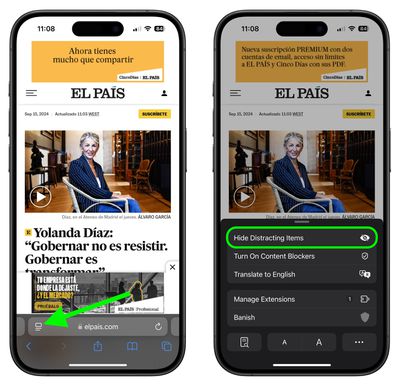
- In Safari, tap the Page menu in the left of the address bar.
- Select Hide Distracting Items.

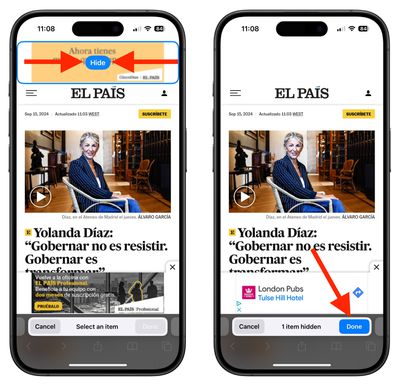
- Select the area on the page that you want to hide, then tap Hide.
- When you're finished selecting areas to hide, tap Done in the address bar.
When you re-visit a site on which you have distracting items hidden, you'll see an icon in the address bar that looks like an eye crossed out. If you tap the Page menu, you'll also see an option to Show Hidden Items that when selected will instantly reveal all hidden elements on the webpage.


Note that your Distraction Control settings remain on-device and will not sync from device to device, so you will need to hide website elements on each one of your Apple devices.


























![Apple Pulls Keynote, Pages and Numbers From App Store [Update: Back]](https://images.macrumors.com/t/Okb7kitB_gNr6qe5Pex9nQIysD8=/112x112/article-new/2026/01/Apple-Creator-Studio-iWork-suite.jpg)


















