iOS 26: Remotely Control iPhone Camera With Your AirPods - MacRumors
Skip to Content

iOS 26: Remotely Control iPhone Camera With Your AirPods

by

Apple's iOS 26 update brings an unexpected camera trick to AirPods 4 and AirPods Pro 2 – the ability to control iPhone photo and video capture using AirPods stem gestures. The new Camera Remote feature essentially turns your wireless earbuds into a handy hands-free photography tool. Keep reading to learn how it works.
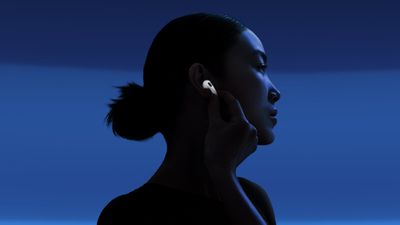
airpods 4 stem
New in iOS 26, Apple's Camera Remote feature for AirPods offers a neat solution in scenarios where standard phone photography might fall short. If you've ever used the Camera Remote app for Apple Watch, it offers similar benefits. When taking group photos, you can position your iPhone at the perfect angle, step into the frame, and trigger the shot with a simple press of your AirPods. It can also help capture steadier footage when shooting video, since you're not handling the camera and don't need to work with on-screen controls.

Getting the Beta Software

Before you can access the Camera Remote feature, you'll need to have the appropriate beta software on your devices. First, install iOS 26 beta or iPadOS 26 beta on your iPhone/iPad by following these instructions.

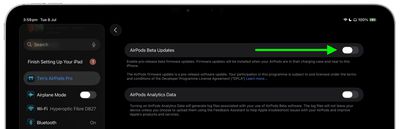
Once you have your device running the iOS 26/iPadOS 26 beta, you need to give Apple permission to install beta firmware on your AirPods.

  1. Connect your AirPods to your iPhone or iPad, then open Settings ➝ [Your Name]'s AirPods.
  2. Scroll to the bottom of the menu and select AirPods Beta Updates.
    settings

  3. Toggle the switch next to AirPods Beta Updates to the green ON position.
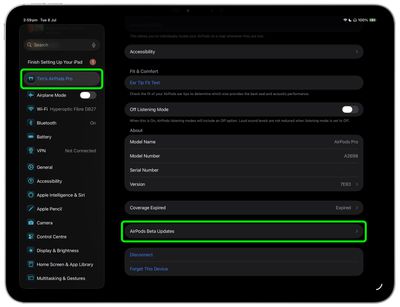
    settings

After you've completed these steps, the firmware update will be installed automatically when your AirPods are in their charging case and near to your iPhone/iPad/Mac. This could take anywhere from a few seconds to several minutes, so be patient.

Enabling Camera Remote

After updating the firmware of your AirPods 4 or AirPods Pro 2, you can enable and configure the Camera Remote feature:

  1. Connect your AirPods to your iPhone, then open Settings.
  2. Tap your AirPods name under the Apple Account banner.
  3. Scroll down to "Camera Control", then tap Camera Remote.
  4. Choose your preferred gesture: Press Once or Press and Hold.
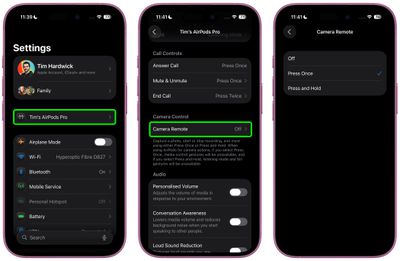
settings

The "Press Once" option responds to a single tap on your AirPods stem, while "Press and Hold" requires you to maintain pressure on the stem to activate the camera.

Using Camera Remote

Once enabled, the feature works seamlessly with the built-in Camera app. Wearing at least one paired AirPod, simply open the Camera app and select either Photo or Video mode, then frame your shot as you normally would. When you're ready to capture, use your chosen AirPods gesture to trigger the camera remotely.

camera ios 26 e1756384193773
When taking photos, your selected gesture triggers a 3-second countdown, after which the camera captures a burst of 10 photos. This gives you multiple shots to choose from, increasing your chances of getting the perfect image. When shooting video, the gesture starts and stops video recording, functioning much like a wireless record button.

The Camera Remote feature works at any distance within your AirPods' Bluetooth range, making it handy for wide-angle shots and creative photography where you need to be some distance away from your device.

And that's it. iOS 26 also brings additional AirPods features and improvements like auto-pause audio when asleep and improved call quality. A general release of iOS 26 is expected around mid-September.

Related Roundups: AirPods 5, AirPods Pro 3
Related Forum: AirPods

Top Rated Comments

mrmax86 Avatar
15 months ago
But then you're wearing AirPods in the picture...what am I missing here?
Score: 4 Votes (Like | Disagree)
15 months ago
You can already take a photo handsfree, without any special software. Simply tell Siri to turn the volume up. There was even an article about it on this very site ('https://www.geekwebguides.com/how-to/remotely-control-iphone-camera-no-apple-watch/'). Bit strange that the journalist, sorry, author of the article doesn't search the archives before writing and posting.
Score: 3 Votes (Like | Disagree)
jayducharme Avatar
15 months ago

But then you're wearing AirPods in the picture...what am I missing here?
You're wearing AirPods, and the photo will be of you with a hand on your ear. I don't see how this can be called "hands-free".
Score: 3 Votes (Like | Disagree)
15 months ago

You're wearing AirPods, and the photo will be of you with a hand on your ear. I don't see how this can be called "hands-free".
Read the article - pressing the AirPods starts a countdown so you have time to move your hand away.
Score: 2 Votes (Like | Disagree)
15 months ago
Should be useful in certain situations. Currently sometimes I take photos with the help of Apple Watch. Will try it out once I update my devices.
Score: 1 Votes (Like | Disagree)
BGPL Avatar
15 months ago
Why. Scrapin' the bottom of the idea barrel. Sure saves a lot of time not having to push the pesky volume button with my finger that's already next to it.
Score: 1 Votes (Like | Disagree)

Popular Stories

AirPods Pro Beta Firmware 2

Apple Releases New AirPods Beta Firmware

Tuesday September 29, 2026 11:38 am PDT by
Apple today released new beta firmware for the AirPods Pro 2, AirPods Pro 3, AirPods 4, AirPods 5, and AirPods Max 2. The firmware has a build number of 9B5042a and is rolling out for developers and public beta testers. There's no word on what's included in the firmware update because Apple doesn't offer notes for AirPods beta releases. When the AirPods are connected to an iPhone, iPad,...
AirPods Pro Beta Firmware 2

Apple Releases New AirPods Beta Firmware

Tuesday October 13, 2026 11:28 am PDT by
Apple today released new beta firmware for the AirPods Pro 2, AirPods Pro 3, AirPods 4, AirPods 5, and AirPods Max 2. The firmware has a build number of 9B5043a and is rolling out for developers and public beta testers. There's no word on what's included in the firmware update because Apple doesn't offer notes for AirPods beta releases. When the AirPods are connected to an iPhone, iPad,...
ifixit airpods 5

AirPods 5 Teardown: Batteries Removable, Case Still Tough

Tuesday September 29, 2026 2:38 pm PDT by
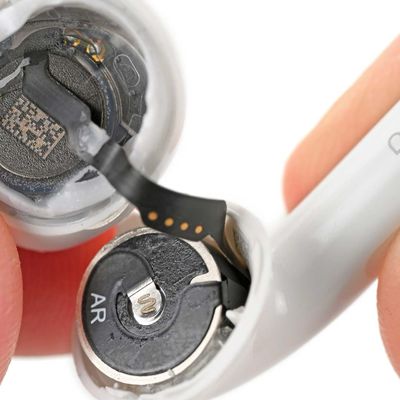
Repair site iFixit today took apart Apple's AirPods 5 for one of its traditional teardown videos. It turns out the new AirPods are slightly more repairable than prior models, but it's still not a simple home fix. The AirPods 5 use pronged batteries that Apple previously used in the AirPods 3, but not the AirPods 4. The battery can be removed with a "nifty pair of tongs," and iFixit says the...
Latest Stories
Apple's iWork Apps Get 'Intelligent Assistant' and iPhone Duo Support
53 minutes ago
Apple is Apparently Considering a Slightly Larger iPhone Duo
57 minutes ago
Giant iPhone Duo Displays Coming to Four Apple Stores
2 hours ago
Apple Pulls Keynote, Pages and Numbers From App Store [Update: Back]
3 hours ago
Apple Updates More Apps With iPhone Duo Support
3 hours ago
Apple Will Label Apps 'Made for iPhone Duo' in App Store
6 hours ago
Amazon Takes $49 Off iPad With Prices Starting at $399.99
7 hours ago
F1 on Apple TV Now Available in Dolby Atmos
7 hours ago
Apple Reveals More Than 50 Apps That Will Be Updated for iPhone Duo
8 hours ago
Apple Blocks Certificates That Could Help Attackers Fake Websites
9 hours ago
Giant iPhone Duo Installations Spotted at Apple Fifth Avenue
10 hours ago
iPhone Duo 2 Prototypes Include Under-Display Face ID
10 hours ago
Tesla App Gains iPad and iPhone Duo Support
14 hours ago
Apple Reportedly Boosts iPhone Duo Orders by 44%
15 hours ago
Fortnite Returning to Australian App Store After Court Ruling
15 hours ago
Apple Ordered to Open iPhone to Rival App Stores in Australia
15 hours ago
Apple Suppliers Face Hurdles Cutting Circuit Board Emissions
16 hours ago
Things Updated for iPhone Duo With Adaptive Layout
16 hours ago
Simplicity and Siri AI Are HomeView's Killer Features, Apple Says
16 hours ago
iPhone Duo Reviewers Really Miss Face ID
21 hours ago
Does the iPhone Duo Run Hot? Here's What Reviews Found
23 hours ago
Apple Music's New Look is Now Live on Apple's Website
1 day ago
Anthropic Launches Claude Duet, a Proactive AI Agent
1 day ago
What 32,000 Folds Did to the iPhone Duo's Hinge
1 day ago
iPhone Duo's Hidden FaceTime Camera Takes 'Trash' Photos
1 day ago
iPhone Duo Has 'Edge Light' Feature That Debuted on Macs Last Year
1 day ago
Apple Support App Updated for iPhone Duo's Larger Display
1 day ago
Amazon Sweetens the Deal on Entry-Level 16-Inch MacBook Pro With $570 Off
1 day ago
iPhone Duo Tips Over on MagSafe Stands When Unfolded
1 day ago
Apple Music's New Look Officially Announced
1 day ago