

In iOS 17 and iPadOS 17, Apple has introduced Sensitive Content Warnings to prevent unsolicited nude photos and similar content coming through to your iPhone or iPad. Here's how to enable the feature.
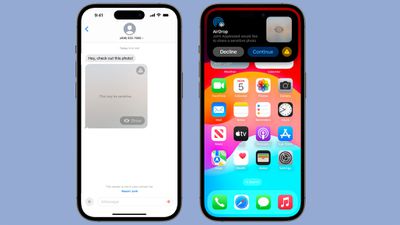
With Sensitive Content Warnings enabled in iOS 17, incoming files, videos, and images are scanned on-device and blocked if they contain nudity. The opt-in blurring can be applied to images in Messages, AirDrop, Contact Posters for the Phone app, FaceTime messages, and third-party apps.
Note that this is separate from the Communication Safety features the Apple has implemented for children, and is designed for people of all ages. Sensitive Content Warnings can be enabled by following the steps below.
- Open up the Settings app.
- Tap Privacy & Security.
- Scroll down and tap Sensitive Content Warning.
- Tap the switch next to Sensitive Content Warning to enable the feature.
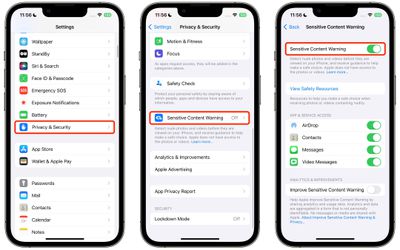
With the feature turned on, you'll see additional options that allow you to turn enable Sensitive Content Warnings for specific services, including AirDrop, Contacts, Messages, and Video Messages.
Note that all nudity is blocked by Apple's operating system by default when the feature is enabled, but individual media can always be viewed by tapping on the "Show" button.
























![Apple Pulls Keynote, Pages and Numbers From App Store [Update: Back]](https://images.macrumors.com/t/Okb7kitB_gNr6qe5Pex9nQIysD8=/112x112/article-new/2026/01/Apple-Creator-Studio-iWork-suite.jpg)





















