
iOS 26: Fine-Tune Podcast Playback Speeds - MacRumors
Skip to Content

iOS 26: Fine-Tune Podcast Playback Speeds

by

With iOS 26 (currently in beta), Apple has finally caught up with rival podcast apps like Overcast by adding more fine-grained playback speed controls to the Podcasts app.
iOS 26 Podcasts Glass Feature
While competitors have long offered precise speed adjustments, Apple's rigid presets often left you caught between speeds that felt either too slow or uncomfortably fast.

In previous versions of iOS, Apple's stock Podcasts app provided only four fixed playback speed options: 1.25x, 1.5x, 1.75, and 2x. That's changed in iOS 26, and users now have a lot more flexibility.

Not only has Apple increased the range of playback speeds from 0.5x to 3x, the updated setting also allows you to adjust the speed in 0.1x increments, thanks to a new, more granular adjustment interface.

How to Adjust Podcast Playback Speed

Here's how to find your perfect playback speed.

  1. Open the Podcasts app and start playing any show.
  2. Open the fullscreen playback controls.
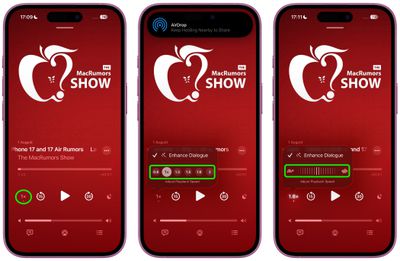
  3. Tap the playback speed button (1x) in the bottom left.
  4. Tap one of the preset playback speed options. Alternatively, drag your finger over the preset options to invoke a dial allowing for 0.1x incremental adjustments.
podcasts

The expanded range opens up new possibilities: Super slow speeds may be useful for listening to podcasts where the host speaks too fast, as well as language learning or transcription work, whereas the upper speeds can be used to boost the pace of plodding narrators, or help you when you just want to skim-listen to a show.

Best of all, the new playback speed setting remembers your preference for each individual podcast, so you shouldn't need to adjust it every time you return to the same show.

Apple will roll out iOS 26 to compatible iPhones in September 2025.

Top Rated Comments

9 months ago
I see Apple have not yet Sherlocked the one feature that keeps me on Overcast. Namely the ability to reduce the period of silence between people speaking. Truly excellent feature.
Score: 12 Votes (Like | Disagree)
LanaDelDeathRay Avatar
9 months ago
Even better—You can also just drag your finger up/down directly on the playback speed button. Yw
Score: 8 Votes (Like | Disagree)
9 months ago
This is just another example of a feature they should have shipped ages ago through a normal app update. Instead we have to wait and pray simple features are included in upcoming OS updates; doesn't make any sense.
Score: 5 Votes (Like | Disagree)
nutmac Avatar
9 months ago

I see Apple have not yet Sherlocked the one feature that keeps me on Overcast. Namely the ability to reduce the period of silence between people speaking. Truly excellent feature.
That and also automatic volume (voice boost). I use Overcast over Apple's for these two features alone.
Score: 4 Votes (Like | Disagree)
ericg301 Avatar
9 months ago
Every year I retry the native podcast app (compared to Pocket Casts, my daily driver), and every year I am still flummoxed by UP NEXT and how it differs from the queue. I just want the default screen to open on the latest episodes, in order, that I can add to the queue.
Score: 3 Votes (Like | Disagree)
9 months ago

Even better—You can also just drag your finger up/down directly on the playback speed button. Yw
LOL actually THANK YOU for this because I probably would've BARELY, very randomly discovered it in like a year's time!!! While trying to scrub a little stain off the screen protector in the area of that playback speed selector while having the app open and listening to a podcast. 😆🥲

The addition of the scrubber (or whatever the term is for it) is welcome in iOS 26; but minus points for UI/UX design on that one! Am I the only one that feels that way? Like I randomly discovered through a "butt swipe" that you can increment the speed through a horizontal scroll; but the implementation still has room for improvement! The first time I did it I didn't even know what the outcome of the action was; because visually the change happens, you feel the haptic response yet you don't see it in the moment, since it updates the indicator - which is UNDER your finger (the touch target) as it touches the screen... You end up having to lift your finger up while still touching the screen to "peek" under.

And I don't even think it has anything to do with being left/right handed; I can see how the approach is a bit faulty if you've got chunkier fingers as well/a big hand. :confused:
Score: 2 Votes (Like | Disagree)

Popular Stories

Dynamic Island iPhone 18 Pro Feature

11 Reasons to Wait for the iPhone 18 Pro

Monday May 11, 2026 9:01 am PDT by
We're only four months out from the launch of Apple's premium next-generation smartphone lineup, and while we're not expecting a sea change in terms of functionality, there are still several enhancements rumored to be coming to the iPhone 18 Pro and iPhone 18 Pro Max. One thing worth noting is that Apple is reportedly planning a major change to its iPhone release cycle this year, adopting a...
iOS 26

iOS 26.5 Features: Everything New in iOS 26.5

Monday May 11, 2026 5:09 pm PDT by
Apple released iOS 26.5 after a few months of beta testing, and while it doesn't have the Siri features we were hoping for since those are being held until iOS 27, there are a handful of useful changes worth knowing about. Subscribe to the MacRumors YouTube channel for more videos. End-to-End Encryption for RCS Support for end-to-end encryption (E2EE) for RCS messages between iPhone and...
General Apps Reddit Feature

Reddit Starts Blocking Mobile Website, Pushing Users to App Instead

Monday May 11, 2026 6:10 am PDT by
Social network Reddit recently began blocking mobile visitors to its website while pushing them to download the official Reddit app, and it's fair to say that the move is not going down well with users. If you visit reddit.com on your iPhone today, you may see a new popup that can't be dismissed, asking you to "get the app to keep using Reddit." A Reddit spokesperson told Ars Technica...










































