

From business meetings to family memories, there are countless reasons to record a phone call, but until now, iPhone users have had to rely on third-party apps or complex workarounds. That changed in October 2024 with the release of iOS 18.1, which introduced native call recording and transcription powered by Apple Intelligence.
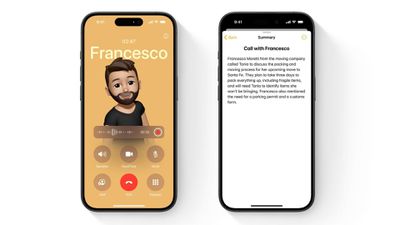
Apple's new Phone app feature not only records conversations but automatically creates searchable transcripts and AI-generated summaries, all while maintaining Apple's commitment to privacy and transparency. When you start recording, all participants automatically hear an announcement, ensuring everyone knows they're being recorded. A visible indicator also remains on screen throughout the call for as long as the recording continues.
To further protect user privacy, all recordings are stored locally in the Notes app with end-to-end encryption, and the new Apple Intelligence-powered transcription happens entirely on your device, meaning conversations never leave your iPhone. Here's how to make your first phone call recording in iOS 18.1.
Recording a Phone Call
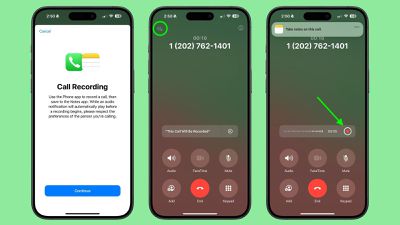
- Start or answer a phone call.
- Tap the record button (the waveform icon) in the top-left corner of the call screen.
- An automated voice will notify all participants that recording has begun.
- The recording will automatically save to the Notes app when the call ends or when you stop the recording.
Finding and Managing Phone Call Recordings
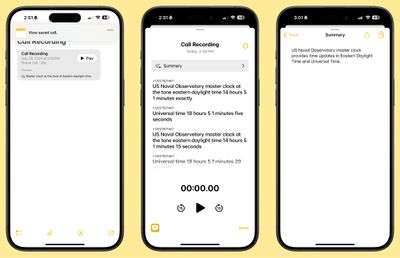
Once saved, recordings appear in the Notes app as audio files with attached transcripts. Tap any recording to access a range of options: You can play back the audio, read the full transcript, view an AI-generated summary of the conversation, or share and delete recordings as needed.
Legal Considerations
While iOS 18.1 makes recording calls easier than ever, it's important to understand your legal obligations. Although Apple's automated announcement helps ensure transparency, you should familiarize yourself with local recording laws. Regardless, it's always best to get explicit verbal consent before the start of any recorded conversation.
Phone call recording and transcription features are available on compatible iPhone models running iOS 18.1 and later.























![Apple Pulls Keynote, Pages and Numbers From App Store [Update: Back]](https://images.macrumors.com/t/Okb7kitB_gNr6qe5Pex9nQIysD8=/112x112/article-new/2026/01/Apple-Creator-Studio-iWork-suite.jpg)






















