
With iOS 18.1, Apple has introduced AI-powered notification summarization across all apps, which means your iPhone will automatically condense your alerts to show just the key details. The feature aims to reduce notification overload, but it doesn't always work as advertised. Keep reading to learn how to manage the feature.

apple intelligence fails

Image credits: r/AppleIntelligenceFail

Powered by Apple Intelligence, the new summarization feature works by analyzing notification content and creating more concise versions that highlight the most important information. By default, it's enabled for compatible apps after you complete the initial setup process in iOS 18.1.

While Apple's AI summaries offer convenience, they've also produced some unexpectedly funny results. The system's struggle with emotional context and tone detection has led to some particularly amusing recap fails. As recorded in places like the subreddit r/AppleIntelligenceFail, when the algorithm misinterprets sarcasm, combines unrelated notifications, or fails to grasp logic, the results can be surprisingly entertaining (or not, depending on your sense of humor).

Customize or Disable Notification Summaries

Whether you've been tickled or confused by summaries, or they just don't appeal to your workflow, fortunately you can disable the feature entirely or customize which apps use the feature. This gives you complete control over how your notifications appear on the Lock Screen and in Notification Center on your iPhone.

  1. Open Settings on your iPhone.
  2. Scroll down and tap Notifications.
  3. Tap Summarize Previews.
  4. Toggle off the switch at the top to completely disable Summarize Previews. Alternatively, toggle off the switches for individual apps only.
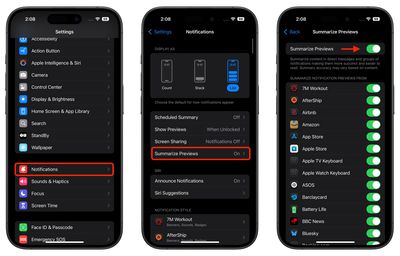
settings

Things to Know About Notification Summaries

  • Turning off summarization doesn't affect other notification settings like grouping or Focus modes.
  • The feature only works on devices that support Apple Intelligence (iPhone 15 Pro and iPhone 16 models, M-series iPads, iPad mini 7, and Macs with Apple silicon).
  • Disabling summaries returns notifications to their standard format immediately.
  • You can re-enable summarization at any time through Settings.

Keep in mind that notification summaries are separate from the Notification Summary feature that delivers scheduled batches of notifications at specific times. While they may seem similar, they serve different purposes in helping you manage your notifications more effectively.

Top Rated Comments

frost_horizon Avatar
16 months ago
I am totally agree with arguments in this video:

Score: 15 Votes (Like | Disagree)
contacos Avatar
16 months ago
I still don't get the point of this like Notifications are super short as it is, what's there to summarize.

I guess it makes sense for people like the Kardashians with Notifications coming in every second of the day.
Score: 13 Votes (Like | Disagree)
Rkuda Avatar
16 months ago
Tech companies are willing to burn down the world for this ****...
Score: 12 Votes (Like | Disagree)
Mr_Ed Avatar
16 months ago
Apple: “Here’s an awesome new feature you didn’t ask for.”
MR: “Here’s how you turn that awesome new feature off.”
Most of the rest of us: “Thanks! I needed that!”

I’ve been holding out on moving to iOS 18 until some of the AI nonsense works itself out. I don’t want any of it, and there is nothing compelling to me about other stuff in 18, so I guess I’ll continue to wait.
Score: 12 Votes (Like | Disagree)
Godspeed8230 Avatar
16 months ago
That has Siri Intelligence written all over it. Oh dear..
Score: 9 Votes (Like | Disagree)
CharlesShaw Avatar
16 months ago
This explains what happens to the feedback I send to Apple.
Score: 7 Votes (Like | Disagree)

Popular Stories

maxresdefault

Apple Shows Off a Key Reason to Upgrade to the iPhone 17

Saturday February 7, 2026 9:26 am PST by
Apple today shared an ad that shows how the upgraded Center Stage front camera on the latest iPhones improves the process of taking a group selfie. "Watch how the new front facing camera on iPhone 17 Pro takes group selfies that automatically expand and rotate as more people come into frame," says Apple. While the ad is focused on the iPhone 17 Pro and iPhone 17 Pro Max, the regular iPhone...
Finder Siri Feature

Why Apple's iOS 26.4 Siri Upgrade Will Be Bigger Than Originally Promised

Friday February 6, 2026 3:06 pm PST by
In the iOS 26.4 update that's coming this spring, Apple will introduce a new version of Siri that's going to overhaul how we interact with the personal assistant and what it's able to do. The iOS 26.4 version of Siri won't work like ChatGPT or Claude, but it will rely on large language models (LLMs) and has been updated from the ground up. Upgraded Architecture The next-generation...
wwdc sans text feature

Apple Rumored to Announce New Product on February 19

Thursday February 5, 2026 12:22 pm PST by
Apple plans to announce the iPhone 17e on Thursday, February 19, according to Macwelt, the German equivalent of Macworld. The report, citing industry sources, is available in English on Macworld. Apple announced the iPhone 16e on Wednesday, February 19 last year, so the iPhone 17e would be unveiled exactly one year later if this rumor is accurate. It is quite uncommon for Apple to unveil...
apple wallet drivers license feature iPhone 15 pro

Apple Says These 7 U.S. States Plan to Offer iPhone Driver's Licenses

Monday February 9, 2026 6:24 am PST by
In select U.S. states, residents can add their driver's license or state ID to the Apple Wallet app on the iPhone and Apple Watch, and then use it to display proof of identity or age at select airports and businesses, and in select apps. The feature is currently available in 13 U.S. states and Puerto Rico, and it is expected to launch in at least seven more in the future. To set up the...
14 inch MacBook Pro Keyboard

New MacBook Pros Could Now Arrive in March

Sunday February 8, 2026 6:02 am PST by
New MacBook Pro models with the M5 Pro and M5 Max chips could arrive as soon as Monday, March 2, according to Bloomberg's Mark Gurman. In today's "Power On" newsletter, Gurman said that the release of new MacBook Pro models is tied to the release of macOS Tahoe 26.3. The launch is said to be slated for as early as the week of March 2. He added that the M4 Pro and M4 Max models on sale today...















