How to Use the iPad's Nifty Flick Keyboard Feature - GeekWebGuides
Skip to Content

How to Use the iPad's Nifty Flick Keyboard Feature

by

The QuickType keyboard on the iPad has been updated in iOS 11 to introduce a super handy new Flick feature designed to let you enter numbers and symbols without the shift key.

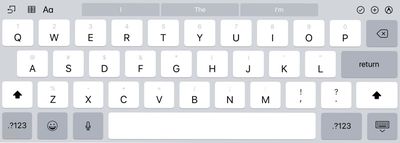
When you upgrade to iOS 11 and take a look at the keyboard on the iPad, you'll notice that all of the keys now display letters and number/symbols. A tap lets you enter the main letter on the keyboard, while a flick lets you enter the secondary symbol or number. Here's how to use it:

  1. Bring up the iPad's keyboard, either in an app or using the search feature.ios11keyboardipad
  2. Tap on a key if you want to enter the standard letter or symbol.
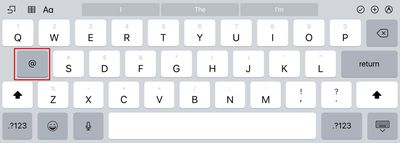
  3. To enter the "flick" symbol, touch a key and then pull downwards.
  4. As you pull down, the symbol will replace the letter on the keyboard and it'll be entered into the text field.ios11ipadkeyboardflick

Typing symbols and numbers this way is simple, intuitive, and a lot faster than taking the time to use the shift key. With this keyboard, you can still access the special characters and accent marks by holding down on a key.

Turning Off the Flick Key Option

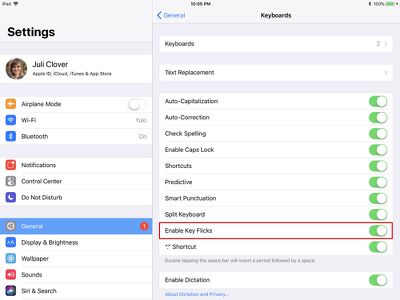
  1. Open the Settings app.
  2. Tap "General."
  3. Select the "Keyboard" option.ios11ipadkeyflickssettings
  4. Toggle off "Enable Key Flicks."

Compatibility

The new key flicking feature is available for almost all iPads that are able to run iOS 11, with the exception of the 12.9-inch iPad Pro. With the larger iPad Pro model, you won't be able to use key flicks. It is, however, available on all other iPad Pro models, the iPad Air and later, the iPad mini 2 and later, and the 5th generation iPad.


Related Forum: iOS 11

Top Rated Comments

HiRez Avatar
119 months ago
This is a great feature and for people who mix a lot of numbers into their text (like me) it's going to be a huge time saver. However, to me they got the direction wrong. It's much more intuitive to flick up, towards the symbol you're "shifting" to IMO. Maybe it's just one of those things that makes sense for some people and not for others, for example up-down flight controls in games with inverted option. Unfortunately as far as I can tell, Apple isn't providing an option to invert it.
Score: 3 Votes (Like | Disagree)
Sanct1mon1a Avatar
119 months ago
Doesn’t work on the flagship 12.9 Pro?
It is on mine, I have the 1st Gen iPad Pro 12.9. Not sure if that was a typo or not. Had it on all the betas for it too.
Score: 2 Votes (Like | Disagree)
Scott6666 Avatar
119 months ago
I love this thing. Agree the gray is too light. Thought I’d be getting it on the phone as well. Really miss it there.
Score: 2 Votes (Like | Disagree)
119 months ago
This is one of my favorite features of iOS 11. Before, I remember thinking how good the Win 10 keyboard (at least on the SP3) was with being able to long press on the top row and then swipe up to access the numbers directly, without having to switch to the number keyboard. I would often try to do that by accident on iOS 10.

Now I find myself doing the opposite and trying to use flick gestures on the SP3 keyboard. MS has even gone a step backwards (imo) in their preview releases and took a good idea and ruined it (you now have to long press and swipe up and right).
Score: 2 Votes (Like | Disagree)
Cmbqwerty79 Avatar
119 months ago
Why not on the 12.9?
Score: 2 Votes (Like | Disagree)
118 months ago
This is a great feature and for people who mix a lot of numbers into their text (like me) it's going to be a huge time saver. However, to me they got the direction wrong. It's much more intuitive to flick up, towards the symbol you're "shifting" to IMO. Maybe it's just one of those things that makes sense for some people and not for others, for example up-down flight controls in games with inverted option. Unfortunately as far as I can tell, Apple isn't providing an option to invert it.
I'm OK with flick-down for digits & symbols; especially since what I'd really like is for Apple to add flick-up for uppercase.
Score: 1 Votes (Like | Disagree)

Popular Stories

iPhone Duo Trio

Here's What Apple's Apps Look Like on the iPhone Duo

Tuesday October 20, 2026 11:12 am PDT by
With just three days to go until the iPhone Duo is released, Apple is getting ready for the launch. Behind the scenes, the App Store now has screenshots of Apple's built-in apps running on the Duo. We've seen some apps in marketing materials, but images of the ones we haven't seen give us an idea of what it will be like using the iPhone Duo day to day. Many apps are shown in landscape...
Apple Creator Studio iWork suite

Apple Pulls Keynote, Pages and Numbers From App Store [Update: Back]

Thursday October 22, 2026 11:01 am PDT by
Apple has temporarily removed Keynote, Pages, and Numbers from the App Store, just after releasing an update that added iPhone Duo support and a new Intelligent Assistant. It is not clear if the apps were removed intentionally, or if it is a bug. Apple has not said when the apps will be reinstated, but if it was in error, they should return soon. Update: The Mac versions are back without...
M5 MacBook Pro

RIP, MacBook Ultra

Monday October 19, 2026 9:37 am PDT by
Apple today sent out invites for an experience in Los Angeles on Wednesday, October 28, and the "Pro and tell" tagline on the invitation likely means that the rumored MacBook models with touch-enabled OLED displays will stick with MacBook Pro branding instead of the once-rumored "MacBook Ultra" name. The long-rumored "iPhone Ultra" ended up being named iPhone Duo, so speculation that Apple...
Latest Stories
iPhone Duo Demand Reportedly Exceeds Apple's Expectations
2 hours ago
iPhone Duo Launch Begins as First Orders Reach Customers
8 hours ago
1Password for Agents Keeps Your Passwords Hidden From AI
9 hours ago
iPhone Duo 24 Hours Later: Your Questions Answered
9 hours ago
Apple's iWork Apps Get 'Intelligent Assistant' and iPhone Duo Support
10 hours ago
Apple is Apparently Considering a Slightly Larger iPhone Duo
10 hours ago
Giant iPhone Duo Displays Coming to Four Apple Stores
11 hours ago
Apple Pulls Keynote, Pages and Numbers From App Store [Update: Back]
12 hours ago
Apple Updates More Apps With iPhone Duo Support
13 hours ago
Apple Will Label Apps 'Made for iPhone Duo' in App Store
16 hours ago
Amazon Takes $49 Off iPad With Prices Starting at $399.99
16 hours ago
F1 on Apple TV Now Available in Dolby Atmos
17 hours ago
Apple Reveals More Than 50 Apps That Will Be Updated for iPhone Duo
17 hours ago
Apple Blocks Certificates That Could Help Attackers Fake Websites
19 hours ago
Giant iPhone Duo Installations Spotted at Apple Fifth Avenue
19 hours ago
iPhone Duo 2 Prototypes Include Under-Display Face ID
19 hours ago
Tesla App Gains iPad and iPhone Duo Support
23 hours ago
Apple Reportedly Boosts iPhone Duo Orders by 44%
1 day ago
Fortnite Returning to Australian App Store After Court Ruling
1 day ago
Apple Ordered to Open iPhone to Rival App Stores in Australia
1 day ago
Apple Suppliers Face Hurdles Cutting Circuit Board Emissions
1 day ago
Things Updated for iPhone Duo With Adaptive Layout
1 day ago
Simplicity and Siri AI Are HomeView's Killer Features, Apple Says
1 day ago
iPhone Duo Reviewers Really Miss Face ID
1 day ago
Does the iPhone Duo Run Hot? Here's What Reviews Found
1 day ago
Apple Music's New Look is Now Live on Apple's Website
1 day ago
Anthropic Launches Claude Duet, a Proactive AI Agent
1 day ago
What 32,000 Folds Did to the iPhone Duo's Hinge
1 day ago
iPhone Duo's Hidden FaceTime Camera Takes 'Trash' Photos
2 days ago
iPhone Duo Has 'Edge Light' Feature That Debuted on Macs Last Year
2 days ago