iPhone 15: How to Turn Photos into Portraits After Shooting - MacRumors
Skip to Content

iPhone 15: How to Turn Photos into Portraits After Shooting

by

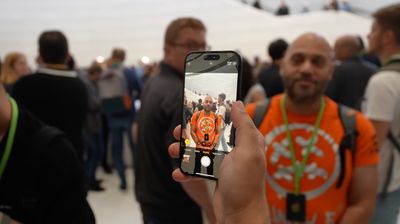
On iPhone 15, if you take a photo of a person, cat, or dog, the camera detects them in the frame and captures rich depth information automatically — allowing you to turn it into a stunning portrait right away or later on in the Photos app. Here's how it's done.
iphone 15 portrait photo
Apple's Portrait Mode has become a popular way of taking impressive shots using a depth-of-field effect known as bokeh, allowing iPhone users to shoot a photo that keeps the subject sharp with a blurred background.

On previous iPhones, Portrait photos mode used a more laborious system than regular photos in order to capture the depth map in the image, and this resulted in more shutter lag as well as a lack of support for Smart HDR.

On iPhone 15 models, however, Apple's new next-generation Portraits use the same Photonic engine pipeline as regular photos, so there's no compromise in quality or shutter lag in either mode. That means you can turn a photo of a subject into a Portrait long after shooting. All it takes is a few taps when editing. The following steps show you how.

Quickly Change a Photo to a Portrait

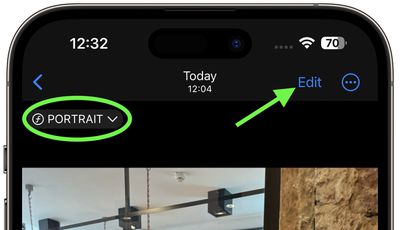
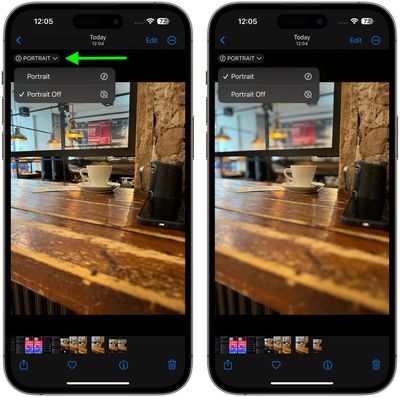
  1. In the Photos app, tap any photo taken in Photo mode to view it in fullscreen. If depth information is available for the photo, a Portrait button will appear in the top-left corner.
  2. Tap the Portrait button and select Portrait from the dropdown to enable the depth of field effect.
  3. If you're not happy with the effect, tap the Portrait button again and select Portrait Off to disable it.
photos

Edit the Portrait Effect in Photos

  1. In the Photos app, tap any photo taken in Photo mode to view it in fullscreen. If depth information is available for the photo, a Portrait indicator will appear in the top-left corner.
  2. Tap Edit.
    photos

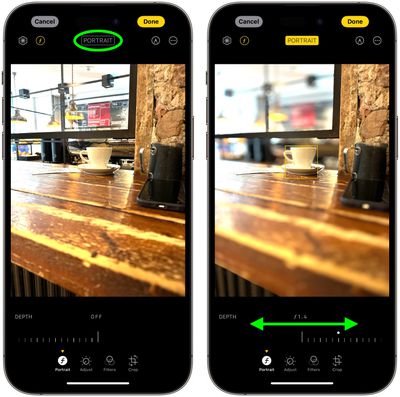
  3. Tap the Portrait button to enable the depth of field information.
  4. Use the Depth Control slider to increase or decrease the level of background blur in the portrait.
    photos

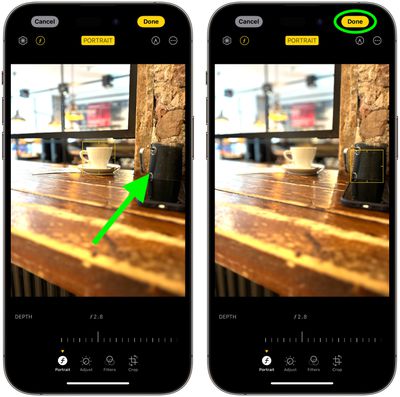
  5. To change the focal subject in the picture, simply tap the new subject, and the focus will switch to it.

  6. Tap Done to finish.
    photos

To undo all portrait effects, simply open the photo again, tap Edit, then tap Revert.

It's worth noting that when the portrait effect is applied to a Live Photo taken in Photo mode, the Live Photo effects aren't available. Tap Live to view the Live Photo or apply a Live Photo effect without the portrait effect applied.

Disable Auto Portrait Capture

If you want to save storage space, you can prevent the iPhone 15 camera from automatically capturing depth information in photos.

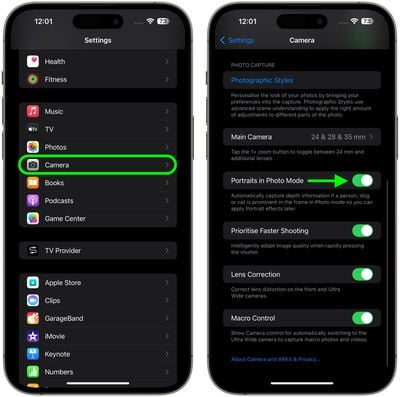
  1. Open the Settings app.
  2. Scroll down and tap Camera.
  3. Scroll down and toggle off the switch next to Portraits in Photo Mode.
settings

To learn how to take photos in Portrait mode during shooting, check out our dedicated how-to article.


Related Forum: iPhone

Popular Stories

M5 MacBook Pro

RIP, MacBook Ultra

Monday October 19, 2026 9:37 am PDT by
Apple today sent out invites for an experience in Los Angeles on Wednesday, October 28, and the "Pro and tell" tagline on the invitation likely means that the rumored MacBook models with touch-enabled OLED displays will stick with MacBook Pro branding instead of the once-rumored "MacBook Ultra" name. The long-rumored "iPhone Ultra" ended up being named iPhone Duo, so speculation that Apple...
iPhone Duo Trio

Here's What Apple's Apps Look Like on the iPhone Duo

Tuesday October 20, 2026 11:12 am PDT by
With just three days to go until the iPhone Duo is released, Apple is getting ready for the launch. Behind the scenes, the App Store now has screenshots of Apple's built-in apps running on the Duo. We've seen some apps in marketing materials, but images of the ones we haven't seen give us an idea of what it will be like using the iPhone Duo day to day. Many apps are shown in landscape...
apple pro tell logo

Apple Announcing New Products Next Week: 'Pro and Tell'

Monday October 19, 2026 9:05 am PDT by
Apple's Greg Joswiak today hinted at new product announcements coming next week, sharing a social media post that says "Can't wait to pro and tell next week." Rumors suggest Apple is planning to debut the new MacBook Pro with an OLED touchscreen display, an M6 entry-level MacBook Pro, an M6 iMac, an iPad mini with an OLED display. Can't wait to pro and tell next week....
Latest Stories
iPhone Duo Launch Begins as First Orders Reach Customers
46 minutes ago
1Password for Agents Keeps Your Passwords Hidden From AI
2 hours ago
iPhone Duo 24 Hours Later: Your Questions Answered
2 hours ago
Apple's iWork Apps Get 'Intelligent Assistant' and iPhone Duo Support
3 hours ago
Apple is Apparently Considering a Slightly Larger iPhone Duo
3 hours ago
Giant iPhone Duo Displays Coming to Four Apple Stores
4 hours ago
Apple Pulls Keynote, Pages and Numbers From App Store [Update: Back]
5 hours ago
Apple Updates More Apps With iPhone Duo Support
5 hours ago
Apple Will Label Apps 'Made for iPhone Duo' in App Store
8 hours ago
Amazon Takes $49 Off iPad With Prices Starting at $399.99
9 hours ago
F1 on Apple TV Now Available in Dolby Atmos
9 hours ago
Apple Reveals More Than 50 Apps That Will Be Updated for iPhone Duo
10 hours ago
Apple Blocks Certificates That Could Help Attackers Fake Websites
11 hours ago
Giant iPhone Duo Installations Spotted at Apple Fifth Avenue
12 hours ago
iPhone Duo 2 Prototypes Include Under-Display Face ID
12 hours ago
Tesla App Gains iPad and iPhone Duo Support
16 hours ago
Apple Reportedly Boosts iPhone Duo Orders by 44%
17 hours ago
Fortnite Returning to Australian App Store After Court Ruling
17 hours ago
Apple Ordered to Open iPhone to Rival App Stores in Australia
17 hours ago
Apple Suppliers Face Hurdles Cutting Circuit Board Emissions
18 hours ago
Things Updated for iPhone Duo With Adaptive Layout
18 hours ago
Simplicity and Siri AI Are HomeView's Killer Features, Apple Says
19 hours ago
iPhone Duo Reviewers Really Miss Face ID
1 day ago
Does the iPhone Duo Run Hot? Here's What Reviews Found
1 day ago
Apple Music's New Look is Now Live on Apple's Website
1 day ago
Anthropic Launches Claude Duet, a Proactive AI Agent
1 day ago
What 32,000 Folds Did to the iPhone Duo's Hinge
1 day ago
iPhone Duo's Hidden FaceTime Camera Takes 'Trash' Photos
1 day ago
iPhone Duo Has 'Edge Light' Feature That Debuted on Macs Last Year
1 day ago
Apple Support App Updated for iPhone Duo's Larger Display
1 day ago