
iPhone 17: Disable Center Stage Front Camera Auto-Rotate - MacRumors
Skip to Content

iPhone 17: Disable Center Stage Front Camera Auto-Rotate

by

On the iPhone 17 series and iPhone Air, the new 18-megapixel Center Stage front camera features a square sensor. This allows Center Stage to automatically switch between horizontal and vertical orientation when you're lining up a shot, meaning you don't need to change how you hold your iPhone.
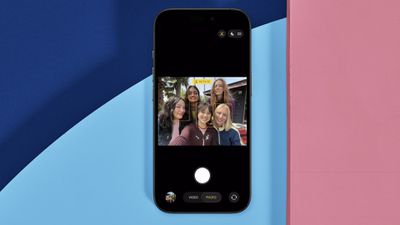
iphone 17 center stage rotate
However, you may find when taking selfies that Center Stage detects people's faces beside you or in the background and attempts to include them in the shot by auto-rotating the sensor. This isn't great if you're trying to take a personal selfie, but fortunately it's easy to disable auto rotate. The following steps show you how.

iPhone 17: How to Disable Center Stage Auto Rotate

  1. Open the Camera app on your iPhone.
  2. Tap the circular arrows icon bottom-right to switch to the selfie camera.
  3. Tap the yellow Center Stage button (the icon with a person's profile within a frame).
  4. Tap Off next to Auto Rotate.
  5. Line up your shot and hit the shutter button to take a photo or start recording video.
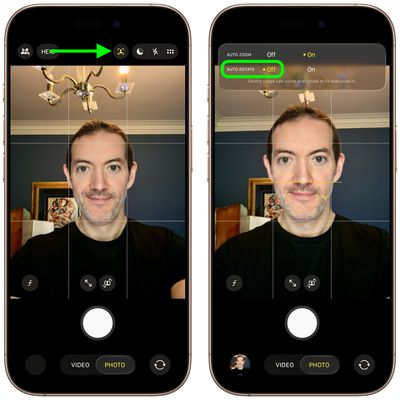
iphone 17 disable auto rotate

That's all there is to it. Note that Center Stage also works during FaceTime calls, though it attempts to keep your face centered, similar to how it functions on iPads and MacBooks.


Related Roundups: iPhone 17, iPhone 17 Pro, iPhone Air
Related Forum: iPhone

Popular Stories

imac video apple feature

Apple Released Yet Another New Product Today

Friday March 20, 2026 2:39 pm PDT by
Apple has unveiled a whopping nine new products so far this March, including an iPhone 17e, iPad Air models with the M4 chip, MacBook Air models with the M5 chip, MacBook Pro models with M5 Pro and M5 Max chips, the all-new MacBook Neo, an updated Studio Display, a higher-end Studio Display XDR, AirPods Max 2, and now the Nike Powerbeats Pro 2. iPhone 17e features the same overall design as...
iOS 26

iOS 26.4 Adds Two New Features to CarPlay

Tuesday March 24, 2026 1:55 pm PDT by
iOS 26.4 was released today, and it includes a couple of new features for CarPlay: an Ambient Music widget and support for voice-based chatbot apps. To update your iPhone 11 or newer to iOS 26.4, open the Settings app and tap on General → Software Update. CarPlay will automatically offer the new features so long as the iPhone connected to your vehicle is running iOS 26.4 or later....
HomePod mini and Apple TV Sage

New Apple TV and HomePod Mini Remain 'Ready' to Launch

Sunday March 22, 2026 6:33 am PDT by
Apple has unveiled nine new products this month, but the wait continues for the next-generation Apple TV 4K and HomePod mini models. In his Power On newsletter today, Bloomberg's Mark Gurman said new versions of the Apple TV and HomePod mini have been "ready" since last year, but he reiterated that Apple has held off on releasing them until the more personalized version of Siri and other...















