How to Use Lighting Mode Photo Effects in iOS 13, Including the New High-Key Mono - MacRumors
Skip to Content

How to Use Lighting Mode Photo Effects in iOS 13, Including the New High-Key Mono

by

photos iconWhen you take a picture in Apple's Portrait mode, iOS uses the dual cameras of your iPhone to create a depth-of-field effect, allowing you to compose a photo that keeps your subject sharp with a blurred background.

On iPhone X and later, and iPhone 8 Plus, Apple also includes a Portrait Lighting feature that you can use to apply studio-quality lighting effects to your Portrait mode images.

The full set of Portrait Lighting effects in Apple's Photos and Camera apps include Studio Light to brighten facial features, Contour Light for more dramatic directional lighting, Stage Light to isolate your subject in the spotlight, and Stage Mono for stage light in a classic black and white.

In iOS 13, Apple also added a new Portrait Lighting effect called High-Key Light Mono. High-Key Mono is a black and white effect that's similar to Stage Light Mono, but designed to add a white background rather than a black one.

Keep reading to learn how to use Portrait Lighting effects on your iPhone photos, just bear in mind that the new High-Key Mono effect demoed in the steps below is limited to the iPhone XS, XS Max, and XR.

  1. Launch the stock Photos app on your iPhone.
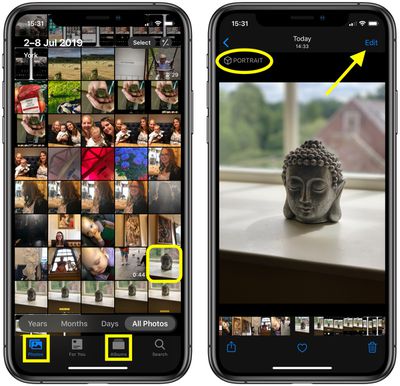
  2. Using the Photos tab, tap to select a Portrait photo in your Photo library. If it isn't a recent Portrait photo that you want to edit, you can use the Days, Months, and Years views to whittle down your collection. Alternatively, select a photo from one of your albums via the Albums tab.
    How to use portrait lighting ios 2

  3. Check the image was captured in Portrait mode by looking for the Portrait label in the top-left corner of the screen, then tap Edit in the top-right corner to enter the editing interface.
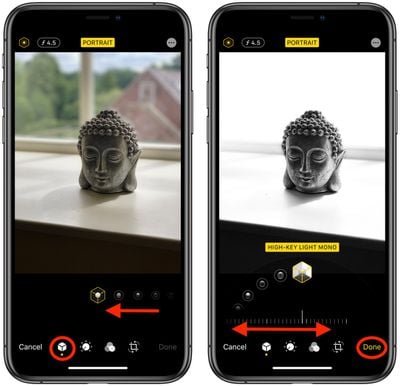
  4. With the Portrait icon selected in the bottom row of tools, select a lighting mode by sliding your finger along the icons below the photo.
    How to use portrait lighting ios 1

  5. Once a lighting mode is selected, such as the new High-Key Light Mono effect (shown), you'll see a slider appear below it. Move your fingertip along it to dial down or ratchet up the intensity of the lighting effect.
  6. Tap Done when you're happy with how the image looks.
Remember, in addition to using the ‌Photos‌ app, you can also use these lighting tools whenever you take a Portrait mode picture using the built-in Camera app – you don't even have to unlock your device to edit the photo you just shot.

Related Forum: iOS 13

Popular Stories

iphone duo colors

Apple Shares Photos Shot on iPhone Duo

Thursday October 1, 2026 1:37 pm PDT by
Apple on Instagram today shared a curated gallery of six photos shot on the iPhone Duo. The photos were shot by American photographers Jake Michaels and Jason Nocito, as part of a project commissioned by Apple. iPhone Duo is equipped with four cameras:A rear 48-megapixel Fusion Main camera A rear 48-megapixel Ultra Wide camera A front 12-megapixel Center Stage camera in the outer display A...
google photos wardrobe

Google Photos Wardrobe Feature Comes to iOS

Thursday September 24, 2026 1:33 pm PDT by
Google today said its digital wardrobe option is available in the Google Photos iOS app in the U.S., India, and Brazil. Google first announced the feature back in April, but it was limited to Android users until now. The wardrobe option uses AI to pull images of clothing from the Google Photos library, organizing them into a digital closet. Users can put items together to create outfits ...
iphone duo facetime

iPhone Duo's Hidden FaceTime Camera Takes 'Trash' Photos

Wednesday October 21, 2026 11:36 am PDT by
The iPhone Duo's inner screen has an under-display front camera that's largely hidden from view. It's the first time we've seen an under-display camera on an iPhone, and it turns out there's a reason Apple hasn't used the technology before. Apple said the camera offers 1080p video recording, but didn't mention photo quality. Gizmodo said it's a 4-megapixel camera and described the photos as...
Latest Stories
iPhone Duo Launch Begins as First Orders Reach Customers
1 hour ago
1Password for Agents Keeps Your Passwords Hidden From AI
2 hours ago
iPhone Duo 24 Hours Later: Your Questions Answered
2 hours ago
Apple's iWork Apps Get 'Intelligent Assistant' and iPhone Duo Support
3 hours ago
Apple is Apparently Considering a Slightly Larger iPhone Duo
3 hours ago
Giant iPhone Duo Displays Coming to Four Apple Stores
4 hours ago
Apple Pulls Keynote, Pages and Numbers From App Store [Update: Back]
5 hours ago
Apple Updates More Apps With iPhone Duo Support
6 hours ago
Apple Will Label Apps 'Made for iPhone Duo' in App Store
9 hours ago
Amazon Takes $49 Off iPad With Prices Starting at $399.99
9 hours ago
F1 on Apple TV Now Available in Dolby Atmos
10 hours ago
Apple Reveals More Than 50 Apps That Will Be Updated for iPhone Duo
10 hours ago
Apple Blocks Certificates That Could Help Attackers Fake Websites
12 hours ago
Giant iPhone Duo Installations Spotted at Apple Fifth Avenue
12 hours ago
iPhone Duo 2 Prototypes Include Under-Display Face ID
13 hours ago
Tesla App Gains iPad and iPhone Duo Support
17 hours ago
Apple Reportedly Boosts iPhone Duo Orders by 44%
17 hours ago
Fortnite Returning to Australian App Store After Court Ruling
17 hours ago
Apple Ordered to Open iPhone to Rival App Stores in Australia
18 hours ago
Apple Suppliers Face Hurdles Cutting Circuit Board Emissions
18 hours ago
Things Updated for iPhone Duo With Adaptive Layout
18 hours ago
Simplicity and Siri AI Are HomeView's Killer Features, Apple Says
19 hours ago
iPhone Duo Reviewers Really Miss Face ID
1 day ago
Does the iPhone Duo Run Hot? Here's What Reviews Found
1 day ago
Apple Music's New Look is Now Live on Apple's Website
1 day ago
Anthropic Launches Claude Duet, a Proactive AI Agent
1 day ago
What 32,000 Folds Did to the iPhone Duo's Hinge
1 day ago
iPhone Duo's Hidden FaceTime Camera Takes 'Trash' Photos
1 day ago
iPhone Duo Has 'Edge Light' Feature That Debuted on Macs Last Year
1 day ago
Apple Support App Updated for iPhone Duo's Larger Display
1 day ago