
How to Look Up a Word Definition on Your iPhone or iPad - MacRumors
Skip to Content

How to Look Up a Word Definition on Your iPhone or iPad

by

iOS 11 and later include a neat built-in dictionary feature that lets you quickly look up the definition of words on your iPhone or iPad, even if an internet connection is unavailable.

It's a handy recourse if someone breaks out a "big word" during a conversation, or you come across an expression in a book or on the web that you don't quite understand.
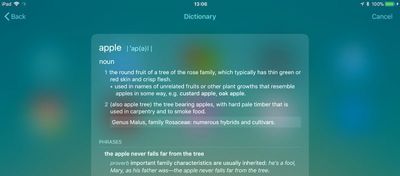
dictionary in ios11
There are a couple of ways to access the dictionary which we've outlined below. Keep them in mind, and with a little luck, you won't have to consult a physical dictionary, a third-party dictionary app, or an online definition service the next time you want to know the meaning of a word.

How to Get a Word Definition

  1. On your iOS device, swipe right on the Lock screen or Home screen to display the Today view. Alternatively, swipe down on the Home screen to invoke the Search screen.

  2. Tap the search field if it isn't already active, and begin typing the word that you want to define. (You can also tap the microphone icon and say the word – if you know how to pronounce it.)

  3. Read the dictionary definition preview that appears in the search results, or tap it to see the extended definition.
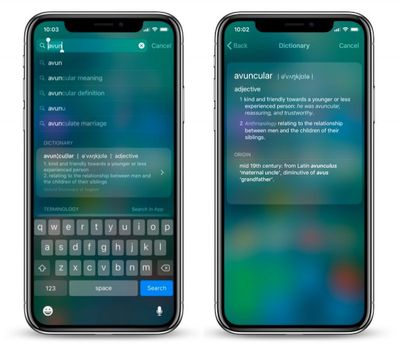
ios 11 dictionary 1
In our experience, these definitions can occasionally get mixed up with Wikipedia suggestions from Siri. If you want to increase the chances that you get a dictionary definition first, go to Settings -> Siri & Search and toggle off Suggestions in Search.

How to Look Up a Word Within an App

If you come across a word you don't know in a document or email, or even when browsing the web, use the following method to look up its definition.

  1. Tap and hold your finger on the word to highlight it.

  2. Tap Look Up in the pop-up menu.

  3. Read the dictionary definition preview that appears in the Look Up results, or tap it to see the extended definition.
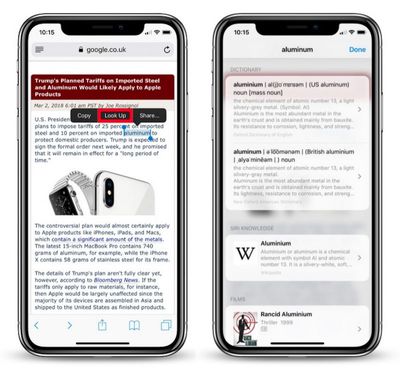
ios 11 dictionary look up 1
If you don't see any word definitions in the search results, it's likely you haven't got any dictionaries installed on your iOS device.

To remedy this, scroll down to the bottom of the results screen and tap Manage Dictionaries. You'll be presented with a list of dictionaries available to you. Simply tap the ones you want to download and they'll be automatically installed on your device.
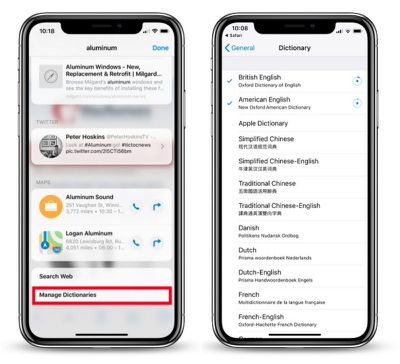
ios 11 dictionary lookup 2
The next time you look up a word, you'll get individual definitions from every dictionary that's installed. Note that you can add and remove dictionaries at any time by ticking/unticking them in Settings -> General -> Dictionary.

Finally, if you're seeking a more feature-rich lexical resource to explore words and phrases, check out the Terminology app for iPhone and iPad. [Direct Link]


Top Rated Comments

111 months ago
These how to guides are becoming spam when you have nothing else to report. Keep all this in one section so it doesn’t mix with actual rumors and news
More interesting and useful than a story about Carpool frickin’ Karaoke, thanks.
Score: 8 Votes (Like | Disagree)
unsharptooth Avatar
111 months ago
More interesting and useful than a story about Carpool frickin’ Karaoke, thanks.
Seriously, I want this kind of post. I moved to macOS like 6 months ago and iOS not even 2 years ago.
Score: 7 Votes (Like | Disagree)
IJ Reilly Avatar
111 months ago

[LIST=1]
* Tap the search field if it isn't already active, and begin typing the word that you want to define.

You aren't defining the word, the dictionary is defining the word. You are looking up the definition.

And that's the definition of define. You could look it up.
Score: 5 Votes (Like | Disagree)
111 months ago
Didn't know this. I hardly use the Search function on iOS. Thanks for this handy information!

....I also just found out the other day the Notes app can act as a document scanner. I told a bunch of people this when I found out, and they also didn't know. Apple should promote these functions more than they do.
Score: 5 Votes (Like | Disagree)
Aluminum213 Avatar
111 months ago
These how to guides are becoming spam when you have nothing else to report. Keep all this in one section so it doesn’t mix with actual rumors and news
Score: 5 Votes (Like | Disagree)
sully54 Avatar
111 months ago
I wish Apple would expand the dictionary on iOS to include a thesaurus like it does in macOS.
Score: 4 Votes (Like | Disagree)

Popular Stories

iPhone Duo Trio

Here's What Apple's Apps Look Like on the iPhone Duo

Tuesday October 20, 2026 11:12 am PDT by
With just three days to go until the iPhone Duo is released, Apple is getting ready for the launch. Behind the scenes, the App Store now has screenshots of Apple's built-in apps running on the Duo. We've seen some apps in marketing materials, but images of the ones we haven't seen give us an idea of what it will be like using the iPhone Duo day to day. Many apps are shown in landscape...
Apple Creator Studio iWork suite

Apple Pulls Keynote, Pages and Numbers From App Store [Update: Back]

Thursday October 22, 2026 11:01 am PDT by
Apple has temporarily removed Keynote, Pages, and Numbers from the App Store, just after releasing an update that added iPhone Duo support and a new Intelligent Assistant. It is not clear if the apps were removed intentionally, or if it is a bug. Apple has not said when the apps will be reinstated, but if it was in error, they should return soon. Update: The Mac versions are back without...
M5 MacBook Pro

RIP, MacBook Ultra

Monday October 19, 2026 9:37 am PDT by
Apple today sent out invites for an experience in Los Angeles on Wednesday, October 28, and the "Pro and tell" tagline on the invitation likely means that the rumored MacBook models with touch-enabled OLED displays will stick with MacBook Pro branding instead of the once-rumored "MacBook Ultra" name. The long-rumored "iPhone Ultra" ended up being named iPhone Duo, so speculation that Apple...
Latest Stories
iPhone Duo Launch Begins as First Orders Reach Customers
2 hours ago
1Password for Agents Keeps Your Passwords Hidden From AI
3 hours ago
iPhone Duo 24 Hours Later: Your Questions Answered
3 hours ago
Apple's iWork Apps Get 'Intelligent Assistant' and iPhone Duo Support
4 hours ago
Apple is Apparently Considering a Slightly Larger iPhone Duo
4 hours ago
Giant iPhone Duo Displays Coming to Four Apple Stores
6 hours ago
Apple Pulls Keynote, Pages and Numbers From App Store [Update: Back]
6 hours ago
Apple Updates More Apps With iPhone Duo Support
7 hours ago
Apple Will Label Apps 'Made for iPhone Duo' in App Store
10 hours ago
Amazon Takes $49 Off iPad With Prices Starting at $399.99
10 hours ago
F1 on Apple TV Now Available in Dolby Atmos
11 hours ago
Apple Reveals More Than 50 Apps That Will Be Updated for iPhone Duo
11 hours ago
Apple Blocks Certificates That Could Help Attackers Fake Websites
13 hours ago
Giant iPhone Duo Installations Spotted at Apple Fifth Avenue
13 hours ago
iPhone Duo 2 Prototypes Include Under-Display Face ID
14 hours ago
Tesla App Gains iPad and iPhone Duo Support
18 hours ago
Apple Reportedly Boosts iPhone Duo Orders by 44%
18 hours ago
Fortnite Returning to Australian App Store After Court Ruling
18 hours ago
Apple Ordered to Open iPhone to Rival App Stores in Australia
19 hours ago
Apple Suppliers Face Hurdles Cutting Circuit Board Emissions
19 hours ago
Things Updated for iPhone Duo With Adaptive Layout
20 hours ago
Simplicity and Siri AI Are HomeView's Killer Features, Apple Says
20 hours ago
iPhone Duo Reviewers Really Miss Face ID
1 day ago
Does the iPhone Duo Run Hot? Here's What Reviews Found
1 day ago
Apple Music's New Look is Now Live on Apple's Website
1 day ago
Anthropic Launches Claude Duet, a Proactive AI Agent
1 day ago
What 32,000 Folds Did to the iPhone Duo's Hinge
1 day ago
iPhone Duo's Hidden FaceTime Camera Takes 'Trash' Photos
1 day ago
iPhone Duo Has 'Edge Light' Feature That Debuted on Macs Last Year
1 day ago
Apple Support App Updated for iPhone Duo's Larger Display
1 day ago









































