
macos finder iconStationery Pad is a handy way to nix a step in your workflow if you regularly use document templates on your Mac. The long-standing Finder feature essentially tells a file's parent application to open a copy of it by default, ensuring that the original file remains unedited.

Stationery Pad doesn't get much attention these days, but it's a neat alternative to repeatedly editing templates and using the "Save As..." command, which can lead to overwriting the original file if you're not too careful.

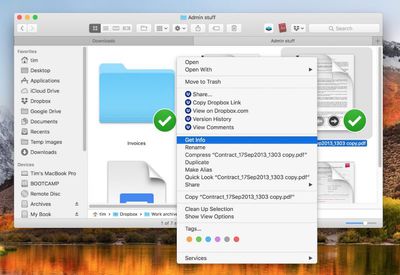
Almost any file type can be defined as a template with Stationery Pad – it could be used to streamline common Photoshop jobs, create skeleton HTML/CSS files, or help with Word document invoicing. To make use of Stationery Pad, create the file you want to use as a template, then follow the steps below.

How to Define a File as a Template Using Stationery Pad

  1. Find the file in Finder that you want to use as a template.

  2. Right-click (or Ctrl-click) the file and select Get Info in the contextual dropdown menu. Alternatively, click the file to select it and use the Command+I keyboard shortcut to launch Get Info.
    How to Use Stationery Pad

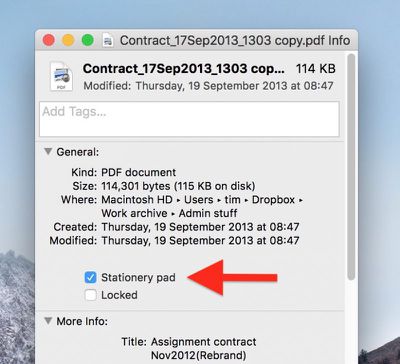
  3. Tick the Stationery Pad checkbox under the General section.
    How to Use Stationery Pad 1

  4. Click the red traffic light button to close the Get Info window.
Next time you double-click the template file, Finder will create and open a copy of it, leaving the original untouched. To reverse the behavior, simply untick the Stationery Pad checkbox in the template file's Get Info window.

Top Rated Comments

Starfia Avatar
101 months ago
Whoa!!

I've been a programming-enthusiast Mac user since well before the dawn of OS X and I never truly noticed that check box. That was one truly rare high-value meeting of article and reader.
Score: 10 Votes (Like | Disagree)
CreatorCode Avatar
101 months ago
Definitely before OS X.

Possibly before System 7, but definitely added in some 7.x version. One of the interesting long-standing Mac features.
The original concept is actually a relic of the Lisa. The original idea behind the Lisa was that users would create files by tearing off the appropriate type of Stationery (Word processing, spreadsheet, drawing) and then start editing it. None of this "launching apps" business like today.

The ability to designate any file as a Stationery Pad, though, was a System 7 feature, I'm pretty sure.
Score: 6 Votes (Like | Disagree)
Pupi Avatar
101 months ago
Cool tip, thanks. Mac is such a beast. I can’t even imagine how it would be by now if they kept developing the power-user side of it, instead of making it more and more like an iPad.
Score: 5 Votes (Like | Disagree)
chucker23n1 Avatar
101 months ago
It's a something that's been there for ages (even before OS X if I remember correctly) but I guess it's a feature most aren't aware of – I don't ever use it myself, even tough it might be a good idea sometimes. :)
Definitely before OS X.

Possibly before System 7, but definitely added in some 7.x version. One of the interesting long-standing Mac features.
Score: 3 Votes (Like | Disagree)
ignatius345 Avatar
101 months ago

4. Click the red traffic light button to close the Get Info window.
Is "red traffic light button" really what we're calling the close window button now?
Score: 3 Votes (Like | Disagree)
lec0rsaire Avatar
101 months ago
I can honestly say I would’ve never known about this. I spent nearly my entire life with Windows and it’s fun to discover little things this OS can do.
Score: 2 Votes (Like | Disagree)

Popular Stories

Apple Logo Zoomed

Tim Cook Teases Plans for Apple's Upcoming 50th Anniversary

Thursday February 5, 2026 12:54 pm PST by
Apple turns 50 this year, and its CEO Tim Cook has promised to celebrate the milestone. The big day falls on April 1, 2026. "I've been unusually reflective lately about Apple because we have been working on what do we do to mark this moment," Cook told employees today, according to Bloomberg's Mark Gurman. "When you really stop and pause and think about the last 50 years, it makes your heart ...
wwdc sans text feature

Apple Rumored to Announce New Product on February 19

Thursday February 5, 2026 12:22 pm PST by
Apple plans to announce the iPhone 17e on Thursday, February 19, according to Macwelt, the German equivalent of Macworld. The report, citing industry sources, is available in English on Macworld. Apple announced the iPhone 16e on Wednesday, February 19 last year, so the iPhone 17e would be unveiled exactly one year later if this rumor is accurate. It is quite uncommon for Apple to unveil...
Finder Siri Feature

Why Apple's iOS 26.4 Siri Upgrade Will Be Bigger Than Originally Promised

Friday February 6, 2026 3:06 pm PST by
In the iOS 26.4 update that's coming this spring, Apple will introduce a new version of Siri that's going to overhaul how we interact with the personal assistant and what it's able to do. The iOS 26.4 version of Siri won't work like ChatGPT or Claude, but it will rely on large language models (LLMs) and has been updated from the ground up. Upgraded Architecture The next-generation...
maxresdefault

Apple Shows Off a Key Reason to Upgrade to the iPhone 17

Saturday February 7, 2026 9:26 am PST by
Apple today shared an ad that shows how the upgraded Center Stage front camera on the latest iPhones improves the process of taking a group selfie. "Watch how the new front facing camera on iPhone 17 Pro takes group selfies that automatically expand and rotate as more people come into frame," says Apple. While the ad is focused on the iPhone 17 Pro and iPhone 17 Pro Max, the regular iPhone...
iOS 26

iOS 26.3 and iOS 26.4 Will Add These New Features to Your iPhone

Tuesday February 3, 2026 7:47 am PST by
While the iOS 26.3 Release Candidate is now available ahead of a public release, the first iOS 26.4 beta is likely still at least a week away. Following beta testing, iOS 26.4 will likely be released to the general public in March or April. Below, we have recapped known or rumored iOS 26.3 and iOS 26.4 features so far. iOS 26.3 iPhone to Android Transfer Tool iOS 26.3 makes it easier...