How to Unlock Your Mac With Your Apple Watch - MacRumors
Skip to Content

How to Unlock Your Mac With Your Apple Watch

by

Starting with macOS Sierra, Apple introduced an "Auto Unlock" feature that makes it easier for Apple Watch owners to unlock their Macs, with the Apple Watch being used for authentication purposes instead of a traditional password.

It's a feature that's limited to more recent Macs so it's not going to work on some older machines, but when it is available, Auto Unlock is a super useful option that genuinely saves a bit of time. It isn't always enabled by default, so there are a few steps to go through to turn Auto Unlock on. Here's how to use it.

  1. Navigate to the Apple logo on the upper left hand of the screen and select "System Preferences."
  2. Click on "Security & Privacy" from the first row of apps.
  3. Auto Unlock is an option under the "General" section. Click the check box to turn it on.
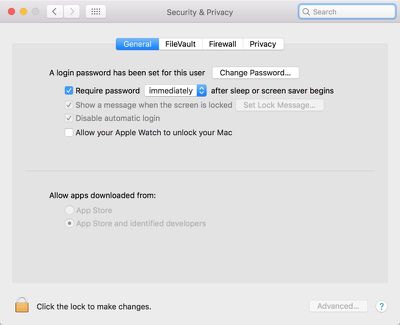
    autounlocksierra

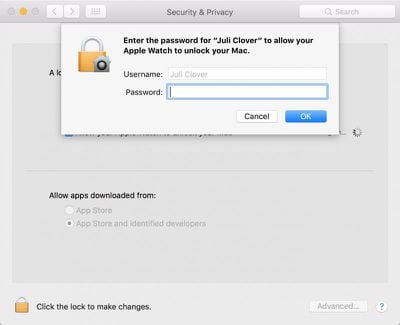
  4. Enter your password.

    enteryourpassword

Once enabled, Auto Unlock works automatically whenever your authenticated Apple Watch is near your Mac (as in within a few feet). When waking a Mac from sleep and the password entry screen pops up, it will say "Unlocking with Apple Watch..." instead of bringing up the password text box.

loginscreenautounlock
A few seconds later, the Mac will unlock and you will receive a notification on your Apple Watch letting you know the unlocking was successful. If Auto Unlock fails to authenticate for some reason, the password entry option will pop up after approximately 10 seconds and you will be required to enter your password to log in.
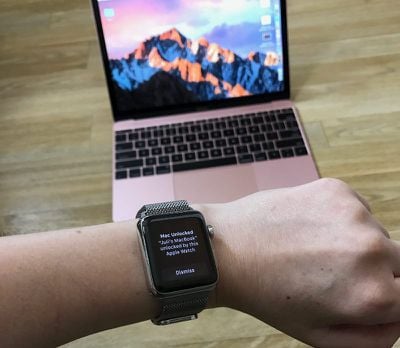
applewatchautounlockmac
Auto Unlock is a Continuity feature, so it is limited to some of Apple's more recent machines. It is supported by all Mac models introduced in mid-2013 or later, and it requires an Apple Watch running watchOS 3 or later paired with an iPhone 5 or later. Handoff must be turned on in System Preferences (General --> Allow Handoff) and your iPhone, Apple Watch, and Mac must be signed into the same iCloud account.
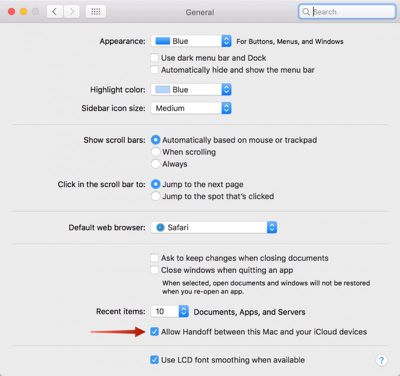
sierraunlockallowhandoff
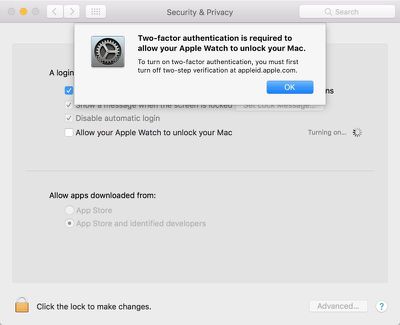
To enable Auto Unlock, you will also need to turn on Two-Factor Authentication if it isn't on already.

For those of you using the original Two-Step Verification instead of the Two-Factor Authentication feature introduced with iOS 10, you will need to disable Two-Step Verification on the Apple ID management site and then enable Two-Factor Authentication on an iOS device. A passcode also needs to be established on the Apple Watch.
autounlock2farequired
Apple doesn't offer troubleshooting tips if Auto Unlock isn't working, but signing out of iCloud and back in again and restarting your devices may help solve any issues.

There are still instances where you will need to log in with a password, like after rebooting your machine, but for the most part, Auto Unlock successfully replaces password entry on the Mac.


Related Forum: macOS Sierra

Top Rated Comments

132 months ago
Same here. I can't think of any technical reason that this wouldn't work. I'd be shocked if it doesn't work on a 2012 rMBP. Oh wait, this is Apple. Wouldn't shock me in the slightest.
Because it uses time-of-flight WiFi, it requires a Mac with a 802.11ac card.
Score: 7 Votes (Like | Disagree)
132 months ago
Why is this limited to only the watch? Real Question - is this a technical issue?
i think it has to do with which device has the most recent/constant authentication. For the iPhone, only once you unlock with touchID, only then it is considered authenticated. Since anyone can take your phone and place it near your mac to unlock it.

With the watch, from the moment you put it on AND authenticate it with your iPhone touchID, the watch will always be considered authenticated. Until you remove the watch.

Can anyone please verify my theory? remove the watch off your wrist and try to unlock your Mac.

i'm sure apple can set it up to work with your phone. but that would require you to use touchID on your phone every time. Apple being apple, I assume would rather take the most seamless path. I honestly wouldn't mind using the phone as a second method. Maybe with the next update?
Score: 6 Votes (Like | Disagree)
WiseAJ Avatar
132 months ago
Probably limiting it so you buy a new computer.
Now they just need to release said new computers.
Score: 5 Votes (Like | Disagree)
pat500000 Avatar
132 months ago
Same here. I can't think of any technical reason that this wouldn't work. I'd be shocked if it doesn't work on a 2012 rMBP. Oh wait, this is Apple. Wouldn't shock me in the slightest.
Probably limiting it so you buy a new computer.
Score: 4 Votes (Like | Disagree)
132 months ago
I have Continuity and Handoff on my Late-2012 rMBP, so I'm anxious to see if this works for me.
Score: 4 Votes (Like | Disagree)
132 months ago
Works fine with MacID (a 3rd party solution). Any other excuses Apple can come up with?
Explain how MacID is resistant to relay and amplifier attacks, especially at short distances.

How does MacID prevent this from happening?
https://www.wired.com/2016/03/study-finds-24-car-models-open-unlocking-ignition-hack/

Perhaps you should learn a little more about computer security before criticizing.
Score: 3 Votes (Like | Disagree)

Popular Stories

iPhone Duo Trio

Here's What Apple's Apps Look Like on the iPhone Duo

Tuesday October 20, 2026 11:12 am PDT by
With just three days to go until the iPhone Duo is released, Apple is getting ready for the launch. Behind the scenes, the App Store now has screenshots of Apple's built-in apps running on the Duo. We've seen some apps in marketing materials, but images of the ones we haven't seen give us an idea of what it will be like using the iPhone Duo day to day. Many apps are shown in landscape...
Apple Creator Studio iWork suite

Apple Pulls Keynote, Pages and Numbers From App Store [Update: Back]

Thursday October 22, 2026 11:01 am PDT by
Apple has temporarily removed Keynote, Pages, and Numbers from the App Store, just after releasing an update that added iPhone Duo support and a new Intelligent Assistant. It is not clear if the apps were removed intentionally, or if it is a bug. Apple has not said when the apps will be reinstated, but if it was in error, they should return soon. Update: The Mac versions are back without...
M5 MacBook Pro

RIP, MacBook Ultra

Monday October 19, 2026 9:37 am PDT by
Apple today sent out invites for an experience in Los Angeles on Wednesday, October 28, and the "Pro and tell" tagline on the invitation likely means that the rumored MacBook models with touch-enabled OLED displays will stick with MacBook Pro branding instead of the once-rumored "MacBook Ultra" name. The long-rumored "iPhone Ultra" ended up being named iPhone Duo, so speculation that Apple...
Latest Stories
iPhone Duo Launch Begins as First Orders Reach Customers
3 hours ago
1Password for Agents Keeps Your Passwords Hidden From AI
4 hours ago
iPhone Duo 24 Hours Later: Your Questions Answered
5 hours ago
Apple's iWork Apps Get 'Intelligent Assistant' and iPhone Duo Support
6 hours ago
Apple is Apparently Considering a Slightly Larger iPhone Duo
6 hours ago
Giant iPhone Duo Displays Coming to Four Apple Stores
7 hours ago
Apple Pulls Keynote, Pages and Numbers From App Store [Update: Back]
8 hours ago
Apple Updates More Apps With iPhone Duo Support
8 hours ago
Apple Will Label Apps 'Made for iPhone Duo' in App Store
11 hours ago
Amazon Takes $49 Off iPad With Prices Starting at $399.99
11 hours ago
F1 on Apple TV Now Available in Dolby Atmos
12 hours ago
Apple Reveals More Than 50 Apps That Will Be Updated for iPhone Duo
13 hours ago
Apple Blocks Certificates That Could Help Attackers Fake Websites
14 hours ago
Giant iPhone Duo Installations Spotted at Apple Fifth Avenue
15 hours ago
iPhone Duo 2 Prototypes Include Under-Display Face ID
15 hours ago
Tesla App Gains iPad and iPhone Duo Support
19 hours ago
Apple Reportedly Boosts iPhone Duo Orders by 44%
19 hours ago
Fortnite Returning to Australian App Store After Court Ruling
20 hours ago
Apple Ordered to Open iPhone to Rival App Stores in Australia
20 hours ago
Apple Suppliers Face Hurdles Cutting Circuit Board Emissions
20 hours ago
Things Updated for iPhone Duo With Adaptive Layout
21 hours ago
Simplicity and Siri AI Are HomeView's Killer Features, Apple Says
21 hours ago
iPhone Duo Reviewers Really Miss Face ID
1 day ago
Does the iPhone Duo Run Hot? Here's What Reviews Found
1 day ago
Apple Music's New Look is Now Live on Apple's Website
1 day ago
Anthropic Launches Claude Duet, a Proactive AI Agent
1 day ago
What 32,000 Folds Did to the iPhone Duo's Hinge
1 day ago
iPhone Duo's Hidden FaceTime Camera Takes 'Trash' Photos
1 day ago
iPhone Duo Has 'Edge Light' Feature That Debuted on Macs Last Year
1 day ago
Apple Support App Updated for iPhone Duo's Larger Display
1 day ago