

In macOS, a Text Clipping is a selection of text that you've dragged from an application to another location on your Mac, where it becomes a unique kind of standalone file.
The relatively little-known feature has been around since at least Mac OS 9, and it offers a convenient way to save out pieces of text from pretty much anywhere for later use in another app or document.
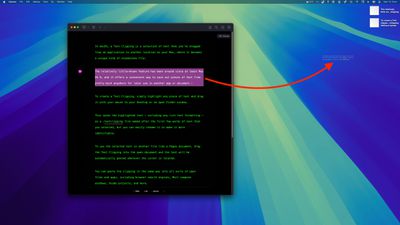
To create a Text Clipping, simply highlight any piece of text, then hold left-click and drag it with your mouse to your Desktop or an open Finder window.
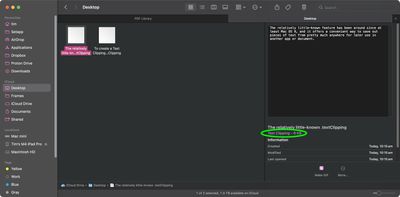
This saves the highlighted text – including any rich text formatting – as a .textclipping file named after the first few words of text that you selected, but you can easily rename it to make it more identifiable.
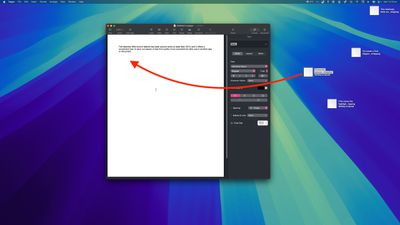
To use the selected text in another file like a Pages document, drag the Text Clipping into the open document and the text will be automatically pasted wherever the cursor is located.
You can paste the clipping in the same way into all sorts of open files and apps, including browser search engines, Mail compose windows, Xcode projects, and more.
To quickly view the contents of a Text Clipping, simply select the file and invoke Quick Look with a tap of the spacebar.
You can also double-click a Text Clipping to view the text in a dedicated window, and even highlight and copy (Command-C) just a snippet of the text from this window for pasting elsewhere.

Text clippings can speed up many repetitive tasks, making things like reusing email/letter templates and code snippets a cinch. If clippings become indispensable to your workflow, consider creating a dedicated folder to store them, otherwise they can quickly clutter up your desktop.
Bear in mind that Text Clippings store content in a unique format that may not be compatible across all platforms or devices. So if you're sharing clippings, it's best to convert them into standard text formats to ensure they can be opened elsewhere.
























![Apple Pulls Keynote, Pages and Numbers From App Store [Update: Back]](https://images.macrumors.com/t/Okb7kitB_gNr6qe5Pex9nQIysD8=/112x112/article-new/2026/01/Apple-Creator-Studio-iWork-suite.jpg)





















