Make Any File a Template Using This Hidden macOS Tool - MacRumors
Skip to Content

Make Any File a Template Using This Hidden macOS Tool

by

Stationery Pad is a handy way to nix a step in your workflow if you regularly use document templates on your Mac. The long-standing Finder feature essentially tells a file's parent application to open a copy of it by default, ensuring that the original file remains unedited.
stationery pad
Stationery Pad doesn't get much attention these days, but it's a neat alternative to repeatedly editing templates and using the "Save As..." command, which can lead to overwriting the original file if you're not too careful.

Almost any file type can be defined as a template with Stationery Pad – it could be used to streamline common Photoshop jobs, create skeleton HTML/CSS files, or help with Word document invoicing. To make use of Stationery Pad, create the file you want to use as a template, then follow the steps below.

Define a File as a Template Using Stationery Pad

  1. Find the file in Finder that you want to use as a template.

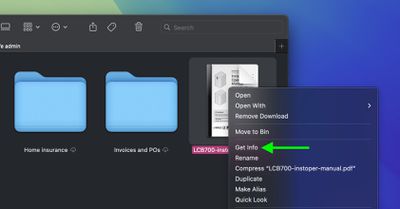
  2. Right-click (or Ctrl-click) the file and select Get Info in the contextual dropdown menu. Alternatively, click the file to select it and use the Command+I keyboard shortcut to launch Get Info.
    finder

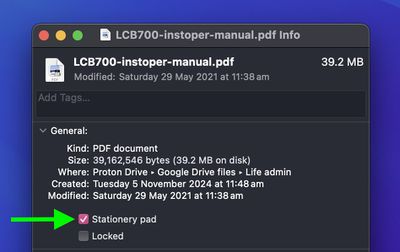
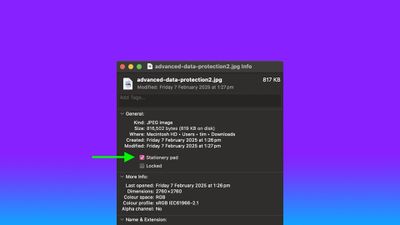
  3. Check the Stationery Pad checkbox under the General section.
    finder

  4. Click the red traffic light button to close the Get Info window.
Next time you double-click the template file, Finder will create and open a copy of it, leaving the original untouched. To reverse the behavior, simply uncheck the Stationery Pad checkbox in the template file's Get Info window.


Top Rated Comments

wanha Avatar
16 months ago
Apple is usually great at naming things, but "Stationary pad" is a terribly confusing name for this useful feature
Score: 20 Votes (Like | Disagree)
UltimateSyn Avatar
16 months ago
I’ve used Macs for ~25 years and never knew you could do this. Thank you!
Score: 20 Votes (Like | Disagree)
16 months ago
If Apple actually renamed this checkbox and call it "This file is a template" or whatever else they want to use as long as it has the word "template" on it, it would have more mainstream awareness. Who the hell uses the term "stationary pad" nowadays?
Score: 13 Votes (Like | Disagree)
AngerDanger Avatar
16 months ago
Not only did I not know what that checkbox did, I'd somehow never even noticed it 😅


Apple is usually great at naming things, but "Stationary pad" is a terribly confusing name for this useful feature
Seriously, "Make Template" would be so much less ambiguous.
Score: 9 Votes (Like | Disagree)
Willis Avatar
16 months ago
I remember looking this up around 10-15 years ago and thought oh cool, but had zero use for it. Naturally, I forgot this existed.

Probably the best Mac tip going right now
Score: 6 Votes (Like | Disagree)
Nermal Avatar
16 months ago

I’ve looked at thousands of Get Info dialogs and can’t recall ever seeing it. I have used Locked, so I must have seen it, but apparently I was never curious enough to research what it did.
I think I first noticed it in System 7 :)

Edit: After a little bit of playing around in an emulator, it looks like the feature was added in 7.
Score: 5 Votes (Like | Disagree)

Popular Stories

Dynamic Island iPhone 18 Pro Feature

11 Reasons to Wait for the iPhone 18 Pro

Monday May 11, 2026 9:01 am PDT by
We're only four months out from the launch of Apple's premium next-generation smartphone lineup, and while we're not expecting a sea change in terms of functionality, there are still several enhancements rumored to be coming to the iPhone 18 Pro and iPhone 18 Pro Max. One thing worth noting is that Apple is reportedly planning a major change to its iPhone release cycle this year, adopting a...
iOS 26

iOS 26.5 Features: Everything New in iOS 26.5

Monday May 11, 2026 5:09 pm PDT by
Apple released iOS 26.5 after a few months of beta testing, and while it doesn't have the Siri features we were hoping for since those are being held until iOS 27, there are a handful of useful changes worth knowing about. Subscribe to the MacRumors YouTube channel for more videos. End-to-End Encryption for RCS Support for end-to-end encryption (E2EE) for RCS messages between iPhone and...
General Apps Reddit Feature

Reddit Starts Blocking Mobile Website, Pushing Users to App Instead

Monday May 11, 2026 6:10 am PDT by
Social network Reddit recently began blocking mobile visitors to its website while pushing them to download the official Reddit app, and it's fair to say that the move is not going down well with users. If you visit reddit.com on your iPhone today, you may see a new popup that can't be dismissed, asking you to "get the app to keep using Reddit." A Reddit spokesperson told Ars Technica...