How to Make Apple Card the Default Card on Your iPhone - MacRumors
Skip to Content

How to Make Apple Card the Default Card on Your iPhone

by

If you've just had your Apple Card application approved then you'll probably want to start using it right away. You can purchase things online with your ‌Apple Card‌ wherever you see the Apple Pay symbol in checkout, and you can make purchases in stores wherever you see the ‌Apple Pay‌ logo or the contactless symbol.

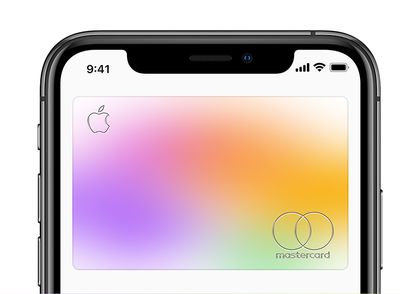
applecardinwallet2
If you plan to use ‌Apple Card‌ for the majority of your purchases, then consider making it the default card on your iPhone. That way it will be automatically selected whenever you use ‌Apple Pay‌. It'll also make ‌Apple Card‌ your preferred card for App Store, Apple Music, and Apple services. Keep reading to learn how.

How to Make Apple Card Your Default Card

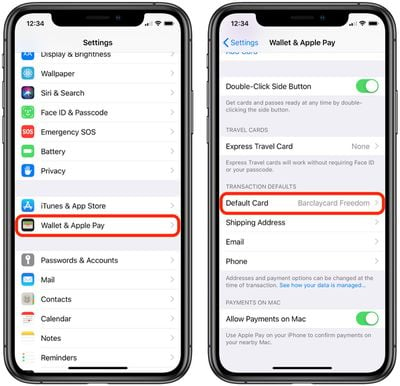
  1. Launch the Settings app on your iPhone or iPad.
  2. Tap Wallet & Apple Pay.
    apple pay transaction defaults

  3. Under Transaction Defaults, tap Default Card.
  4. Select your ‌Apple Card‌.

On iPhone, you can also make ‌Apple Card‌ your default card in the Wallet app: Simply touch and hold your ‌Apple Card‌, then drag it to the front of your card stack.

Popular Stories

apple card savings account

Apple Lowers Savings Account Rate for Apple Card Users

Thursday April 23, 2026 8:07 am PDT by
The interest rate on Apple Card's savings account was today lowered from 3.65% to 3.50%. Push notifications regarding the cut were sent to ‌Apple Card‌ users on Thursday. Savings account interest rates often fluctuate with changes made by the Federal Reserve, and when rates are lowered, banks cut their annual percentage yield (APY). That said, today's cut doesn't appear tied to a...
Apple Event Logo

Apple's Next Era Begins September 1

Thursday May 7, 2026 10:36 am PDT by
Apple recently announced that Tim Cook will be stepping down as CEO later this year, after 15 years of leading the company. Effective September 1, Apple's hardware engineering chief John Ternus will become the company's next CEO, while Cook will become executive chairman of Apple's board of directors. In his new role, Apple said Cook will assist with "certain aspects" of the company,...
Instagram Feature 2

PSA: Instagram Encrypted Messaging Ends on Friday, May 8

Tuesday May 5, 2026 8:24 am PDT by
Instagram will remove end-to-end encryption for direct messages between users from May 8, 2026. When the date comes around, Meta will potentially be able to see the contents of all messages between users on the social media platform. Encrypting messages has been an optional feature in Instagram since 2023, but in March of this year the social media platform quietly updated a help page to say ...