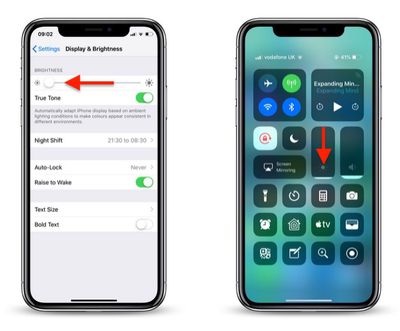
If the screen of your iPhone or iPad is too bright for comfort, the usual solution is to go to Settings -> Display & Brightness and drag the Brightness slider to the left, or open Control Center and adjust the corresponding setting from there.
how to reduce screen brightness further in iOS 1
However, if the lowest setting offered by the Brightness level just isn't dim enough for you, there are a couple of ways to make your screen even darker. One method we've covered previously is to adjust white point using the Accessibility Shortcut. Another way is to enable a low light filter, which you can do by following the steps below.

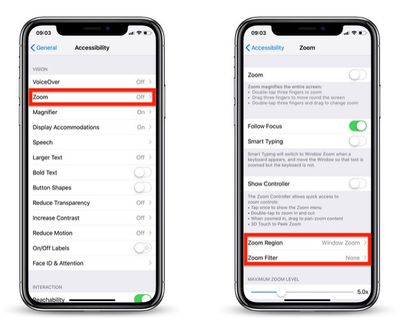
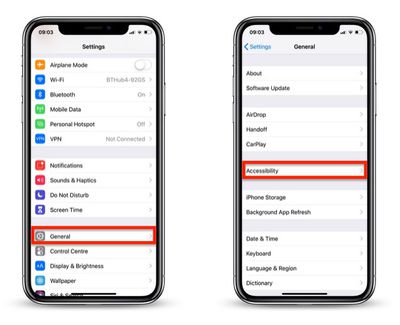
  1. Launch the Settings app on your iOS device.
  2. Tap General.
  3. Tap Accessibility.
    how to reduce screen brightness further in iOS 2

  4. Tap Zoom.
  5. Tap Zoom Region.
    how to reduce screen brightness further in iOS 3

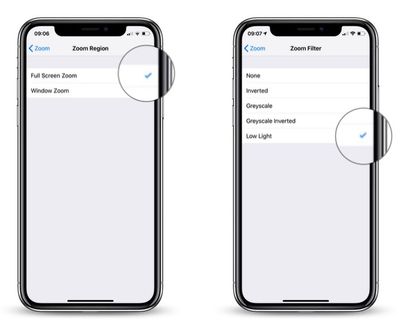
  6. Select Full Screen Zoom and return to the main Zoom menu.
  7. Tap Zoom Filter.
  8. Select Low Light and return to the main Zoom menu.
    how to reduce screen brightness further in iOS 4

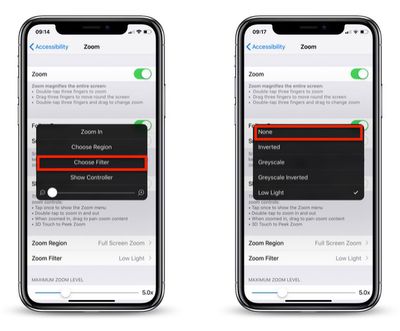
  9. Now, turn on Zoom by toggling the switch at the top of the Zoom menu.
  10. Double-tap the screen with three fingers to zoom out to fullscreen.
how to reduce iphone screen brightness5
Your device's display brightness should now be extra dim. Note that you can disable the low light filter at any time: Simply triple-tap the screen with three fingers, tap Choose Filter from the overlay panel and then select None.


Top Rated Comments

McFreggle Avatar
92 months ago
Settings > General > Accessibility > Accessibility Shortcut > Reduce White Point.

Much simpler than the procedure described in this article. Triple-click on home button (or side button) for reducing the brightness. Triple-clicking again to increase it again.

You're welcome.
Score: 16 Votes (Like | Disagree)
Sovon Halder Avatar
92 months ago
Settings > General > Accessibility > Accessibility Shortcut > Reduce White Point.

Much simpler than the procedure described in this article. Triple-click on home button (or side button) for reducing the brightness. Triple-clicking again to increase it again.

You're welcome.
WARNING : This triple clicking home button accessibility feature brings a noticeable lag into double clicking function.
Score: 4 Votes (Like | Disagree)
jacjustjac Avatar
92 months ago
There’s an easier way to invoke this. At the bottom of the accessibility page, there’s one called “Accessibility Shortcut”. Select Zoom (and I also have Reduce White Point, which in my opinion is more effective). Now when you triple tap your home button (or the sleep wake button if you don’t have one), your screen can instantly dim. It’s that easy.

Lastly, I use Color Filters (Color Tint) found in Display Accomadations to make an extreme version of Night Shift, whereby my screen removes almost 99% of blue and green light, making my screen appear an ultra red. This in my opinion is more effective than lowering the brightness and Night Shift alone, because you can actually have your screen at a comfortable brightness to read black and white text, but still fall easily asleep.

I’d love to help write and article or video on this process, because I use it every night and have no problems falling asleep while using my phone, and I think others can benefit from it too.
Score: 3 Votes (Like | Disagree)
C DM Avatar
92 months ago
Settings > General > Accessibility > Accessibility Shortcut > Reduce White Point.

Much simpler than the procedure described in this article. Triple-click on home button (or side button) for reducing the brightness. Triple-clicking again to increase it again.

You're welcome.
Any difference between this and Reduce White Point?

Is it redundent to have both enabled?
I was just about to reply to this. The method macrumours shown is far too long-winded.
Yeah I was thinking the same when I read that post. Way too many steps.
Pretty sure Reduce White Point doesn't dim it as much as the Zoom Low Light filter does.
Exactly... sadly this zoom method has been doing the rounds in the last day or so and this is just 100% lazy copy and paste crap.
This method (as well as the Reduce White Point one) have been around for quite a while (at least a number of years and iOS versions).
[doublepost=1547767528][/doublepost]
Has anyone ever complained that their iPhone was too bright?
Sure, in various dark environments, for one.
Score: 2 Votes (Like | Disagree)
Koalazub Avatar
92 months ago
The battery
I’m not a fan of the minimum brightness in phones currently. It’s still way too bright if you’re in a dark room/half asleep
Score: 2 Votes (Like | Disagree)
ItzJordan Avatar
92 months ago
Theres probably a thread already, but does anyone else’s iPhone X/XS/XS Max experience the display to dim to a max brightness of 50% when it is quite warm (or doing instense work loads). Also the CPU and graphics seem to be throttled as everything lags while the device is warm to touch.

Experienced it heavily on the iPhone X and worked with Apple to try a resolve this with diagnostics. The performance throttling is less noticeable on the XS Max but the brightness being maxed at 50% is still noticeable...

Intensive usage needs to be occurring in order this to happen. Using Personal Hotspot (downloading/uploading files) while on a FaceTime call on the iPhone usually does the trick... also room temp needs to be around 20°c or warmer maybe. Only noticed in the summer time and noticing the past few days, as I’m over in Australia! :)
Score: 2 Votes (Like | Disagree)

Popular Stories

Apple Logo Zoomed

Tim Cook Teases Plans for Apple's Upcoming 50th Anniversary

Thursday February 5, 2026 12:54 pm PST by
Apple turns 50 this year, and its CEO Tim Cook has promised to celebrate the milestone. The big day falls on April 1, 2026. "I've been unusually reflective lately about Apple because we have been working on what do we do to mark this moment," Cook told employees today, according to Bloomberg's Mark Gurman. "When you really stop and pause and think about the last 50 years, it makes your heart ...
wwdc sans text feature

Apple Rumored to Announce New Product on February 19

Thursday February 5, 2026 12:22 pm PST by
Apple plans to announce the iPhone 17e on Thursday, February 19, according to Macwelt, the German equivalent of Macworld. The report, citing industry sources, is available in English on Macworld. Apple announced the iPhone 16e on Wednesday, February 19 last year, so the iPhone 17e would be unveiled exactly one year later if this rumor is accurate. It is quite uncommon for Apple to unveil...
Finder Siri Feature

Why Apple's iOS 26.4 Siri Upgrade Will Be Bigger Than Originally Promised

Friday February 6, 2026 3:06 pm PST by
In the iOS 26.4 update that's coming this spring, Apple will introduce a new version of Siri that's going to overhaul how we interact with the personal assistant and what it's able to do. The iOS 26.4 version of Siri won't work like ChatGPT or Claude, but it will rely on large language models (LLMs) and has been updated from the ground up. Upgraded Architecture The next-generation...
iOS 26

iOS 26.3 and iOS 26.4 Will Add These New Features to Your iPhone

Tuesday February 3, 2026 7:47 am PST by
While the iOS 26.3 Release Candidate is now available ahead of a public release, the first iOS 26.4 beta is likely still at least a week away. Following beta testing, iOS 26.4 will likely be released to the general public in March or April. Below, we have recapped known or rumored iOS 26.3 and iOS 26.4 features so far. iOS 26.3 iPhone to Android Transfer Tool iOS 26.3 makes it easier...
maxresdefault

Apple Shows Off a Key Reason to Upgrade to the iPhone 17

Saturday February 7, 2026 9:26 am PST by
Apple today shared an ad that shows how the upgraded Center Stage front camera on the latest iPhones improves the process of taking a group selfie. "Watch how the new front facing camera on iPhone 17 Pro takes group selfies that automatically expand and rotate as more people come into frame," says Apple. While the ad is focused on the iPhone 17 Pro and iPhone 17 Pro Max, the regular iPhone...