

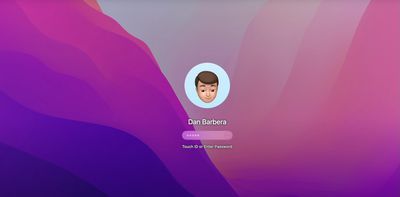
In macOS Monterey, you can use an animated Memoji as your Mac user profile instead of a standard static image. Of course you could always use a still photo of yourself to welcome you at startup and on the Lock Screen, but where's the fun in that? Keep reading to learn how it's done.
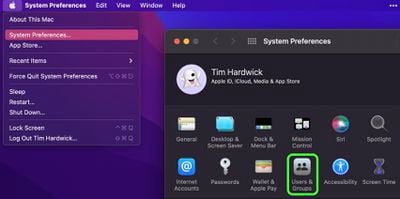
- Click the Apple () symbol in the menu bar and select System Preferences....
- Click Users & Groups in the preferences pane. You can also click on your profile picture in the top left of the window.

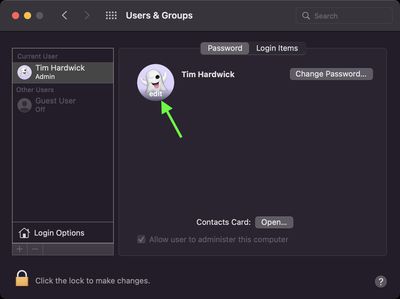
- Make sure the Current User is highlighted in the sidebar, then hover your pointer over the circled profile picture and click edit.
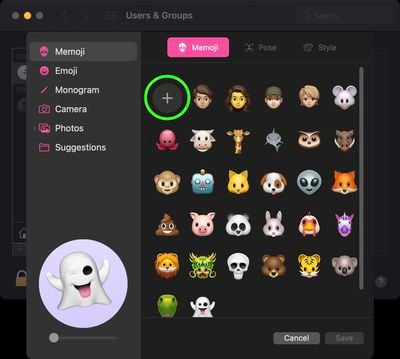
- With Memoji selected in the sidebar, click on an existing Memoji. Alternately, create one from scratch by clicking the big round plus button, where you'll find a wealth of features from which you can create your personalized avatar.
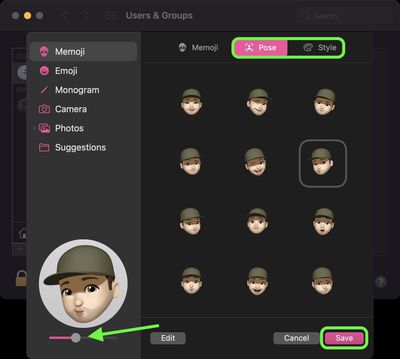
- Once you've settled on a Memoji, use the Pose tab in the main Memoji selection window to give your avatar a facial expression. (Note, you can use the slider below the preview window to zoom your character's face in the profile circle.) You can also use the Style tab to change the color of your Memoji's background.
- Once you're done, click Save.
Next time you login to your Mac, you'll see your animated Memoji avatar there to welcome you. And if you get your login password wrong a few times, just watch the expression on their face go from mildly irritated to thoroughly irate.
Tag: Memoji
Related Forum: macOS Monterey
























![Apple Pulls Keynote, Pages and Numbers From App Store [Update: Back]](https://images.macrumors.com/t/Okb7kitB_gNr6qe5Pex9nQIysD8=/112x112/article-new/2026/01/Apple-Creator-Studio-iWork-suite.jpg)





















