How to Enable Markup Annotation Tools in macOS - GeekWebGuides
Skip to Content

How to Enable Markup Annotation Tools in macOS

by

Recognizing the utility of Markup annotation tools, Apple has extended their availability in recent versions of iOS, but it's worth bearing in mind that you can access a similar and equally useful annotation toolset within several native Mac applications.

In macOS, accessing an application's Markup toolbar lets you draw on and annotate images or PDF documents within the app using arrows, shapes, and text. You can also use it to quickly sign a document with your digital signature.
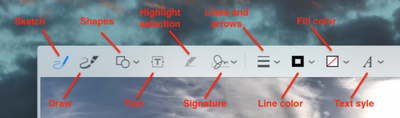
macos markup tools
We've highlighted which native apps support Markup in this article. But before you can access the toolset in desktop apps, you'll need to check that the relevant extension is enabled on your Mac. Keep reading to learn how it's done.

How to Enable the Markup Extension in macOS

  1. Click the Apple () symbol in your Mac's menu bar and select System Preferences....
    macos extensions

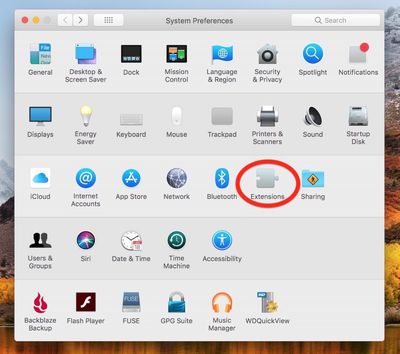
  2. Click the Extensions preference pane.

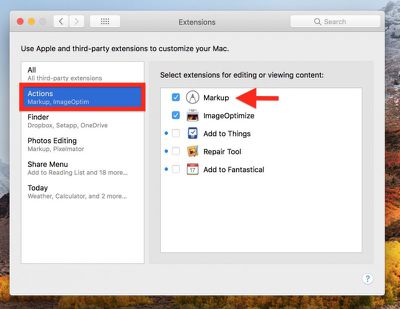
  3. Click Actions in the left column of the Extension pane.
    macos Markup extension

  4. If it isn't already ticked, click on the box next to the Markup extension in the right column.
macos mail markup
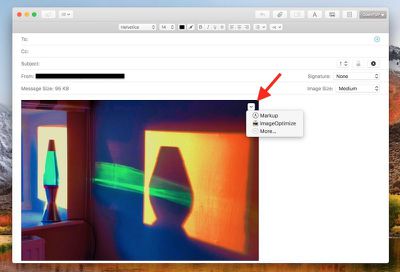
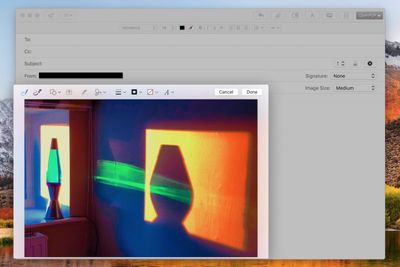
One of the most useful Markup integrations can be found in Mail. Once you've dragged an image into your message, hover your mouse cursor over it, click the arrow button that appears in the upper right corner, and select Markup from the dropdown menu.
macos mail markup 2
Your attached image will be foregrounded with the Markup toolbar across the top, ready for you to apply your annotations.

Markup can be accessed in the same manner within TextEdit as well as some third-party document editors. To test whether it's available, simply hover your cursor over the image once it's inside your document and look for the arrow in the upper right corner.

macos preview markup
In Preview, the Markup toolbar has its own button next to the Search input field on the right of the taskbar. You also get a few extra Markup tools here, like Adjust Color, Adjust Size, and Crop, so if you can't annotate an image within your application of choice then Preview should be your next stop.

macos photos markup
Finally, the Markup toolset is also accessible in Apple's Photos application: Next time you're editing an image, click the Extensions icon (the three dots in a circle) and select Markup to enter annotation mode.


Top Rated Comments

111 months ago
Apple pencil support (on trackpad) with more expansive markup tools in macos would be awesome.
Score: 4 Votes (Like | Disagree)
chucker23n1 Avatar
111 months ago
Having Markup available in many places (such as Mail and Notes) is cool, but in practice I find the annotation tools a bit baffling. Maybe I just need to get used to them. I want a highlight pen like in Windows Snipping Tool.

Is there a third-party extension that does this?
Score: 2 Votes (Like | Disagree)
chucker23n1 Avatar
111 months ago
I browse the internet on an iPad docked to a keyboard/case. No reason this can't happen on a Macbook as well.
There are plenty of reasons. There's plenty Apple would need to do to change macOS to make it suitable for touch, such as adding a virtual keyboard, making the controls suitable in size for touch targets, changing the gestures, …. And you'd roughly end up with the touch experience of Windows 7, which wasn't great.
Score: 1 Votes (Like | Disagree)
111 months ago
Apple pencil support (on trackpad) with more expansive markup tools in macos would be awesome.
I'll go further and suggest touch screens on all Apple products.
I don't understand the opposition.

No, you're not going to draw vertically on an iMac or laptop. But there are plenty of times where a quick finger touch to select a button is quicker than a cursor.

Make it optional. If you don't like using touch...guess what...don't touch the screen.
Score: 1 Votes (Like | Disagree)

Popular Stories

iPhone Duo Trio

Here's What Apple's Apps Look Like on the iPhone Duo

Tuesday October 20, 2026 11:12 am PDT by
With just three days to go until the iPhone Duo is released, Apple is getting ready for the launch. Behind the scenes, the App Store now has screenshots of Apple's built-in apps running on the Duo. We've seen some apps in marketing materials, but images of the ones we haven't seen give us an idea of what it will be like using the iPhone Duo day to day. Many apps are shown in landscape...
Apple Creator Studio iWork suite

Apple Pulls Keynote, Pages and Numbers From App Store [Update: Back]

Thursday October 22, 2026 11:01 am PDT by
Apple has temporarily removed Keynote, Pages, and Numbers from the App Store, just after releasing an update that added iPhone Duo support and a new Intelligent Assistant. It is not clear if the apps were removed intentionally, or if it is a bug. Apple has not said when the apps will be reinstated, but if it was in error, they should return soon. Update: The Mac versions are back without...
M5 MacBook Pro

RIP, MacBook Ultra

Monday October 19, 2026 9:37 am PDT by
Apple today sent out invites for an experience in Los Angeles on Wednesday, October 28, and the "Pro and tell" tagline on the invitation likely means that the rumored MacBook models with touch-enabled OLED displays will stick with MacBook Pro branding instead of the once-rumored "MacBook Ultra" name. The long-rumored "iPhone Ultra" ended up being named iPhone Duo, so speculation that Apple...
Latest Stories
MacBook Neo Helps Apple Outpace Rivals as Market Declines
2 hours ago
Happy 25th Anniversary, iPod
2 hours ago
iPhone Duo Demand Reportedly Exceeds Apple's Expectations
5 hours ago
iPhone Duo Launch Begins as First Orders Reach Customers
11 hours ago
1Password for Agents Keeps Your Passwords Hidden From AI
12 hours ago
iPhone Duo 24 Hours Later: Your Questions Answered
12 hours ago
Apple's iWork Apps Get 'Intelligent Assistant' and iPhone Duo Support
13 hours ago
Apple is Apparently Considering a Slightly Larger iPhone Duo
13 hours ago
Giant iPhone Duo Displays Coming to Four Apple Stores
14 hours ago
Apple Pulls Keynote, Pages and Numbers From App Store [Update: Back]
15 hours ago
Apple Updates More Apps With iPhone Duo Support
16 hours ago
Apple Will Label Apps 'Made for iPhone Duo' in App Store
18 hours ago
Amazon Takes $49 Off iPad With Prices Starting at $399.99
19 hours ago
F1 on Apple TV Now Available in Dolby Atmos
20 hours ago
Apple Reveals More Than 50 Apps That Will Be Updated for iPhone Duo
20 hours ago
Apple Blocks Certificates That Could Help Attackers Fake Websites
21 hours ago
Giant iPhone Duo Installations Spotted at Apple Fifth Avenue
22 hours ago
iPhone Duo 2 Prototypes Include Under-Display Face ID
22 hours ago
Tesla App Gains iPad and iPhone Duo Support
1 day ago
Apple Reportedly Boosts iPhone Duo Orders by 44%
1 day ago
Fortnite Returning to Australian App Store After Court Ruling
1 day ago
Apple Ordered to Open iPhone to Rival App Stores in Australia
1 day ago
Apple Suppliers Face Hurdles Cutting Circuit Board Emissions
1 day ago
Things Updated for iPhone Duo With Adaptive Layout
1 day ago
Simplicity and Siri AI Are HomeView's Killer Features, Apple Says
1 day ago
iPhone Duo Reviewers Really Miss Face ID
1 day ago
Does the iPhone Duo Run Hot? Here's What Reviews Found
1 day ago
Apple Music's New Look is Now Live on Apple's Website
2 days ago
Anthropic Launches Claude Duet, a Proactive AI Agent
2 days ago
What 32,000 Folds Did to the iPhone Duo's Hinge
2 days ago