

In iOS 10, Apple introduced the Messages App Store, allowing users to jump into miniature versions of their favorite apps so they could do things like choose a movie time, send their location, pay a friend, give a recommendation from Apple Music, and attach stickers. With the launch of iOS 11, the app drawer and selection experience of Messages apps have been streamlined, and this guide will walk you through the fastest way to access your favorite apps, organize them, and add more from the Messages App Store.
Navigating the New App Drawer in Messages
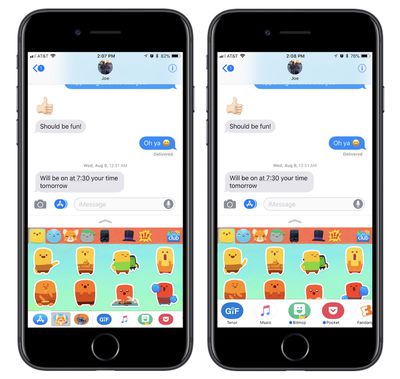
- Open Messages.
- Choose a contact to text.
- At the bottom of the screen sits the new app drawer, and you can tap one to bring it up or scroll to dive deeper into your collection.
From here, apps within Messages function essentially the same as they did in iOS 10: the bottom half of the screen represents the app, which you can interact with and send content into the upper half section of the screen in the form of an iMessage. A small chevron sitting just below the text entry field can be tapped to expand the Messages app to full screen, and tapped again to reduce it.
If you ever accidentally leave the app by tapping the text field, simply tap the App Store icon to the left of the text field. Conversely, if you're inside of a Messages app and want to make it and the app drawer disappear, tap the same App Store icon to the left of the text field (it'll be blue when the app drawer is open) to make the app disappear (returning the icon to gray).
Editing the New App Drawer in Messages
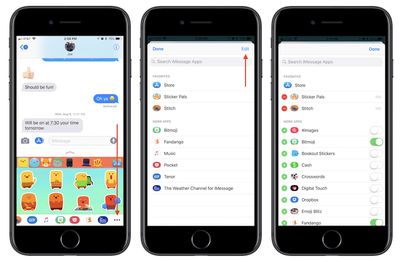
- Navigate to the app drawer in Messages.
- Scroll the drawer all the way to the right and tap the ellipses, or "More," icon.
- Tap "Edit."
- On the right side, choose any installed app you want or don't want in your Messages app drawer by tapping the green toggles.
- On the left side, tap the green "+" icon next to any app you want as a favorite.
- Tap "Done."
Now that your app drawer is fully customized, your favorites will appear on the far left side of the drawer, and any other apps you have toggled on will appear after your favorites. Any time you want to search for more, you can tap the blue App Store icon sitting to the left of your favorites to visit the Messages App Store. There are numerous standalone Messages apps, but many popular apps have also been updated over the past year to include Messages support.
For this reason, it's easy for your app drawer to become crowded, making the deeper editing and favoriting options in iOS 11 a welcome addition. If you'd rather not see the app drawer, tap on the gray App Store icon at the left of the Messages text box to hide it from view.

























![Apple Pulls Keynote, Pages and Numbers From App Store [Update: Back]](https://images.macrumors.com/t/Okb7kitB_gNr6qe5Pex9nQIysD8=/112x112/article-new/2026/01/Apple-Creator-Studio-iWork-suite.jpg)




















Top Rated Comments
I’m a grown up. I text people. I don’t need everything to be shared or “connected”.
THANK YOU !!! honestly, I search the setting and I figures you couldn’t turn it off cuz they wanted to you to buy those stupid stickers. Thank you again. MR needs a post with just this info for us who aren’t in middle school.