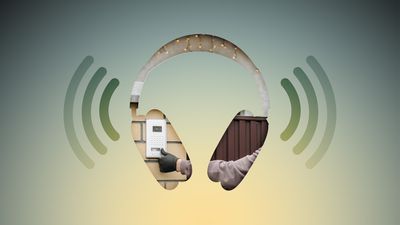
Noise-canceling headphones are great for blocking out distractions, but they can also block out sounds you actually need to hear, like a courier at the front door with your all-important package. Well, thanks to an Apple accessibility feature, your iPhone can do the listening for you and alert you when your doorbell rings.
Never Miss Your Doorbell While Wearing Headphones on iPhone Feature
Meet Sound Recognition, the feature in question that uses your iPhone's microphone to continuously monitor for specific sounds. When it detects one, you'll receive a notification that plays through your connected headphones, along with a vibration on your iPhone (or Apple Watch if you're wearing one).

The feature is primarily designed for people who are deaf or hard of hearing, but it's equally useful for anyone who works from home and regularly wears AirPods or noise-canceling headphones.

How to Enable Doorbell Alerts

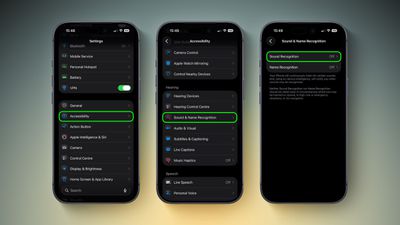
  1. Open Settings on your iPhone.
  2. Tap Accessibility.
  3. Under "Hearing," tap Sound & Name Recognition, then tap through to Sound Recognition.
    doorbell sound recognition2 1

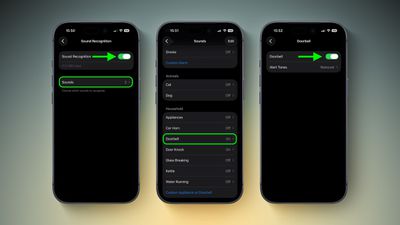
  4. Toggle on Sound Recognition, then tap Sounds.
  5. Under "Household," tap Door Bell and toggle it on in the next screen. You'll also see the option to choose a specific alert tone.
    settings

Note that your iPhone may need to download a small file (around 30MB) before the feature becomes active, so a Wi-Fi or data connection could be needed.

Training Your iPhone to Recognize Your Doorbell

If your iPhone doesn't reliably detect your specific doorbell, you can train it to recognize the sound by following these steps:

  1. Go to SettingsAccessibilitySound & Name RecognitionSound RecognitionSounds.
  2. Tap Custom Appliance or Doorbell, then enter a name.
  3. Place your iPhone near the doorbell and tap Start Listening.
  4. Ring your doorbell. Repeat this five times to complete the training.

Quick Access via Control Center

Once Sound Recognition is enabled, iOS automatically adds a toggle to Control Center. From here, you can press and hold the Sound Recognition icon to quickly enable or disable specific sounds without diving into Settings, which is handy if you only want doorbell detection when you're at home wearing headphones.

control center
Sound Recognition can also detect smoke alarms, dog barking, babies crying, water running, and more. Just keep in mind that Apple advises against relying on this feature in high-risk or emergency situations.

Top Rated Comments

Rychiar Avatar
5 hours ago at 09:17 am
can you make a HomePod listen for specific sounds like this? I'd like my kitchen HomePod to know when my fridge is beeping since the door always gets stuck
Score: 4 Votes (Like | Disagree)
recurringdream Avatar
5 hours ago at 09:45 am

('https://www.geekwebguides.com/how-to/never-miss-doorbell-wearing-iphone/')

Noise-canceling headphones are great for blocking out distractions, but they can also block out sounds you actually need to hear, like a courier at the front door with your all-important package. Well, thanks to an Apple accessibility feature, your iPhone can do the listening for you and alert you when your doorbell rings.


Meet Sound Recognition, the feature in question that uses your iPhone's microphone to continuously monitor for specific sounds. When it detects one, you'll receive a notification that plays through your connected headphones, along with a vibration on your iPhone (or Apple Watch if you're wearing one).

The feature is primarily designed for people who are deaf or hard of hearing, but it's equally useful for anyone who works from home and regularly wears AirPods or noise-canceling headphones.

How to Enable Doorbell Alerts

[LIST=1]
* Open Settings on your iPhone.

* Tap Accessibility.

* Under "Hearing," tap Sound & Name Recognition, then tap through to Sound Recognition.


Toggle on Sound Recognition, then tap Sounds.

* Under "Household," tap Door Bell and toggle it on in the next screen. You'll also see the option to choose a specific alert tone.

Note that your iPhone may need to download a small file (around 30MB) before the feature becomes active, so a Wi-Fi or data connection could be needed.

Training Your iPhone to Recognize Your Doorbell

If your iPhone doesn't reliably detect your specific doorbell, you can train it to recognize the sound by following these steps:
[LIST=1]
*
Go to SettingsAccessibilitySound & Name RecognitionSound RecognitionSounds.

* Tap Custom Appliance or Doorbell, then enter a name.

* Place your iPhone near the doorbell and tap Start Listening.

* Ring your doorbell. Repeat this five times to complete the training.

Quick Access via Control Center

Once Sound Recognition is enabled, iOS automatically adds a toggle to Control Center. From here, you can press and hold the Sound Recognition icon to quickly enable or disable specific sounds without diving into Settings, which is handy if you only want doorbell detection when you're at home wearing headphones.
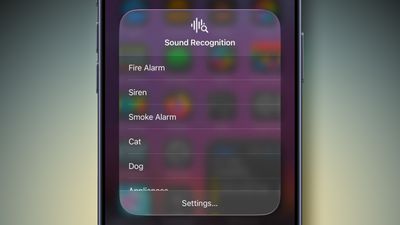


Sound Recognition can also detect smoke alarms, dog barking, babies crying, water running, and more. Just keep in mind that Apple advises against relying on this feature in high-risk or emergency situations.


Article Link: Never Miss Your Doorbell While Wearing Headphones on iPhone ('https://www.geekwebguides.com/how-to/never-miss-doorbell-wearing-iphone/')
I already have this feature in my home. It's called "having a Terrier".
Score: 4 Votes (Like | Disagree)
matttarantino Avatar
6 hours ago at 09:05 am
Imagine when the apple doorbell can tell you exactly who is at the door and you get notified via your airpods
Score: 2 Votes (Like | Disagree)
WarmWinterHat Avatar
5 hours ago at 09:32 am

I think this is creepy as ****. They already started repurposing Ring as a surveillance network.

I've got an analogue video entry phone that makes enough noise that you can hear it listening to black metal with the airpods in and noise cancellation on.
Wife said the same thing when we saw the Ring Super Bowl commercial with the lost dogs.

No thank you.
Score: 2 Votes (Like | Disagree)
KeepCalmPeople Avatar
5 hours ago at 09:49 am
Amazing - Apple creates problems while trying to solve problems, and then solves the problems they create.

I'm sure the list of things that you would actually want to be able to hear is quite long, such as the sound of breaking glass, gunfire etc. Trying to 'whitelist' all of those is quite the challenge. AI to the rescue? It never ends...
Score: 2 Votes (Like | Disagree)
Windoes Avatar
5 hours ago at 09:49 am
Doesn’t work much with a door knocker
Score: 2 Votes (Like | Disagree)

Popular Stories

maxresdefault

Apple Shows Off a Key Reason to Upgrade to the iPhone 17

Saturday February 7, 2026 9:26 am PST by
Apple today shared an ad that shows how the upgraded Center Stage front camera on the latest iPhones improves the process of taking a group selfie. "Watch how the new front facing camera on iPhone 17 Pro takes group selfies that automatically expand and rotate as more people come into frame," says Apple. While the ad is focused on the iPhone 17 Pro and iPhone 17 Pro Max, the regular iPhone...
apple wallet drivers license feature iPhone 15 pro

Apple Says These 7 U.S. States Plan to Offer iPhone Driver's Licenses

Monday February 9, 2026 6:24 am PST by
In select U.S. states, residents can add their driver's license or state ID to the Apple Wallet app on the iPhone and Apple Watch, and then use it to display proof of identity or age at select airports and businesses, and in select apps. The feature is currently available in 13 U.S. states and Puerto Rico, and it is expected to launch in at least seven more in the future. To set up the...
m5 macbook pro deal

Why You Shouldn't Buy the Next MacBook Pro

Tuesday February 10, 2026 4:27 pm PST by
Apple is planning to launch new MacBook Pro models as soon as early March, but if you can, this is one generation you should skip because there's something much better in the works. We're waiting on 14-inch and 16-inch MacBook Pro models with M5 Pro and M5 Max chips, with few changes other than the processor upgrade. There won't be any tweaks to the design or the display, but later this...
Apple Logo Zoomed

Apple Expected to Launch These 10+ Products Over the Coming Months

Tuesday February 10, 2026 6:33 am PST by
It has been a slow start to 2026 for Apple product launches, with only a new AirTag and a special Apple Watch band released so far. We are still waiting for MacBook Pro models with M5 Pro and M5 Max chips, the iPhone 17e, a lower-cost MacBook with an iPhone chip, long-rumored updates to the Apple TV and HomePod mini, and much more. Apple is expected to release/update the following products...
14 inch MacBook Pro Keyboard

New MacBook Pros Could Now Arrive in March

Sunday February 8, 2026 6:02 am PST by
New MacBook Pro models with the M5 Pro and M5 Max chips could arrive as soon as Monday, March 2, according to Bloomberg's Mark Gurman. In today's "Power On" newsletter, Gurman said that the release of new MacBook Pro models is tied to the release of macOS Tahoe 26.3. The launch is said to be slated for as early as the week of March 2. He added that the M4 Pro and M4 Max models on sale today...