Complete Guide to Using AirPods Pro's Newest Features - GeekWebGuides
Skip to Content

Complete Guide to Using AirPods Pro's Newest Features

by

With last year's release of iOS 17, Apple introduced new features for second-generation AirPods Pro, such as Adaptive Audio, the ability mute/unmute yourself when on a phone call, and more.
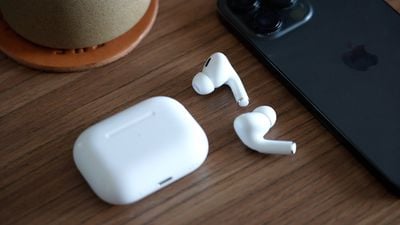
airpods pro 2 thumbnail
Keep reading to learn what use cases the new noise control features are designed for, and how you can control them in iOS 17 when your iPhone is connected to AirPods Pro 2 with updated firmware. To skip to a specific feature, hit one of the links below.

The new features are available on iPhones running iOS 17 when paired with second-generation AirPods Pro updated with the latest firmware. That includes second-generation AirPods Pro with the new USB-C MagSafe Charging Case, as well as second-generation AirPods Pro with the Lightning ‌MagSafe‌ Charging Case.

Check Your AirPods Pro Firmware

Apple does not offer instructions on how to upgrade AirPods software, but firmware is generally installed over-the-air while the ‌‌AirPods‌‌ are connected to an iOS device. Putting the ‌‌‌‌‌AirPods‌‌‌‌‌ in the case, connecting the ‌‌‌‌‌AirPods‌‌‌‌‌ to a power source, and then pairing the ‌‌‌‌‌AirPods‌‌‌‌‌ to an iOS device or Mac should force the update.

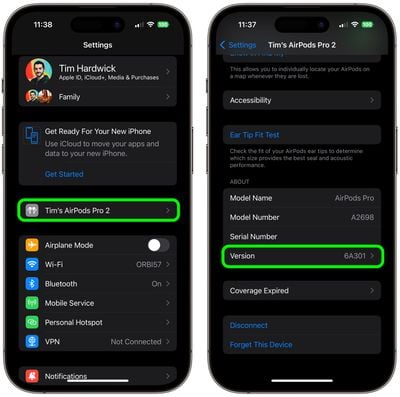
You can check your‌ ‌‌‌‌‌‌‌AirPods Pro‌‌‌‌‌‌‌‌ firmware by connecting them to your iPhone and following these steps:

  1. Open the Settings app.
  2. Tap [your name]'s AirPods Pro.
  3. Scroll down to the "About" section.
  4. Look for the Version number.

settings

If your AirPods Pro are updated with the latest version number (6E188 as of March 2024) you're ready to enjoy the new features in iOS 17.

Adaptive Audio

When the second-generation ‌AirPods Pro‌ were introduced, their Adaptive Transparency feature offered a new way to reduce loud environmental noise for more comfortable everyday listening.

Adaptive Audio, or Adaptive Noise Control, takes that approach to the next level by dynamically blending the existing Transparency and Active Noise Cancellation modes together to deliver the best audio experience in the moment. Adaptive Audio tailors the noise control as you move between different environments and interactions.

airpods pro adaptive audio
This way, loud or distracting noises surrounding, such as the sound of a leaf blower, are automatically reduced, while other noises, like the sudden beep of a car horn, will still be audible.

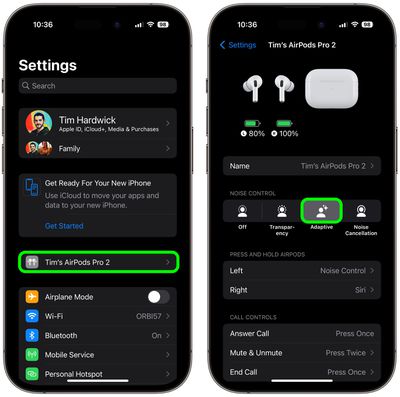
To enable or disable Adaptive Audio on AirPods Pro, connect them to your iPhone and follow one of these series of steps.

Method 1:

  1. Open Settings.
  2. Tap [your name]'s AirPods Pro.
  3. Under "Noise Control," tap Adaptive.

settings

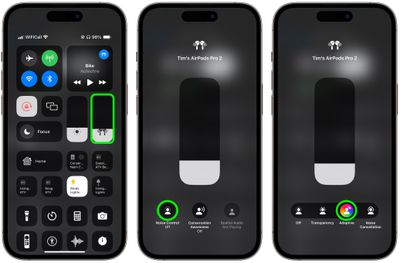
Method 2:

  1. Bring up the Control Center from your iPhone by swiping down from the upper right corner of the screen (on an ‌iPhone‌ with a Home button, swipe up from the bottom of the screen).
  2. Long press on the AirPods Pro volume slider.
  3. Tap the Noise Control button.
  4. Select Adaptive.

settings

Button Control

You can also switch to Adaptive Audio with a long button press, but first you need to assign it to your AirPods Pro 2 controls, like so:

  1. Open Settings.
  2. Tap [your name]'s AirPods Pro.
  3. Under "Press and Hold AirPods," tap Left or Right.
  4. Select Noise Control, then check Adaptive. You can also check Noise Cancellation and/or Transparency to switch between these modes using the same button, or check Off to turn off Noise Control using another long press.
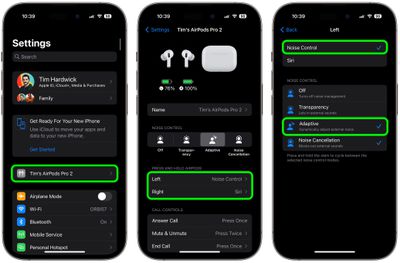
settings

Conversation Awareness

Conversation Awareness is able to detect when someone starts talking to you, and will lower the volume of the audio you're listening to and cut down on background noise accordingly.

airpods pro conversation boost
Conversation Awareness also helps when you're on a call, by reducing noise around you while you speak. As a sub-component of Adaptive Audio, this feature also enhances the voices in front of you so you can hear what's going on.

To enable or disable Conversation Awareness, connect your AirPods Pro 2 to your iPhone and follow these steps.

  1. Open Settings.
  2. Tap [your name]'s AirPods Pro.
  3. Scroll down to the "Audio" section and toggle on/off the switch next to Conversation Awareness.
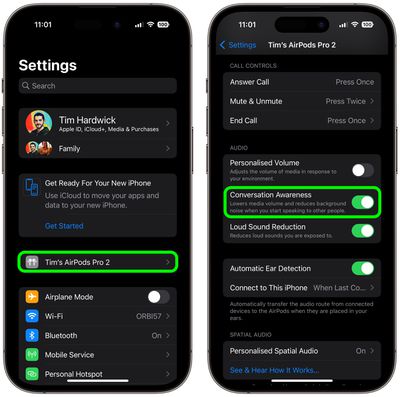
settings

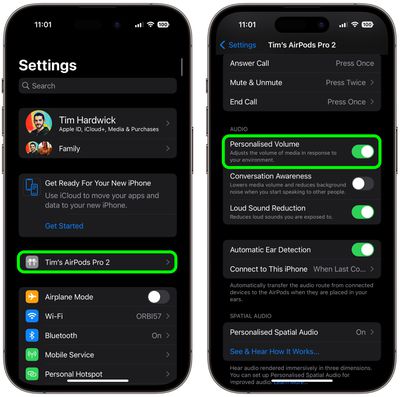
Personalized Volume

Similar to Adaptive Audio, Personalized Volume uses machine learning to fine-tune your listening experience by understanding environmental conditions and listening preferences.
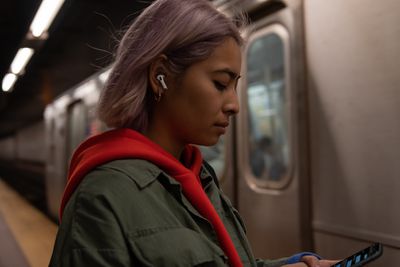
airpods pro person
Thanks to this feature, your ‌‌iPhone‌‌ is able to learn more about the volume that you prefer over time, and will tweak it as necessary to match your desired sound level.
To enable or disable Personalized Volume, connect your AirPods Pro 2 to your iPhone and follow these steps.

  1. Open Settings.
  2. Tap [your name]'s AirPods Pro.
  3. Scroll down to "Audio" and toggle on/off the switch next to Personalized Volume.
settings

Mute Controls

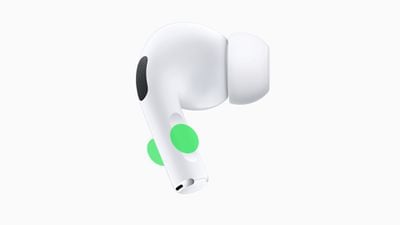
Prior to the release of iOS 17, ‌AirPods Pro‌ did not include an assignable on-board mute function. Thankfully, that's no longer the case. If you press the stem of your ‌‌AirPods Pro‌‌ earbuds, you will be able to mute and unmute yourself while you're on a call.
airpods pro 2 mute
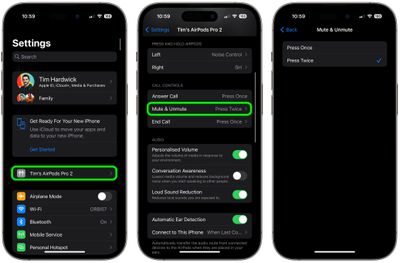
You can assign mute and unmute call controls to activate with a single press or a double press of the button on your AiPods Pro 2. Connect your AirPods Pro 2 to your iPhone and follow these steps to set your preference.

  1. Open Settings.
  2. Tap [your name]'s AirPods Pro.
  3. Scroll down to "Call Controls", then tap Mute & Unmute.
  4. Select either Press Once or Press Twice.
settings

Other AirPods Changes

AirPods have been criticized in the past for sluggish performance when attempting to automatically switch between Apple devices. Fortunately, ‌‌AirPods Pro‌‌ 2 automatically switch between Apple devices much quicker in ‌‌iOS 17 and later‌‌.

Hey Siri vs Siri
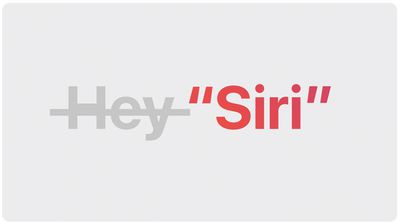
And don't forget, Apple has simplified the voice command to invoke Siri on iPhones running iOS 17 and this also works with second-generation ‌AirPods Pro‌. Instead of "Hey ‌‌Siri‌‌," you can simply say "‌‌Siri‌‌" to activate the voice assistant when wearing your AirPods. You can also issue multiple queries and commands in succession without having to say "‌‌Siri‌‌" again.

Related Roundup: AirPods Pro 3
Buyer's Guide: AirPods Pro (Neutral)
Related Forum: AirPods

Top Rated Comments

40 months ago
I used Conversation Awareness for about 10 minutes before turning it off.

It takes about 4-5 seconds to start the audio back up after it has paused it. If it was quicker maybe it would better but I find it too slow.
Score: 9 Votes (Like | Disagree)
abatabia Avatar
40 months ago
Which feature will keep my AirPods Pro 2 case from draining to nothing once a day now, while Apple support telling me that’s normal behavior. This happened, mind you, with them sitting on my shelf, not being used. Never happened with any previous AirPods I ever owned. Can’t say I’m thrilled with this, or the decline in Apple support.
Score: 7 Votes (Like | Disagree)
fwmireault Avatar
40 months ago

Basically all of those features create unpredictable behavior and negatively affect hearing experience, rather than an easy “on” or “off”. Apple has no way to know what matters the most at any given moment regardless. Trying to outsmart the complexity of the real world is just pointless.
Transparency mode and Active noise cancellation are still an option. If Adaptative audio doesn't work for you, just don't use it. I tried it over the weekend and I quite like it. I'm all for providing options and letting customers making their own choices.
Score: 6 Votes (Like | Disagree)
Shirasaki Avatar
40 months ago
Basically all of those features create unpredictable behavior and negatively affect hearing experience, rather than an easy “on” or “off”. Apple has no way to know what matters the most at any given moment regardless. Trying to outsmart the complexity of the real world is just pointless.
Score: 5 Votes (Like | Disagree)
40 months ago
Does the mute feature work if on a web call, such as Skype or even in a chat such as Discord? It’s not as useful if it’s only for phone calls.
Score: 4 Votes (Like | Disagree)
40 months ago
I don't want my music to get quieter if I have a conversation; I want my music to stop playing. Until they allow that, I don't have any interest in conversation awareness.
Score: 3 Votes (Like | Disagree)

Popular Stories

M5 MacBook Pro

RIP, MacBook Ultra

Monday October 19, 2026 9:37 am PDT by
Apple today sent out invites for an experience in Los Angeles on Wednesday, October 28, and the "Pro and tell" tagline on the invitation likely means that the rumored MacBook models with touch-enabled OLED displays will stick with MacBook Pro branding instead of the once-rumored "MacBook Ultra" name. The long-rumored "iPhone Ultra" ended up being named iPhone Duo, so speculation that Apple...
iPhone Duo Trio

Here's What Apple's Apps Look Like on the iPhone Duo

Tuesday October 20, 2026 11:12 am PDT by
With just three days to go until the iPhone Duo is released, Apple is getting ready for the launch. Behind the scenes, the App Store now has screenshots of Apple's built-in apps running on the Duo. We've seen some apps in marketing materials, but images of the ones we haven't seen give us an idea of what it will be like using the iPhone Duo day to day. Many apps are shown in landscape...
apple pro tell logo

Apple Announcing New Products Next Week: 'Pro and Tell'

Monday October 19, 2026 9:05 am PDT by
Apple's Greg Joswiak today hinted at new product announcements coming next week, sharing a social media post that says "Can't wait to pro and tell next week." Rumors suggest Apple is planning to debut the new MacBook Pro with an OLED touchscreen display, an M6 entry-level MacBook Pro, an M6 iMac, an iPad mini with an OLED display. Can't wait to pro and tell next week....
Latest Stories
iPhone Duo Launch Begins as First Orders Reach Customers
48 minutes ago
1Password for Agents Keeps Your Passwords Hidden From AI
2 hours ago
iPhone Duo 24 Hours Later: Your Questions Answered
2 hours ago
Apple's iWork Apps Get 'Intelligent Assistant' and iPhone Duo Support
3 hours ago
Apple is Apparently Considering a Slightly Larger iPhone Duo
3 hours ago
Giant iPhone Duo Displays Coming to Four Apple Stores
4 hours ago
Apple Pulls Keynote, Pages and Numbers From App Store [Update: Back]
5 hours ago
Apple Updates More Apps With iPhone Duo Support
6 hours ago
Apple Will Label Apps 'Made for iPhone Duo' in App Store
8 hours ago
Amazon Takes $49 Off iPad With Prices Starting at $399.99
9 hours ago
F1 on Apple TV Now Available in Dolby Atmos
9 hours ago
Apple Reveals More Than 50 Apps That Will Be Updated for iPhone Duo
10 hours ago
Apple Blocks Certificates That Could Help Attackers Fake Websites
11 hours ago
Giant iPhone Duo Installations Spotted at Apple Fifth Avenue
12 hours ago
iPhone Duo 2 Prototypes Include Under-Display Face ID
12 hours ago
Tesla App Gains iPad and iPhone Duo Support
16 hours ago
Apple Reportedly Boosts iPhone Duo Orders by 44%
17 hours ago
Fortnite Returning to Australian App Store After Court Ruling
17 hours ago
Apple Ordered to Open iPhone to Rival App Stores in Australia
17 hours ago
Apple Suppliers Face Hurdles Cutting Circuit Board Emissions
18 hours ago
Things Updated for iPhone Duo With Adaptive Layout
18 hours ago
Simplicity and Siri AI Are HomeView's Killer Features, Apple Says
19 hours ago
iPhone Duo Reviewers Really Miss Face ID
1 day ago
Does the iPhone Duo Run Hot? Here's What Reviews Found
1 day ago
Apple Music's New Look is Now Live on Apple's Website
1 day ago
Anthropic Launches Claude Duet, a Proactive AI Agent
1 day ago
What 32,000 Folds Did to the iPhone Duo's Hinge
1 day ago
iPhone Duo's Hidden FaceTime Camera Takes 'Trash' Photos
1 day ago
iPhone Duo Has 'Edge Light' Feature That Debuted on Macs Last Year
1 day ago
Apple Support App Updated for iPhone Duo's Larger Display
1 day ago