How to Pair an Apple Remote With an Apple TV (or Even a Mac) - MacRumors
Skip to Content

How to Pair an Apple Remote With an Apple TV (or Even a Mac)

by

When you set up a new Apple TV and power up the set-top box, the Apple Remote that comes in the box should pair automatically as soon as you press one of the buttons. If the Apple Remote stops working, it's probably out of juice and needs charging for 30 minutes via a USB to Lightning cable connected to a USB outlet.

apple tv siri remote charging
But if that doesn't fix the problem, your best bet is to re-pair the device with your Apple TV. This article shows you how. The following instructions will also come in useful if you need to pair a new replacement Apple Remote in the event that the one that came with your Apple TV stops working completely or is damaged beyond repair.

In addition, at the end of this article we've included a quick tip for pairing your Mac with an Apple TV Remote, for controlling things like iTunes, VLC, and Keynote.

How to Pair an Apple Remote with Apple TV

  1. Make sure your Apple TV is powered on.
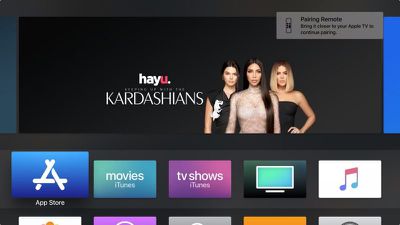
  2. Point the Apple Remote three inches away from the set-top box, then press and hold the remote's Menu and Volume Up buttons for five seconds.
    apple tv remote pair

  3. If you see a notification on your television screen asking you to bring the Apple Remote closer, place the Remote on top of the Apple TV.
  4. If you don't see Remote connected notification on the television screen, unplug your Apple TV from the wall power outlet, wait at least six seconds, then plug it back in.
  5. If necessary, repeat steps 1 to 3.

How to Control Your Mac With an Apple Remote.

Apple used to include a small white or silver infrared remote control with some Macs, which allowed Mac users to control things like Keynote presentations and iTunes media from afar.
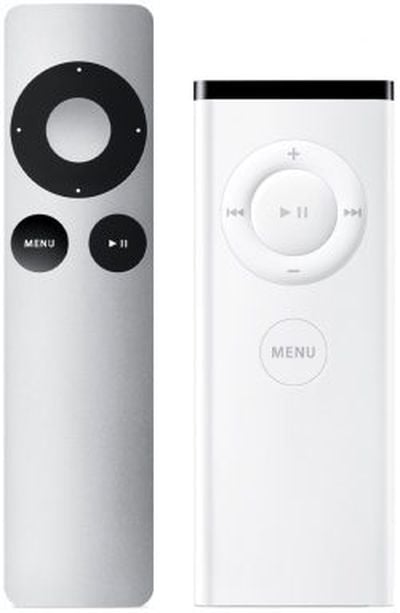
apple tv remotes first second gen
When newer Macs no longer included an IR receiver (indicated by a black line of the front edge of the body) Apple stopped including these remotes, but Apple TV owners can optionally use their Apple TV Remote to control their Mac, thanks to a free third-party Bluetooth macOS utility called SiriMote by Eternal Storms Software.

SiriMote isn't available in the App Store, but you can download it directly from the Eternal Storms website [Direct Link]. After downloading SiriMote, drag it from your Downloads folder to your Applications folder, then launch the app and follow the onscreen instructions to pair your Apple Remote with your Mac.


Related Roundup: Apple TV
Buyer's Guide: Apple TV (Buy Now)

Top Rated Comments

iapplelove Avatar
102 months ago
I would buy an Apple TV in a heartbeat, if the remote was actually decent.
I just use my phone.
Score: 2 Votes (Like | Disagree)
Juicy Box Avatar
102 months ago
Well, the black line was only on certain laptops (unibody aluminium MacBooks and Pros, and on the first Air body style). Non-unibody MacBooks has a pill shaped one and non-unibody MacBook Pros as well as Mac minis had round ones. iMacs had them hidden in the Apple logos. The silver remotes were never included with any Mac (though they were designed to match the new iMacs released at the same time (the first 21 and 27 inch models in 2009). The white remotes were indeed included with some Macs (starting with late 2005 iMac G5 with iSight camera). The remote was also designed to match it, and could magnetically stick to the side. The remote was subsequently also included with all Macs that had IR ports until they were no longer included with early 2008 models (or possibly even some late 2007 models).
Thanks, I was wondering what Macs had IR. It looks like more than I thought.
[doublepost=1545235646][/doublepost]
[doublepost=1545211978][/doublepost]how can you say, he hates everything. ('https://wiseshopping.in/semi-automatic-washing-machine/')
I am not sure how @iapplelove came to this conclusion, I guess they took a peek at my posting history.

Although, I am sure that for every post of mine stating my dislike for something, there is one or more post about something that I enjoy.

Maybe it was just a knee jerk reaction to someone disliking something that they like.
Score: 1 Votes (Like | Disagree)
Juicy Box Avatar
102 months ago
No.

I came to that conclusion based on your posts. You hate everything.
You must of missed this one, it was right under the one you quoted:

This is true, the Apple TV can use just about any IR remote using the Remote Learning feature that a lot of people do not know about.

The Remote Learning feature has been around for over a decade, but many people, including long time ATV users did not know it was there.

It is in the settings, and the Remote Learning feature is really easy to use, and takes less than 30 seconds to do.

Also, I have not found a IR remote that would not work with it. I was even able to use my space heater IR remote and my Roomba remote to control an ATV.
It doesn't look like I stated I hated the Remote Learning feature, actually it would seem I quite like it. Looks like you are wrong about me.

Never had to "learn" or program anything, it just worked from day 1.
This is a great solution if everything is compatible. I have a series 6 TCL that it doesn't work.

One good thing about the Remote Learning feature is that you can use any IR remote, including old universal remotes that have all the playback buttons that most modern remotes do not have, like Skip, Step, FF, RW.... It makes it very useful when watching videos.

One thing that it obviously does not do for older remotes, but might for modern universal remotes with a Mic is do Siri. Does anyone know if this works?
Score: 1 Votes (Like | Disagree)
iapplelove Avatar
102 months ago
You came to that conclusion because I prefer physical buttons over a touch screen?
No.

I came to that conclusion based on your posts. You hate everything.
Score: 1 Votes (Like | Disagree)
102 months ago
I would buy an Apple TV in a heartbeat, if the remote was actually decent.
Score: 1 Votes (Like | Disagree)

Popular Stories

Apple TV Sans Remote Feature

New Apple TV 4K Leaked

Friday September 25, 2026 8:16 am PDT by
MacRumors contributor Aaron Perris has uncovered an image file from Apple for an unreleased Apple TV 4K, suggesting that a new model will finally be released soon. The image is specifically for an "Apple TV 4K (4th generation)" model. Apple TV 4K (4th generation) image (on a gradient) The image reveals that the Apple TV will have the same external design as the current model, with all of its...
Apple TV 4K HomeView HomePod Mini tweaked

New Apple TV 4K, HomeView, and HomePod Mini: 16 Details Just Leaked

Sunday October 11, 2026 12:56 pm PDT by
Just two days before Apple's "Welcome home" experience in New York, Bloomberg's Mark Gurman has leaked several details about the new products set to be unveiled, including an all-new smart home hub, a HomePod mini 2, and a new Apple TV 4K. Here is an all-in-one summary of the details shared by Gurman:Apple's home hub with a touch-enabled display will be named HomeView, seemingly confirming a ...
HomePod minis Apple TV and iPad mini Leak Feature

iPad Mini With A20 Pro, New HomePod Mini Colors, and New Apple TV 4K All Just Leaked

Friday September 25, 2026 8:18 am PDT by
The next iPad mini, HomePod mini, and Apple TV 4K models have all leaked, just a few weeks before the devices are expected to be announced. Specifically, MacRumors contributor Aaron Perris discovered a few of Apple's official images of the devices, confirming their existence and some new features that are planned. The most notable iPad mini details revealed in today's leak include an A20 Pro ...
Latest Stories
iPhone Duo Launch Begins as First Orders Reach Customers
1 hour ago
1Password for Agents Keeps Your Passwords Hidden From AI
2 hours ago
iPhone Duo 24 Hours Later: Your Questions Answered
3 hours ago
Apple's iWork Apps Get 'Intelligent Assistant' and iPhone Duo Support
4 hours ago
Apple is Apparently Considering a Slightly Larger iPhone Duo
4 hours ago
Giant iPhone Duo Displays Coming to Four Apple Stores
5 hours ago
Apple Pulls Keynote, Pages and Numbers From App Store [Update: Back]
6 hours ago
Apple Updates More Apps With iPhone Duo Support
6 hours ago
Apple Will Label Apps 'Made for iPhone Duo' in App Store
9 hours ago
Amazon Takes $49 Off iPad With Prices Starting at $399.99
10 hours ago
F1 on Apple TV Now Available in Dolby Atmos
10 hours ago
Apple Reveals More Than 50 Apps That Will Be Updated for iPhone Duo
11 hours ago
Apple Blocks Certificates That Could Help Attackers Fake Websites
12 hours ago
Giant iPhone Duo Installations Spotted at Apple Fifth Avenue
13 hours ago
iPhone Duo 2 Prototypes Include Under-Display Face ID
13 hours ago
Tesla App Gains iPad and iPhone Duo Support
17 hours ago
Apple Reportedly Boosts iPhone Duo Orders by 44%
17 hours ago
Fortnite Returning to Australian App Store After Court Ruling
18 hours ago
Apple Ordered to Open iPhone to Rival App Stores in Australia
18 hours ago
Apple Suppliers Face Hurdles Cutting Circuit Board Emissions
18 hours ago
Things Updated for iPhone Duo With Adaptive Layout
19 hours ago
Simplicity and Siri AI Are HomeView's Killer Features, Apple Says
19 hours ago
iPhone Duo Reviewers Really Miss Face ID
1 day ago
Does the iPhone Duo Run Hot? Here's What Reviews Found
1 day ago
Apple Music's New Look is Now Live on Apple's Website
1 day ago
Anthropic Launches Claude Duet, a Proactive AI Agent
1 day ago
What 32,000 Folds Did to the iPhone Duo's Hinge
1 day ago
iPhone Duo's Hidden FaceTime Camera Takes 'Trash' Photos
1 day ago
iPhone Duo Has 'Edge Light' Feature That Debuted on Macs Last Year
1 day ago
Apple Support App Updated for iPhone Duo's Larger Display
1 day ago