
Apple Watch includes storage space for adding content like apps, photos, and music, with up to some of that space dedicated to storing songs. When you add a playlist, you can listen to music on it, even when your iPhone is not in range. While the process is fairly self-explanatory, there are a few steps you don't want to forget in order to play music from Apple Watch to your Bluetooth connected headphones

Adding Music to Apple Watch

In order to listen to music on Apple Watch without an iPhone in range, you must sync a playlist to it first.

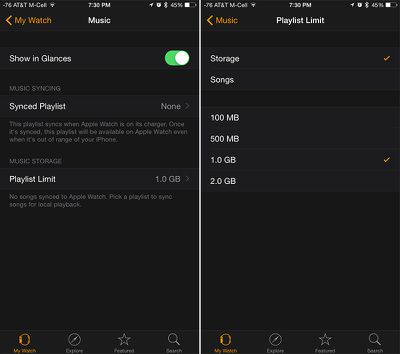
  1. Open the Apple Watch app on your iPhone and tap My Watch.
  2. Select Music from the list.
  3. Tap "Synced Playlist" to access your iPhone's playlist.
  4. Select a playlist from the list (if there is no playlist visible in this list, you will need to create one on your iPhone).
  5. Place your Apple Watch on its charger to initiate the sync. This step is important. Apple Watch will not sync a playlist if it has not been connected to the charger.
addingmusicapplewatch
You can customize your playlist limit here. Switch between the amount of storage or number of songs to change the view. Select 100 MB, 500 MB, 1.0 GB, or 2.0 GB of storage (or 15, 50, 125 or 250 songs). When you reach your maximum playlist limit, you won't be able to add more music.

To remove all playlists from Apple Watch, select "None" at the bottom of the Playlist screen.

Pairing Bluetooth Headphones
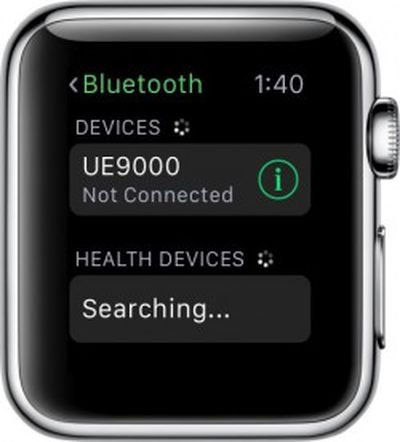
applewatchbluetoothpairingYou may be able to listen to music directly from Apple Watch, but only through Bluetooth headphones. Without them, music will only play through the iPhone.

  1. Put your headphones in Discovery mode.
  2. Open the Settings app on Apple Watch.
  3. Tap Bluetooth.
  4. Select the headphones you wish to pair.

Listening to Music on Apple Watch

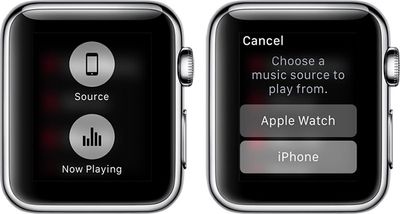
There's one more important first step to listening to music directly on Apple Watch using Bluetooth headphones, and that involves changing the source for the music.
applewatchmusicsource

  1. Open the Music app on Apple Watch.
  2. Force press the display screen.
  3. Select "Source" from the options that appear.
  4. Choose Apple Watch as the music source to play from.
  5. Select a playlist and tap the Play button to begin listening to music.

You can also see how many songs are stored on your Apple Watch under the About section of the Settings app on the device.


Related Roundup: Apple Watch 11
Buyer's Guide: Apple Watch (Neutral)

Top Rated Comments

spotlight07 Avatar
140 months ago
This is a less complete article than on Apple's website.

I would like to suggest a how to article on how to remove how to articles from my newsfeed.
Score: 19 Votes (Like | Disagree)
JCrz Avatar
140 months ago
Tomorrow on MacRumors: How to Use Your Car's Sunroof
Score: 14 Votes (Like | Disagree)
MH01 Avatar
140 months ago
Tomorrow on MacRumors: How to Use Your Car's Sunroof

Too advanced. How to unlock your car door.
Score: 9 Votes (Like | Disagree)
myrtlebee Avatar
140 months ago
I think these how-to articles are great. Not eveyone wants to dig around Google and Apple's website to find things like this. These are great for MacRumors because they help keep people on MacRumors once they're here instead of going elsewhere for this info. And the information is presented in an aesthetically-pleasing way. I do agree, however, with the posters who suggest a setting to disable notification of how-to articles for those who are not interested.
Score: 9 Votes (Like | Disagree)
MentalFloss Avatar
140 months ago
Okay I'm getting a little bored with the Apple Watch now. Please stop publishing stories about it. It's a gadget for the super rich, I get it.

Thanks! I love being called "super rich"!

My colleague just bought a car that cost a hundred times more than my Apple Watch, and he has to pay quite a lot of money each month to fill it up with the rather expensive remains of unreplaceable million-year-old biomass. Not to mention the fact that the moment he left the dealership with the car, it lost the eqivalent of five Apple Watches in value, and it continues to lose value quickly.

If I, as an Apple Watch owner, am considered "super rich", then what do people call someone who can urinate that much money down the drain within the blink of an eye?
Score: 5 Votes (Like | Disagree)
Ballis Avatar
140 months ago
Its hard to imagine anyone buying an Apple watch not carrying an iPhone, so why even bother?
Score: 5 Votes (Like | Disagree)

Popular Stories

Apple Logo Zoomed

Tim Cook Teases Plans for Apple's Upcoming 50th Anniversary

Thursday February 5, 2026 12:54 pm PST by
Apple turns 50 this year, and its CEO Tim Cook has promised to celebrate the milestone. The big day falls on April 1, 2026. "I've been unusually reflective lately about Apple because we have been working on what do we do to mark this moment," Cook told employees today, according to Bloomberg's Mark Gurman. "When you really stop and pause and think about the last 50 years, it makes your heart ...
wwdc sans text feature

Apple Rumored to Announce New Product on February 19

Thursday February 5, 2026 12:22 pm PST by
Apple plans to announce the iPhone 17e on Thursday, February 19, according to Macwelt, the German equivalent of Macworld. The report, citing industry sources, is available in English on Macworld. Apple announced the iPhone 16e on Wednesday, February 19 last year, so the iPhone 17e would be unveiled exactly one year later if this rumor is accurate. It is quite uncommon for Apple to unveil...
Finder Siri Feature

Why Apple's iOS 26.4 Siri Upgrade Will Be Bigger Than Originally Promised

Friday February 6, 2026 3:06 pm PST by
In the iOS 26.4 update that's coming this spring, Apple will introduce a new version of Siri that's going to overhaul how we interact with the personal assistant and what it's able to do. The iOS 26.4 version of Siri won't work like ChatGPT or Claude, but it will rely on large language models (LLMs) and has been updated from the ground up. Upgraded Architecture The next-generation...
iOS 26

iOS 26.3 and iOS 26.4 Will Add These New Features to Your iPhone

Tuesday February 3, 2026 7:47 am PST by
While the iOS 26.3 Release Candidate is now available ahead of a public release, the first iOS 26.4 beta is likely still at least a week away. Following beta testing, iOS 26.4 will likely be released to the general public in March or April. Below, we have recapped known or rumored iOS 26.3 and iOS 26.4 features so far. iOS 26.3 iPhone to Android Transfer Tool iOS 26.3 makes it easier...
iphone 17 pro dark blue 1

iPhone 18 Pro Max Rumored to Deliver Next-Level Battery Life

Friday February 6, 2026 5:14 am PST by
The iPhone 18 Pro Max will feature a bigger battery for continued best-in-class battery life, according to a known Weibo leaker. Citing supply chain information, the Weibo user known as "Digital Chat Station" said that the iPhone 18 Pro Max will have a battery capacity of 5,100 to 5,200 mAh. Combined with the efficiency improvements of the A20 Pro chip, made with TSMC's 2nm process, the...















