
With iOS 13 and tvOS 13, Apple users are now able to connect their favorite console controllers to an iPhone or Apple TV. In this guide, we've provided a quick rundown of how to go about pairing the DualShock 4 Wireless Controller and Xbox Wireless Controller to both iOS and tvOS devices.
how to controller 5
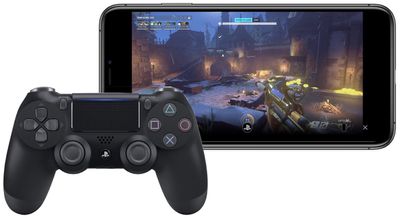
Previously, MFi controllers were the only solution to playing games on ‌iPhone‌, iPad, and ‌Apple TV‌. With the new update, console players don't need to spend extra money on another controller to play iOS and tvOS games. PS4 players also have a reason to look into DualShock 4 pairing since Sony's Remote Play iOS app provides streaming of compatible games to the ‌iPhone‌ or ‌iPad‌, which can now be controlled by a DualShock 4.

How to connect the DualShock 4 Wireless Controller to iPhone or iPad

  1. Press and hold the PS logo and Share buttons simultaneously on your DualShock 4 controller until the light bar flashes.
  2. Open your iOS device's Settings app and navigate to Bluetooth.
  3. Under "Other Devices," tap on your DualShock 4 wireless controller.

How to connect the Xbox Wireless Controller to iPhone or iPad

  1. Press the Xbox button to turn on the Xbox Wireless Controller.
  2. Press and hold the Connect button for a few seconds.
  3. Open your iOS device's Settings app and navigate to Bluetooth.
  4. Under "Other Devices," tap on your Xbox Wireless Controller.
how to controller 3

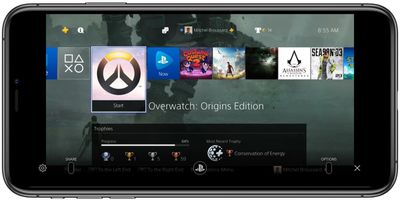
Sony's Remote Play iOS app controlled via DualShock 4

The steps for pairing controllers with an ‌Apple TV‌ are largely similar to the ones for iOS devices. You can find this information below.

How to connect the DualShock 4 Wireless Controller to Apple TV

  1. Press and hold the PS logo and Share buttons simultaneously on your DualShock 4 controller until the light bar flashes.
  2. Open the Settings app on ‌Apple TV‌ > click Remotes and Devices > Bluetooth.
  3. Select the DualShock 4 Wireless Controller to pair it, which will be confirmed with a notification on tvOS.

How to connect the Xbox Wireless Controller to Apple TV

  1. Press the Xbox button to turn on the Xbox Wireless Controller.
  2. Press and hold the Connect button for a few seconds.
  3. Open the Settings app on ‌Apple TV‌ > click Remotes and Devices > Bluetooth.
  4. Select the Xbox Wireless Controller to pair it, which will be confirmed with a notification on tvOS.

It should be noted that for the DualShock 4, some controller functions will not be functional while connected to an ‌iPhone‌, ‌iPad‌, or ‌Apple TV‌. These include the touchpad, the central PS button, rumble, motion sensor, and the headphone jack. The light bar will also remain one color and can not be changed.

Both the PS4 and Xbox controllers will stay connected to the iOS/tvOS device you've paired them with until you re-pair them with your console. To reconnect a DualShock 4 with a PS4, you'll need to manually connect the controller with the console via the micro-USB to USB cable each controller comes with. For Xbox, you can press the connect button on the controller and the console at the same time, or use a micro-USB to USB cable.


Related Forum: iOS 13

Top Rated Comments

star-affinity Avatar
82 months ago

That hasn't been a big deal for me. I plug it in to the console to charge it anyway.
Aha. I put them on the DualShock 4 Charging Station. The console is hidden behind a wooden frame with a piece of fabric around it – which is what we have to hide all the electronics underneath the TV in the living room – so never really need to connect a controller to the console, plus it's a bit of a hassle in my case.
Score: 2 Votes (Like | Disagree)
MisterSavage Avatar
77 months ago

Has anyone successfully paired a PS4 controller to an iPad Pro 11 (2018)?
Yep, I've gamed a lot on mine. Did you hold down the PS button and the share button at the same time before pairing the controller?
Score: 2 Votes (Like | Disagree)
MisterSavage Avatar
82 months ago

It is true you can run it off a USB cable, but I'm not sure how many people have a USB cable running to the sofa.
I bought a really long USB cable on Amazon for that exact scenario but I can see that being the exception and not the norm!
Score: 2 Votes (Like | Disagree)
MisterSavage Avatar
82 months ago
This works remarkably well and is a huge "game" changer. One of my favorite additions with iOS 13.
Score: 2 Votes (Like | Disagree)
Laptopdog78 Avatar
82 months ago

A bit sad the connecting the controller back to the console can't be achieved without connecting a cable between them. But maybe good for Sony and Microsoft since it makes me consider getting more controllers just for iOS/tvOS/macOS play. ? Not so good for the environment... ?
But you can connect an Xbox controller back easily without a cable....... you press the sync button on the controller until it flashes and then the sync button on the Xbox intil it flashes and boom it’s done. Who says that you need a cable?
Score: 2 Votes (Like | Disagree)
CaptMarvel Avatar
82 months ago

So... before shelling out $50... any noted differences between controllers? I've heard Microsoft controllers have better battery life?

For me what makes the XBox controller a better choice for this is it has replaceable AA batteries, where the PS4 controller has to be recharged over USB. So if the PS4 battery runs down, you are done playing, where with the XBox you can just swap in some new AAs. I used Eneloop rechargeables and it worked out well for me.
This is false.
The PS4 controller can be used to play while charging via charging cable. Environmentally conscious, this is better than buying batteries to use then discard.


How do I switch from an iPad to an Apple TV for example? Do I have to re-pair every time I switch devices?

My controller automatically connects to the last device it was paired to and if I try to switch devices it fails to connect unless I de enter pairing mode.
Yes. For now, you have to unpair from one device and pair to each time you want to use it on with different device.

Imagine in the next generation systems, Sony, Microsoft and even Nintendo had the W1 chip via Apple...then, I’m sure switching from system to system would be a breeze and be linked to your Apple ID.

One can dream right?
Score: 2 Votes (Like | Disagree)

Popular Stories

Apple Logo Zoomed

Tim Cook Teases Plans for Apple's Upcoming 50th Anniversary

Thursday February 5, 2026 12:54 pm PST by
Apple turns 50 this year, and its CEO Tim Cook has promised to celebrate the milestone. The big day falls on April 1, 2026. "I've been unusually reflective lately about Apple because we have been working on what do we do to mark this moment," Cook told employees today, according to Bloomberg's Mark Gurman. "When you really stop and pause and think about the last 50 years, it makes your heart ...
wwdc sans text feature

Apple Rumored to Announce New Product on February 19

Thursday February 5, 2026 12:22 pm PST by
Apple plans to announce the iPhone 17e on Thursday, February 19, according to Macwelt, the German equivalent of Macworld. The report, citing industry sources, is available in English on Macworld. Apple announced the iPhone 16e on Wednesday, February 19 last year, so the iPhone 17e would be unveiled exactly one year later if this rumor is accurate. It is quite uncommon for Apple to unveil...
Finder Siri Feature

Why Apple's iOS 26.4 Siri Upgrade Will Be Bigger Than Originally Promised

Friday February 6, 2026 3:06 pm PST by
In the iOS 26.4 update that's coming this spring, Apple will introduce a new version of Siri that's going to overhaul how we interact with the personal assistant and what it's able to do. The iOS 26.4 version of Siri won't work like ChatGPT or Claude, but it will rely on large language models (LLMs) and has been updated from the ground up. Upgraded Architecture The next-generation...
iOS 26

iOS 26.3 and iOS 26.4 Will Add These New Features to Your iPhone

Tuesday February 3, 2026 7:47 am PST by
While the iOS 26.3 Release Candidate is now available ahead of a public release, the first iOS 26.4 beta is likely still at least a week away. Following beta testing, iOS 26.4 will likely be released to the general public in March or April. Below, we have recapped known or rumored iOS 26.3 and iOS 26.4 features so far. iOS 26.3 iPhone to Android Transfer Tool iOS 26.3 makes it easier...
iphone 17 pro dark blue 1

iPhone 18 Pro Max Rumored to Deliver Next-Level Battery Life

Friday February 6, 2026 5:14 am PST by
The iPhone 18 Pro Max will feature a bigger battery for continued best-in-class battery life, according to a known Weibo leaker. Citing supply chain information, the Weibo user known as "Digital Chat Station" said that the iPhone 18 Pro Max will have a battery capacity of 5,100 to 5,200 mAh. Combined with the efficiency improvements of the A20 Pro chip, made with TSMC's 2nm process, the...















