

watchOS 2, the first major update to the Apple Watch's operating system, was released in September, just five months after the device's debut. If you didn't face any download issues getting watchOS 2 on your Apple Watch, you are well on your way towards looking for the new features the update brings.
One major change we'd been anticipating for months is the ability to personalize watch faces with the photos we've taken, and third-party complications are another fantastic addition that will add more variety and more functionality to the look of the Apple Watch. A third addition, time-lapse video watch faces, is sure to wow your friends and will give you some dynamic scenery to look at each time you raise your wrist.
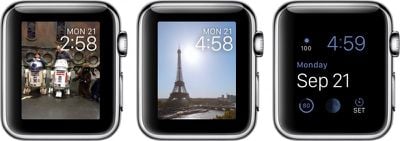
To help you get started, we've created this how-to guide to show you how to set up each of the new watch face features.
This guide assumes you know how to customize your Apple Watch's watch face. If you don't already know the process, head over to our how-to guide on that topic for reference.
Photos Watch Faces
Adding photos to your watch face only takes a few minutes to set up. In watchOS 2, you can either select a specific photo to display all of the time, or choose a photo album to see a different image every time you wake your watch.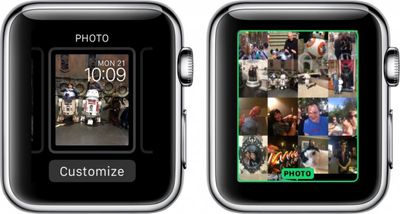
- Make sure you have synced an album to Apple Watch. If you have not yet done so, follow our instruction guide.
- With the watch face showing, firmly press on the screen to call up the customizations.
- Swipe to the left until you see Photo Album and tap to select it.
- If you wish to only show a specific image at all times, select the Photo watch face. Then tap Customize.
- Rotate the Digital Crown to zoom outward and view all images on your Apple Watch.
- Select the photo you wish to add to your watch face.
You cannot customize complications when using a personal photo as a watch face. The watch face will display only the date and time.
Time-Lapse
With watchOS 2, you can add a pre-made time-lapse video to your watch face. Apple has provided six locations: Mack Lake, New York, Hong Kong, London, Paris, and Shanghai.
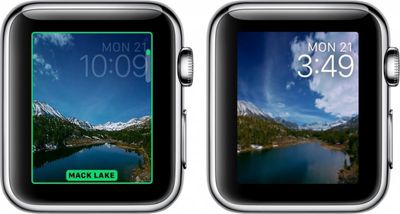
Once you've selected a time-lapse video as your watch face, it will play for approximately three seconds and then stop every time you wake your Apple Watch. Just lift your wrist to see the video play out. Videos will be different based on the time. If you check your watch at 9:00 p.m. you'll see the night sky. When you check it in the morning, you'll see a sunny sky.
You cannot customize complications with the time-lapse watch face. The watch face will display the date and time.
Third-Party Complications
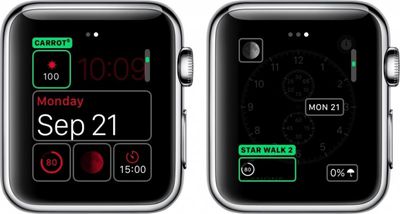
Apple has given third-party app developers the ability to add certain features to watch face complications, like flight status, precipitation, and more.
- Open the Apple Watch app on your iPhone.
- Select Complications from the main menu.
- Available complications will be listed. You can remove complications you do not wish to be shown by tapping the red remove button next to the app. You can also organize the list by touching and holding the three bars on the left side of the app until it hovers. Then, drag it to your preferred position in the list.
- With the watch face showing on Apple Watch, firmly press the screen to call up the customizations.
- Select a watch face that allows you to customize the complications and tap Customize.
- Swipe to the left to edit the complications and tap the module you wish to edit.
- Rotate the Digital Crown until you get to the third-party complication you wish to add. Then, tap the screen to save the customized watch face.
Head over to the forums to find out which apps support complications in watchOS 2.
Live Photos
Live Photos are exclusive to iPhone 6s and 6s Plus. They allow users to capture a few seconds of bursts before and after a picture is taken. If you have a compatible device, you can add Live Photos to Apple Watch the same way you do with regular photos, and they'll animate each time you raise your wrist.
- Make sure you have saved favorites or synced an Album to Apple Watch. If you have not yet done so, follow our instruction guide.
- With the watch face showing, firmly press on the screen to call up the customizations.
- Swipe to the left until you see Live Photo and tap to select it.
- Rotate the Digital Crown to zoom outward and view all images on your Apple Watch.
- Select the photo you wish to add to your watch face.
You cannot customize complications with Live Photos. The watch face will display the date and time.
Now that watchOS 2 adds more watch face possibilities, you can really personalize your look for every occasion.



















Top Rated Comments
If Motorola or other android manufacturers make rectangular watches we will see praise of it here again.
The Apple Watch being rectangular is one example of form following functionality, even though Apple is currently not advertising it this way with fashion in mind.
The off-topic post which derailed the thread have been moved to the Getting sick of MacRumors click and bait articles (https://forums.macrumors.com/threads/getting-sick-of-macrumors-click-and-bait-articles.1892084/) feedback thread.
All that said, it doesn't much matter with their current watch design, anyway. The rectangular screen combined with the ridiculously large dead space around the actual screen area means that there's not much to work with for making lots of attractive and different-looking watch faces. Compare that to the recent round Android watches that have screen area that goes all the way to the physical bezel. You can have watch faces/backgrounds in any color you want, and it can look good. On the Apple Watch, any background color other than black just draws attention to how large the dead space is.