

watchOS 2, the first major update to the Apple Watch's operating system, was released in September, just five months after the device's debut. If you didn't face any download issues getting watchOS 2 on your Apple Watch, you are well on your way towards looking for the new features the update brings.
One major change we'd been anticipating for months is the ability to personalize watch faces with the photos we've taken, and third-party complications are another fantastic addition that will add more variety and more functionality to the look of the Apple Watch. A third addition, time-lapse video watch faces, is sure to wow your friends and will give you some dynamic scenery to look at each time you raise your wrist.
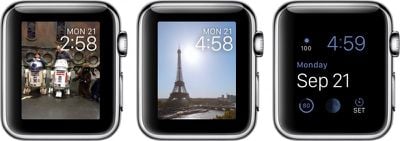
To help you get started, we've created this how-to guide to show you how to set up each of the new watch face features.
This guide assumes you know how to customize your Apple Watch's watch face. If you don't already know the process, head over to our how-to guide on that topic for reference.
Photos Watch Faces
Adding photos to your watch face only takes a few minutes to set up. In watchOS 2, you can either select a specific photo to display all of the time, or choose a photo album to see a different image every time you wake your watch.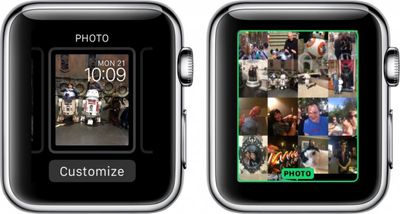
- Make sure you have synced an album to Apple Watch. If you have not yet done so, follow our instruction guide.
- With the watch face showing, firmly press on the screen to call up the customizations.
- Swipe to the left until you see Photo Album and tap to select it.
- If you wish to only show a specific image at all times, select the Photo watch face. Then tap Customize.
- Rotate the Digital Crown to zoom outward and view all images on your Apple Watch.
- Select the photo you wish to add to your watch face.
You cannot customize complications when using a personal photo as a watch face. The watch face will display only the date and time.
Time-Lapse
With watchOS 2, you can add a pre-made time-lapse video to your watch face. Apple has provided six locations: Mack Lake, New York, Hong Kong, London, Paris, and Shanghai.
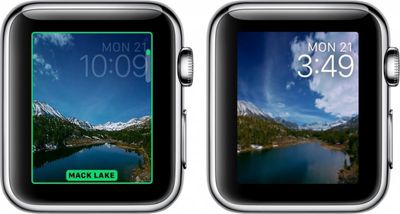
Once you've selected a time-lapse video as your watch face, it will play for approximately three seconds and then stop every time you wake your Apple Watch. Just lift your wrist to see the video play out. Videos will be different based on the time. If you check your watch at 9:00 p.m. you'll see the night sky. When you check it in the morning, you'll see a sunny sky.
You cannot customize complications with the time-lapse watch face. The watch face will display the date and time.
Third-Party Complications
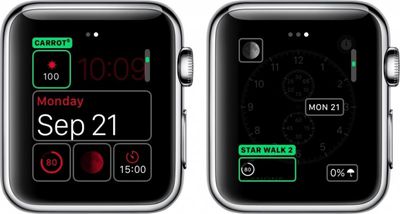
Apple has given third-party app developers the ability to add certain features to watch face complications, like flight status, precipitation, and more.
- Open the Apple Watch app on your iPhone.
- Select Complications from the main menu.
- Available complications will be listed. You can remove complications you do not wish to be shown by tapping the red remove button next to the app. You can also organize the list by touching and holding the three bars on the left side of the app until it hovers. Then, drag it to your preferred position in the list.
- With the watch face showing on Apple Watch, firmly press the screen to call up the customizations.
- Select a watch face that allows you to customize the complications and tap Customize.
- Swipe to the left to edit the complications and tap the module you wish to edit.
- Rotate the Digital Crown until you get to the third-party complication you wish to add. Then, tap the screen to save the customized watch face.
Head over to the forums to find out which apps support complications in watchOS 2.
Live Photos
Live Photos are exclusive to iPhone 6s and 6s Plus. They allow users to capture a few seconds of bursts before and after a picture is taken. If you have a compatible device, you can add Live Photos to Apple Watch the same way you do with regular photos, and they'll animate each time you raise your wrist.
- Make sure you have saved favorites or synced an Album to Apple Watch. If you have not yet done so, follow our instruction guide.
- With the watch face showing, firmly press on the screen to call up the customizations.
- Swipe to the left until you see Live Photo and tap to select it.
- Rotate the Digital Crown to zoom outward and view all images on your Apple Watch.
- Select the photo you wish to add to your watch face.
You cannot customize complications with Live Photos. The watch face will display the date and time.
Now that watchOS 2 adds more watch face possibilities, you can really personalize your look for every occasion.
























![Apple Pulls Keynote, Pages and Numbers From App Store [Update: Back]](https://images.macrumors.com/t/Okb7kitB_gNr6qe5Pex9nQIysD8=/112x112/article-new/2026/01/Apple-Creator-Studio-iWork-suite.jpg)






















Top Rated Comments
If Motorola or other android manufacturers make rectangular watches we will see praise of it here again.
The off-topic post which derailed the thread have been moved to the Getting sick of MacRumors click and bait articles (https://forums.macrumors.com/threads/getting-sick-of-macrumors-click-and-bait-articles.1892084/) feedback thread.
The Apple Watch being rectangular is one example of form following functionality, even though Apple is currently not advertising it this way with fashion in mind.
1) "If you dislike it so much, get something else and go away". I am deep in the Apple ecosystem. I'm also an Apple stockholder. If I don't like something they're doing, I'm going to complain about it. I want them to make things I want to buy and, as a stockholder, I want them to make things that I think others will want to buy.
2) And as a side-point to #1, I *DID* buy something else. I bought a 1st gen moto 360 when they went on sale for $150. There's a lot to love about it and the price is right, but I'm hobbled in what I can do with this watch when paired with my iPhone, and much of that is due to Apple not allowing 3rd party iPhone apps to communicate with Android Wear watches to the extent that 3rd party apps can communicate with an Apple Watch.
3) Another side-point to my pointing out in #2 that the moto 360 I bought for $150 was a great deal...I see these devices as accessories to my smartphone and also as fashion accessories. I don't want to spend a lot on an accessory, and I think that Apple is overpricing these things significantly, which is another complaint of mine. It's bad enough how much they charge for the watch itself, but then you can't buy another Apple-branded plastic wristband for under $50? And a metal band will set you back $150? Come on.
3) "The round screen of many Android Wear watches is a horrible design because data gets cut off." You're absolutely correct that a round screen is inferior to a rectangular screen for a productivity standpoint. But, again, these watches are equal parts computer and fashion accessories, and many people will happily trade the productivity advantage of a rectangular screen for the more fashionable look of a round screen. Don't take my word for it...the square digital watch was invented many years ago, yet today the most expensive and most desirable watches are round and still use analog clocks.
Also, no one really addressed my other big criticisms of the current Apple Watch:
a) The watchface can't be completely customized by 3rd party developers.
b) There's too much wasted black space around the actual screen.