
How to Pre-Order the iPhone X as Quickly as Possible With Apple Store App - MacRumors
Skip to Content

How to Pre-Order the iPhone X as Quickly as Possible With Apple Store App

by

iPhone X pre-orders begin this Friday, October 27 at 12:01 a.m. Pacific Time on a first come, first served basis, and customers that want any chance of receiving the smartphone on launch day will need a combination of speed and luck.
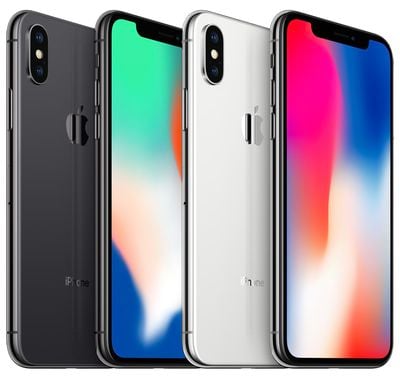
iphone x quad
The quickest way to pre-order the iPhone X is to use the Apple Store app on iPhone. Prospective buyers that want any chance of receiving the iPhone X when it launches Friday, November 3 should follow the steps below to be ready.

Note that these steps are for customers paying full price for the iPhone X upfront, and may not apply to those who owe money towards a previously carrier financed device.
apple store app

Before Pre-Orders Begin

Add the iPhone X to Your Favorites

  1. Download the Apple Store app from the App Store on your iPhone.

  2. Open the Apple Store app and tap on the iPhone X banner in the main Discover tab.

  3. Tap the iPhone X with 5.8-inch display box.

  4. Choose the color: Silver or Space Gray.

  5. Choose the capacity: 64GB or 256GB.

  6. Tap the heart icon in the top-right corner to add the iPhone X you configured to your Favorites for quick access.
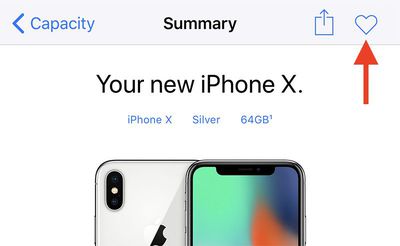
iphone x pre order summary

Use Apple Pay and Ensure Credit Card and Billing Info Are Up to Date

If you don't have Apple Pay set up, tap "Add Credit or Debit Card" or the blue "+" button in the top-right corner and follow the on-screen steps.

  1. Open the Wallet app on your iPhone.

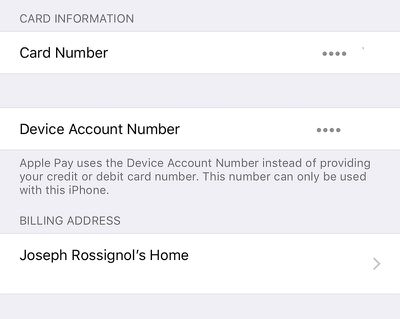
  2. Tap on the credit or debit card that you will use to pay for the iPhone X. Make sure it is still a valid and functioning card.

    wallet app card

  3. Scroll down and ensure the billing address is accurate. If not, tap on the address and edit it or enter a new one.

    wallet billing iphone 1

  4. Open the Apple Store app.

  5. Select any product and tap the blue Add to Bag button at the bottom.

  6. Tap on the Bag tab.

  7. Tap on the black Buy with Apple Pay button at the bottom. You won't actually have to purchase the item.

  8. Tap on the black Apple Pay button at the bottom again.

  9. A prompt for Touch ID will open. Ensure your shipping address, phone number, and email address appear correctly ahead of time.

When iPhone X Pre-Orders Begin

  1. Open the Apple Store app.

  2. Tap on the Account tab at the bottom.

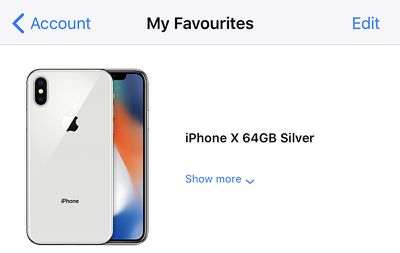
  3. Tap on the iPhone X you saved under My Favorites.

    iphone x fav tab

  4. Tap on the blue Add to Bag button at the bottom.

  5. Tap on the Bag tab.

  6. Tap on the black Buy with Apple Pay button at the bottom.

    buy with apple pay

  7. Tap on the black Apple Pay button at the bottom again.

  8. Hold your thumb enrolled in Touch ID over the Home button to authenticate and complete the purchase.

Tips and Tricks

  • Set an alarm for at least 15 minutes before 12:01 a.m. Pacific Time to ensure you are awake for pre-orders. Make sure that you wake up at the correct time by using Google or a Time Zone Converter.
  • Ensure the iPhone X configuration you add to your Favorites is the color and storage capacity you absolutely want.
  • Practice by adding any available product to your Favorites and proceeding with the checkout process until the final step before payment. Every second counts towards your chances of getting an iPhone X on launch day.
  • If you have multiple iPhones and iPads, have backup devices ready with the Apple Store app open in case something goes wrong. You can also have Apple.com open in a desktop browser as another alternative.
  • If the Add to Bag button can't be tapped, double tap the Home button and swipe up on the Apple Store app to force close it and then reopen it. Rinse and repeat until the moment iPhone X pre-orders go live.
  • If you are participating in the iPhone Upgrade Program, make sure to complete the pre-approval process in the Apple Store app so that you can speed through checkout when pre-orders begin.
  • You can still pay with a credit card without Apple Pay by tapping on the "buy with other payment options" button during checkout, but doing so could take longer. We recommend using Apple Pay if it is available to you.

Final Words

iPhone X pre-orders will likely sell out in a matter of minutes, at which point shipping estimates will be pushed back by several weeks or months, so it's important to complete the pre-order process as quickly as possible.

Once you place your pre-order, Apple will send you an email with an order number and other information. The order will be processed, prepared for shipment, and eventually delivered to the address you provided on launch day or later.

If you aren't quick enough or forget to pre-order, Apple said the iPhone X will be available for walk-in customers at its retail stores, carrier stores, and select authorized resellers like Best Buy on November 3, but supplies will likely be very tight.


Related Forum: iPhone

Top Rated Comments

johnyslats Avatar
117 months ago
Oh MacRumors, why did you have to go and tell the uninformed. If people really wanted an X they should have uncovered this themselves beforehand :(
Score: 36 Votes (Like | Disagree)
117 months ago
This will not work, don't waste your time, honestly it's not worth it.
Score: 23 Votes (Like | Disagree)
johncarync Avatar
117 months ago
Use the Apple Store app, save your config as a favorite, pay with ApplePay...dammit, MacRumors, you're giving away all my secrets!
Score: 13 Votes (Like | Disagree)
117 months ago
Actually, the whole process goes much quicker and smoother if you wait about 30 minutes after it goes on sale! :rolleyes:;)
Score: 10 Votes (Like | Disagree)
117 months ago
Good I will be busy watching Stranger Things 2 while everything is crazy.
Score: 10 Votes (Like | Disagree)
117 months ago
It's funny - the best way to order a new iPhone is on your current iPhone that is functioning just fine.
Score: 9 Votes (Like | Disagree)

Popular Stories

iPhone Duo Trio

Here's What Apple's Apps Look Like on the iPhone Duo

Tuesday October 20, 2026 11:12 am PDT by
With just three days to go until the iPhone Duo is released, Apple is getting ready for the launch. Behind the scenes, the App Store now has screenshots of Apple's built-in apps running on the Duo. We've seen some apps in marketing materials, but images of the ones we haven't seen give us an idea of what it will be like using the iPhone Duo day to day. Many apps are shown in landscape...
Apple Creator Studio iWork suite

Apple Pulls Keynote, Pages and Numbers From App Store [Update: Back]

Thursday October 22, 2026 11:01 am PDT by
Apple has temporarily removed Keynote, Pages, and Numbers from the App Store, just after releasing an update that added iPhone Duo support and a new Intelligent Assistant. It is not clear if the apps were removed intentionally, or if it is a bug. Apple has not said when the apps will be reinstated, but if it was in error, they should return soon. Update: The Mac versions are back without...
M5 MacBook Pro

RIP, MacBook Ultra

Monday October 19, 2026 9:37 am PDT by
Apple today sent out invites for an experience in Los Angeles on Wednesday, October 28, and the "Pro and tell" tagline on the invitation likely means that the rumored MacBook models with touch-enabled OLED displays will stick with MacBook Pro branding instead of the once-rumored "MacBook Ultra" name. The long-rumored "iPhone Ultra" ended up being named iPhone Duo, so speculation that Apple...
Latest Stories
iPhone Duo Launch Begins as First Orders Reach Customers
2 hours ago
1Password for Agents Keeps Your Passwords Hidden From AI
3 hours ago
iPhone Duo 24 Hours Later: Your Questions Answered
3 hours ago
Apple's iWork Apps Get 'Intelligent Assistant' and iPhone Duo Support
4 hours ago
Apple is Apparently Considering a Slightly Larger iPhone Duo
4 hours ago
Giant iPhone Duo Displays Coming to Four Apple Stores
6 hours ago
Apple Pulls Keynote, Pages and Numbers From App Store [Update: Back]
6 hours ago
Apple Updates More Apps With iPhone Duo Support
7 hours ago
Apple Will Label Apps 'Made for iPhone Duo' in App Store
10 hours ago
Amazon Takes $49 Off iPad With Prices Starting at $399.99
10 hours ago
F1 on Apple TV Now Available in Dolby Atmos
11 hours ago
Apple Reveals More Than 50 Apps That Will Be Updated for iPhone Duo
11 hours ago
Apple Blocks Certificates That Could Help Attackers Fake Websites
13 hours ago
Giant iPhone Duo Installations Spotted at Apple Fifth Avenue
13 hours ago
iPhone Duo 2 Prototypes Include Under-Display Face ID
14 hours ago
Tesla App Gains iPad and iPhone Duo Support
18 hours ago
Apple Reportedly Boosts iPhone Duo Orders by 44%
18 hours ago
Fortnite Returning to Australian App Store After Court Ruling
18 hours ago
Apple Ordered to Open iPhone to Rival App Stores in Australia
19 hours ago
Apple Suppliers Face Hurdles Cutting Circuit Board Emissions
19 hours ago
Things Updated for iPhone Duo With Adaptive Layout
20 hours ago
Simplicity and Siri AI Are HomeView's Killer Features, Apple Says
20 hours ago
iPhone Duo Reviewers Really Miss Face ID
1 day ago
Does the iPhone Duo Run Hot? Here's What Reviews Found
1 day ago
Apple Music's New Look is Now Live on Apple's Website
1 day ago
Anthropic Launches Claude Duet, a Proactive AI Agent
1 day ago
What 32,000 Folds Did to the iPhone Duo's Hinge
1 day ago
iPhone Duo's Hidden FaceTime Camera Takes 'Trash' Photos
1 day ago
iPhone Duo Has 'Edge Light' Feature That Debuted on Macs Last Year
1 day ago
Apple Support App Updated for iPhone Duo's Larger Display
1 day ago









































