

When using the Camera app on iPhones, the Night Mode feature comes on automatically when the camera sensor registers an indoor or outdoor scene that is dark enough to warrant brightening, resulting in natural colors and reduced noise. That's the idea, anyway. The reality is that Night Mode won't always capture the kind of nighttime image that you want.
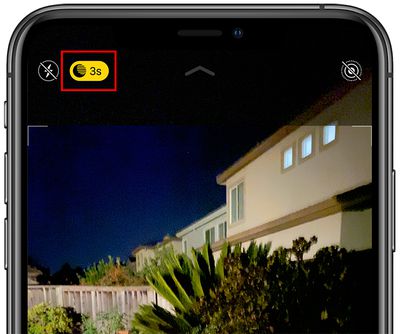
If you're aiming to shoot an authentic evening scene in which any sources of light remain subdued, for example, it's better to turn off Night Mode to prevent extreme light exposure and a blown out picture.
If you don't want Night Mode engaged when you're shooting in low light environments, you can turn it off by tapping the yellow Night Mode button when it appears at the top of the viewfinder. The problem is, when you open the Camera app again and the sensor detects low light, Night Mode will automatically enable itself again.
In iOS 14, there was no way to disable Night Mode for good – you had to manually switch Night Mode off every time you relaunch the Camera. But in iOS 15 and later, you can turn off Night Mode and ensure that it stays off whenever you subsequently open the Camera app. Here's how.
- Launch the Settings app on your iPhone.
- Tap Camera.
- Tap Preserve Settings.
- Toggle the Night Mode switch to the green ON position.
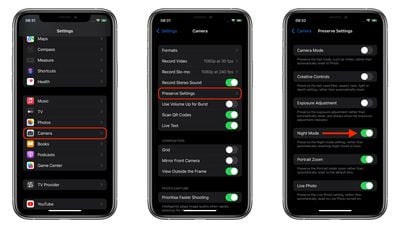
Turning on this switch makes the Camera remember that you disabled Night Mode last time you were shooting. You can still manually enable Night Mode in the Camera app in the usual way, but now you're in control of when it's active.























![Apple Pulls Keynote, Pages and Numbers From App Store [Update: Back]](https://images.macrumors.com/t/Okb7kitB_gNr6qe5Pex9nQIysD8=/112x112/article-new/2026/01/Apple-Creator-Studio-iWork-suite.jpg)






















