 In iOS 13, Apple introduced a redesigned customer feedback process for its Apple Maps app which is designed to make it easier for users to submit corrections for things like incorrect addresses, business locations, or operating hours.
If you find an error or something that needs updating in Apple's maps information, you can now send the correct details in just a few quick taps. The following steps guide you through the process using a fictional example of a café called Hannah's that shows up in Apple Maps but no longer exists.
- Launch the Apple Maps app on your iPhone or iPad.
- Navigate the map to the area where the label is that you want to submit for removal.
- Tap the Information icon (the circled 'i') in the button overlay menu at the top-right corner of the screen.

- Tap Report an Issue.
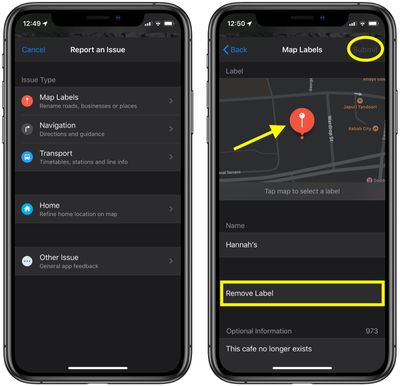
- Under Issue Type, tap Map Labels.
- Tap the map to select the problematic label.
- Tap Remove Label.
- Input any additional information below. In our example, "This café no longer exists."
- Tap Submit in the top-right corner of the screen.
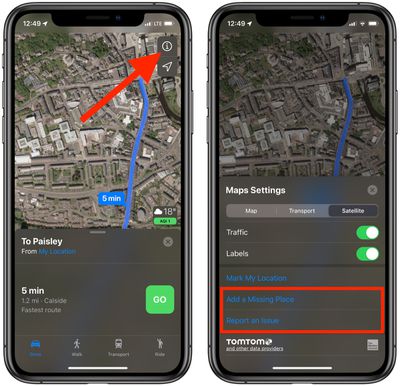
The information that you have to provide when submitting the issue depends on what you want to report. For instance, in the case of reporting a missing place (the option visible in the second screen in our example), you'll be prompted to clarify if it's a business, landmark, street, address, or other, and then be invited to add any additional relevant information, such as a business's opening hours, website, or phone number.
As the third screen in our example suggests, you can report other issues like errors in navigational directions or in public transport timetables, stations, and line information. As you'd expect, the details you'll be asked to provide will vary depending on the problem. And if it's just general feedback about the Maps app that you want to submit, you can do that too.