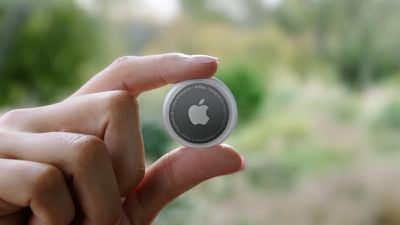
When you set up an AirTag, it's automatically associated with your Apple ID, which means it's linked to your ‌Apple ID‌ and can't be used by someone else unless you reset it.
f1618938547
Resetting can be as simple as removing an ‌AirTag‌ from your ‌Apple ID‌, by following these steps:

  1. Open the Find My app.
  2. Tap on the ‌AirTag‌ that you want to remove by choosing its name from the list.
  3. Swipe upwards to bring up the full ‌AirTag‌ settings.
  4. Tap on "Remove Item." remove airtag
  5. Tap on "Remove" and then tap again on the "Remove" popup.
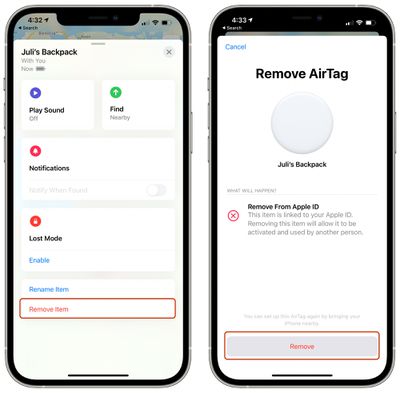
Once you've gone through this process, the ‌AirTag‌'s ownership is cleared and you can give it to someone else to set up and use with their own account.

Unfortunately, if you're not in Bluetooth range of your ‌AirTag‌ when you remove it from your account, it won't register and a manual reset will be required. If you wind up with an ‌AirTag‌ from someone else that says it's linked to their ID but they've already removed it from their account, follow these steps to physically reset the ‌AirTag‌:

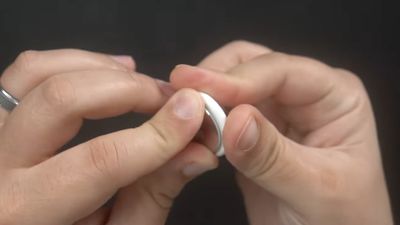
  1. Press down on the stainless steel backing of the ‌AirTag‌.
  2. As you press down, rotate counterclockwise until the cover stops rotating. airtag battery twist open
  3. Pull apart the two halves of the ‌AirTag‌. airtag battery pry apart
  4. Take out the battery.
  5. Put the battery back in.
  6. Press down on the battery until it makes a sound.
  7. Once the sound finishes, repeat this process four more times, removing and replacing the battery and then pressing on the battery until you hear a sound. airtag battery removed
  8. You need to hear a total of five sounds to ensure that the ‌AirTag‌ is reset.
  9. After you've finished this process, put the cover on the ‌AirTag‌ back on and then align the three tabs on the cover with the three slots on the ‌AirTag‌.
  10. Press down on the cover until there's a sound, and rotate the cover clockwise until it locks in place.

To avoid having to do this tedious physical resetting process, it's best to make sure that the person giving you an ‌AirTag‌ has removed it from their account in the proper way while it's in range of Bluetooth, because that's a far easier process for clearing ‌AirTag‌ ownership to pass it along to someone else.

Related Roundup: AirTag

Top Rated Comments

dojoman Avatar
62 months ago
Second step is required only if you removed the Airtag from your account and it's not in Bluetooth range. Thieves cannot use it if you didn't remove it from your account in the beginning.
Score: 23 Votes (Like | Disagree)
dwaltwhit Avatar
62 months ago
AirTags are made to track LOST items, not stolen ones. It is not an anti-theft device. It is not made so you can hunt down a thief and retrieve your items. It is not made to be thief-proof. I feel like people are making the AirTag into something it’s not.
Score: 22 Votes (Like | Disagree)
countryside Avatar
62 months ago
WARNING: Please do this away from children as they MAY swallow the battery... or the entire AirTag for that matter. Thanks, Officeworks ('https://forums.macrumors.com/threads/airtag-removable-battery-sparks-child-safety-concerns.2294746/') for alerting me to this incredible oversight.
Score: 17 Votes (Like | Disagree)
randomthoughts Avatar
62 months ago
So this is what happens, you can’t pair it to the other Apple ID, but the Find My app on the original Apple ID can’t update the location. If I bring it to a device with the original Apple ID, it wants to try to pair again.

So while someone won’t be able to disassociate the AirTag from your account for their own use, if you don’t have the item in your possession, someone could reset it and prevent you from tracking it.

That’s an issue.
Score: 12 Votes (Like | Disagree)
Icaras Avatar
62 months ago

So someone can find my AirTag and reset it to take ownership before I even realize it’s lost? I would think that these would have the same ownership lock that iPhones do… (forgive me but I forget what they call it… maybe Authentication Lock or something?)
No.

"If you wind up with an AirTag from someone else that says it's linked to their ID but they've already removed it from their account, follow these steps to physically reset the AirTag:"
Score: 10 Votes (Like | Disagree)
Ronal Avatar
62 months ago
Why do they even have the second option to remove from Apple ID? Makes this less and less secure, meaning people will still try to steal it and use it for themselves
Score: 9 Votes (Like | Disagree)

Popular Stories

Apple Logo Zoomed

Tim Cook Teases Plans for Apple's Upcoming 50th Anniversary

Thursday February 5, 2026 12:54 pm PST by
Apple turns 50 this year, and its CEO Tim Cook has promised to celebrate the milestone. The big day falls on April 1, 2026. "I've been unusually reflective lately about Apple because we have been working on what do we do to mark this moment," Cook told employees today, according to Bloomberg's Mark Gurman. "When you really stop and pause and think about the last 50 years, it makes your heart ...
iOS 26

iOS 26.3 and iOS 26.4 Will Add These New Features to Your iPhone

Tuesday February 3, 2026 7:47 am PST by
While the iOS 26.3 Release Candidate is now available ahead of a public release, the first iOS 26.4 beta is likely still at least a week away. Following beta testing, iOS 26.4 will likely be released to the general public in March or April. Below, we have recapped known or rumored iOS 26.3 and iOS 26.4 features so far. iOS 26.3 iPhone to Android Transfer Tool iOS 26.3 makes it easier...
imac video apple feature

Apple Makes Its Second-Biggest Acquisition Ever

Tuesday February 3, 2026 12:45 pm PST by
Apple recently acquired Israeli startup Q.ai for close to $2 billion, according to Financial Times sources. That would make this Apple's second-biggest acquisition ever, after it paid $3 billion for the popular headphone maker Beats in 2014. This is also the largest known Apple acquisition since the company purchased Intel's smartphone modem business and patents for $1 billion in 2019....
wwdc sans text feature

Apple Rumored to Announce New Product on February 19

Thursday February 5, 2026 12:22 pm PST by
Apple plans to announce the iPhone 17e on Thursday, February 19, according to Macwelt, the German equivalent of Macworld. The report, citing industry sources, is available in English on Macworld. Apple announced the iPhone 16e on Wednesday, February 19 last year, so the iPhone 17e would be unveiled exactly one year later if this rumor is accurate. It is quite uncommon for Apple to unveil...
Finder Siri Feature

Why Apple's iOS 26.4 Siri Upgrade Will Be Bigger Than Originally Promised

Friday February 6, 2026 3:06 pm PST by
In the iOS 26.4 update that's coming this spring, Apple will introduce a new version of Siri that's going to overhaul how we interact with the personal assistant and what it's able to do. The iOS 26.4 version of Siri won't work like ChatGPT or Claude, but it will rely on large language models (LLMs) and has been updated from the ground up. Upgraded Architecture The next-generation...