

How to Restrict an App's Location Access in iOS 13 - MacRumors
Skip to Content

How to Restrict an App's Location Access in iOS 13

by

ios location servicesApple has doubled down on its privacy features in iOS 13, giving iPhone and iPad users a more granular view of how apps access their location information.

On Apple devices, the location services that apps can tap into use GPS, Bluetooth, and crowd-sourced Wi-Fi hotspot and cellular mast locations to determine your approximate location. The good news is that iOS 13 makes you more aware of how often apps are tracking you, as well as their motivation for doing so, and importantly it makes sure you're in control of your data.

If an app grabs your location data, iOS may display a popup notification showing you a map with the data that the app has tracked, as well as the specific reason why the app is tracking you, along with the question "Do you want to continue allowing this?"

Armed with this information, you'll usually be given three options: Allow While Using App, Allow Once, and Don't Allow. The first option limits the app's access to your location data to when the app is actively being used, the second allows it to track your location just this once, while the third disables location tracking completely.
how to set location service ios 13 1
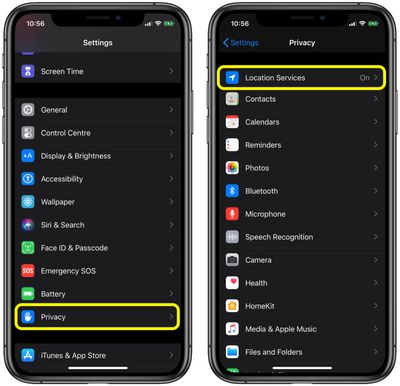
You can expect to see the "Just Once" option appear when you first launch a just-installed app. Otherwise, you can check out how apps on your device are using location services anytime you like by opening the Settings app and tapping through to Privacy -> Location Services.
how to set location service ios 13 2
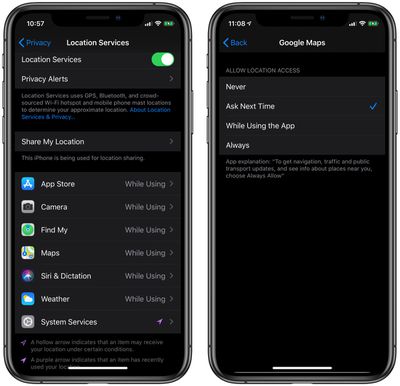
From here, you can change each app's permissions (Never / Ask Next Time /While Using the App / Always) and you'll also learn the reason why an app wants to access your location, allowing you to enable or disable location services on an ad-hoc basis.

The options you choose will depend on the app in question – some apps may have just cause to track your whereabouts in the background, while others may not. The point is Apple wants you to be in control of this behavior, so you can expect similar periodic notifications about what an app is up to with your location information.

Related Forum: iOS 13

Top Rated Comments

JosephAW Avatar
89 months ago
I'd like to see the "ask" option for all sensors. Mic, Camera, Data, etc.
Score: 6 Votes (Like | Disagree)
nutmac Avatar
89 months ago
While this is a good move, it doesn't solve the "home/away" tracking many home automation apps rely on (e.g., August, Nest). And many health tracking apps likewise rely on location service. To this end, I would like one additional option:

* Allow app to track you within certain distance where the app requests location access
Score: 2 Votes (Like | Disagree)
TheWatchfulOne Avatar
89 months ago
...A notes app... !?!? :confused:

Sure why not? For some people, it might be useful to look on a map and see where they were when they wrote the note. Especially in the case where a specific location inspired a great idea. If it's not useful, turn off Location Services for that app.
Score: 1 Votes (Like | Disagree)
89 months ago
Nice! My boss wants us to install an app in which we see our schedules, report our findings and all kinds of stuff.

When we start a shift, the app records our location, once. But I don’t trust ‘em. I’m afraid they can always track us with that app. So I set it to While Using at first. Now I have it turned off completely. I only switch it on when I start my shift and then turn it off again.

Hope that prevents them from spying
If it’s your personal phone can’t really make you install anything. If a company phone then can do and ask what ever wants.
Score: 1 Votes (Like | Disagree)
69Mustang Avatar
89 months ago
This is bad news for Google and Facebook as their apps tracks your location for no reason at all times unless explicitly changed by the user.
Not sure who you're getting your info from, but you seriously need to give it back to them.:D To be fair, I can't speak for Facebook apps because I have none. But if the source is the same one you use for your Google apps info, it's pretty suspect to say the least.

Just a guess, but I'd bet you have no idea how location tracking works on iOS or Android.
Score: 1 Votes (Like | Disagree)
Crowbot Avatar
89 months ago
Isn't this how it worked in past iOS verions? Nothing new
They're adding the option to have the app ask every time. Before you had to turn it on or off or "while in use".
Score: 1 Votes (Like | Disagree)

Popular Stories

apple lock security bug vulnerability fix privacy

Apple Warns Canada's Bill C-22 Could Force Encryption Backdoors

Friday May 8, 2026 4:22 am PDT by
Apple and Meta have opposed a Canadian bill that the companies say could force them to create backdoor access to encrypted user data, should it pass through the country's parliament. Proposed by Canada's ruling Liberal Party, Bill C-22 contains provisions that could be similar ​to a UK data access provision order sent to Apple last year, depending on how they are implemented. Back in Feb...
Apple Event Logo

Apple's Next Era Begins September 1

Thursday May 7, 2026 10:36 am PDT by
Apple recently announced that Tim Cook will be stepping down as CEO later this year, after 15 years of leading the company. Effective September 1, Apple's hardware engineering chief John Ternus will become the company's next CEO, while Cook will become executive chairman of Apple's board of directors. In his new role, Apple said Cook will assist with "certain aspects" of the company,...
Instagram Feature 2

PSA: Instagram Encrypted Messaging Ends on Friday, May 8

Tuesday May 5, 2026 8:24 am PDT by
Instagram will remove end-to-end encryption for direct messages between users from May 8, 2026. When the date comes around, Meta will potentially be able to see the contents of all messages between users on the social media platform. Encrypting messages has been an optional feature in Instagram since 2023, but in March of this year the social media platform quietly updated a help page to say ...








































