

If you're a heavy WhatsApp user and your iPhone is running low on storage, it may be that all the videos, voice messages and photos stored in the app are taking up a hefty amount of space on your device.

Fortunately, WhatsApp features a built-in media management tool that can help you identify, select, and bulk delete GIFs, photos, and videos that may be filling up your phone.
The tool groups together large files and media that has been forwarded many times, sorting files by size in descending order, and provides a way to preview files before deleting them. You can also see a preview of media before selecting one or multiple files to delete.
To access the storage management tool, launch the app and go to Settings -> Storage and Data -> Manage Storage.
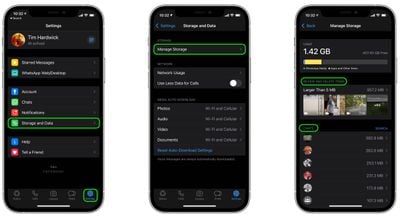
The Review and Delete Items section shows you media that is larger than 5MB, while the Chats section below lists all the media shared in a particular chat thread. Tapping into either section allows you to view media and delete items individually in the viewing window.
You can also bulk-delete media by tapping Select in the top-right corner of the screen, choosing multiple items, then tapping the Trash icon in the bottom-right corner. There's also a nuke option in the form of the Select All button, which lets you delete all WhatsApp media over 5MB.























![Apple Pulls Keynote, Pages and Numbers From App Store [Update: Back]](https://images.macrumors.com/t/Okb7kitB_gNr6qe5Pex9nQIysD8=/112x112/article-new/2026/01/Apple-Creator-Studio-iWork-suite.jpg)





















