
How to Use Safari's Private Browsing Mode - MacRumors
Skip to Content

How to Use Safari's Private Browsing Mode

by

This article explains how to use Safari's Private Browsing mode, which prevents your browsing history from being logged on your Apple devices. It's a useful feature if you're buying gifts online for friends or family, for instance, and you don't want anyone with access to your devices to find out what you're up to.
safari icon blue banner
Of course, if you've already been browsing where you shouldn't have and didn't use Safari's dedicated privacy mode, don't worry – we'll also show you two different ways of deleting your existing browsing history. Keep reading to find out how.

Using Safari's Private Browsing Mode

Enabling Private Browsing limits Safari in three important ways: It prevents the browser from creating a history of the pages you visit, it stops AutoFill information like website usernames and passwords from being remembered, and any tabs you open won't be stored in iCloud.

Also, for added peace of mind when you browse privately, Safari automatically prevents cross-site tracking, and requests that sites and third-party content providers don't track you as a rule. Additionally, the privacy mode stops sites from modifying any information stored on your iOS device, and deletes cookies when you close the associated tab.

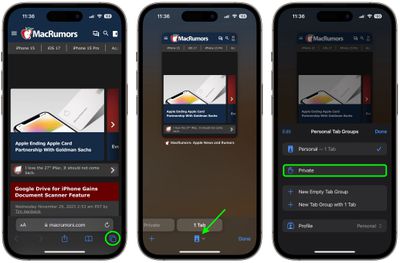
To enable Private Browsing in Safari, follow these steps.

  1. Open Safari on your iPhone or iPad, tap the Pages icon (consisting of two squares) to bring up the open tabs view, and then tap the profile icon, centered at the bottom of the screen.
  2. Tap Private in the pop-up menu card to open a private tab. (You may have to authenticate with Face ID or your passcode.)
    safari

  3. When you're done browsing, return to the open tabs view, individually swipe any open tabs to close them if you wish.
  4. Tap the profile icon again, then choose your regular profile at the top. Your private browsing session is now cleared from memory.
Clearing Existing Browsing History

When you clear your browsing history on a device running iOS 11 or higher, the same logs are cleared on any other devices signed into your ‌iCloud‌ account. The following methods also clear all cookies and web data on the device you're currently using, although AutoFill information remains unchanged.

Method 1

The first method outlined below allows you to either limit the clearing of history, cookies and website data to a specific timeframe, or to delete your existing web history altogether.

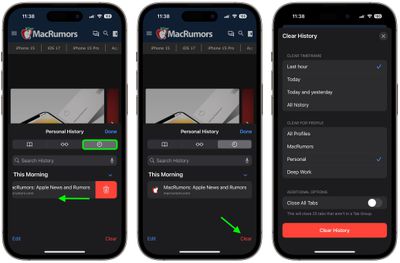
  1. Open Safari and with a tab open, tap the Bookmarks icon (the open book) located at the bottom of the screen.
  2. Tap the tab at the top of the screen with a clock symbol, and you'll see a history of your browsing activity.
  3. To remove instances of recorded visits to specific web pages, swipe leftwards across individual logs in the list and tap the red delete button that appears.
  4. To delete the entire browsing history list, tap Clear.
  5. Choose the timeframe to clear (Last hour, Today, Today and yesterday, or All history), choose the profile or select All Profiles, then tap Clear History.
safari

Method 2

The second method of wiping your browsing history might be considered the 'nuke' option, since it clears all history, cookies and website data on that device, regardless of when the sites were accessed.

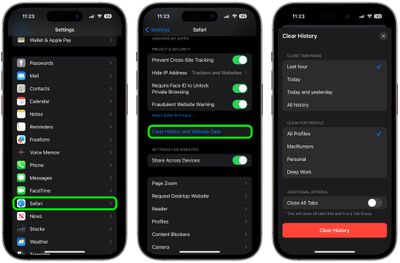
  1. Open the Settings app and scroll down to Safari in the list.
  2. Tap the "Clear History and Website Data" option near the bottom of the menu. (Note that this setting might be grayed out if there's already no history to clear or if parental controls are set for websites.)

  3. Choose the timeframe to clear (Last hour, Today, Today and yesterday, or All history), choose the profile or select All Profiles, then tap Clear History.
  4. Tap Clear History and Data in the pop-up menu to confirm.
    settings

And that's it. Note that these built-in Safari features only make you safer from discovery by other people in the same household.

If your privacy concerns extend to a desire for enhanced security and anonymity online, consider subscribing to a Virtual Private Network (VPN) service that offers an iOS client or supports OpenVPN (Private Internet Access and ProtonVPN are two popular options), and using a Tor-powered browser for iOS.


Tag: Safari

Top Rated Comments

keysofanxiety Avatar
114 months ago

This article explains how to use Safari's Private Browsing mode, which prevents your browsing history from being logged on your Apple devices. It's a useful feature if you're buying gifts online for friends or family, for instance, and you don't want anyone with access to your devices to find out what you're up to.
...yeah... yeah, that’s right... we use it for shopping...

In all seriousness, great article.
Score: 11 Votes (Like | Disagree)
testcard Avatar
114 months ago
“...buying gifts online for friends or family...”
That’s one euphemism I need to work into more conversations.
Score: 6 Votes (Like | Disagree)
puckhead193 Avatar
114 months ago
apple really should just change the name to what we really know what its used for already...
Score: 3 Votes (Like | Disagree)
testcard Avatar
114 months ago
I can really use this info, because I’m always “buying gifts”. ;) :cool:
Impressed that you can still manage to use a keyboard. ;)
Score: 2 Votes (Like | Disagree)
Hastings101 Avatar
114 months ago
Now no one will know I was using my iPhone to buy sex toys for my friends or family
Score: 2 Votes (Like | Disagree)
114 months ago

[doublepost=1517460866][/doublepost]Just saying...
Score: 1 Votes (Like | Disagree)

Popular Stories

Switch to Safari

Apple Explains Why Chrome Users Should 'Switch to Safari'

Tuesday October 13, 2026 5:29 am PDT by
Apple has launched a new "Switch to Safari" marketing campaign that encourages Chrome users to switch to Safari as their web browser of choice on the Mac. "Safari is a more powerful and private browser than Chrome," says Apple. Apple has a new "Switch to Safari" page on its website that outlines more than 10 reasons that Chrome users should switch to Safari, including faster performance...
M5 MacBook Pro

RIP, MacBook Ultra

Monday October 19, 2026 9:37 am PDT by
Apple today sent out invites for an experience in Los Angeles on Wednesday, October 28, and the "Pro and tell" tagline on the invitation likely means that the rumored MacBook models with touch-enabled OLED displays will stick with MacBook Pro branding instead of the once-rumored "MacBook Ultra" name. The long-rumored "iPhone Ultra" ended up being named iPhone Duo, so speculation that Apple...
iPhone Duo Trio

Here's What Apple's Apps Look Like on the iPhone Duo

Tuesday October 20, 2026 11:12 am PDT by
With just three days to go until the iPhone Duo is released, Apple is getting ready for the launch. Behind the scenes, the App Store now has screenshots of Apple's built-in apps running on the Duo. We've seen some apps in marketing materials, but images of the ones we haven't seen give us an idea of what it will be like using the iPhone Duo day to day. Many apps are shown in landscape...
Latest Stories
iPhone Duo Launch Begins as First Orders Reach Customers
39 minutes ago
1Password for Agents Keeps Your Passwords Hidden From AI
1 hour ago
iPhone Duo 24 Hours Later: Your Questions Answered
2 hours ago
Apple's iWork Apps Get 'Intelligent Assistant' and iPhone Duo Support
3 hours ago
Apple is Apparently Considering a Slightly Larger iPhone Duo
3 hours ago
Giant iPhone Duo Displays Coming to Four Apple Stores
4 hours ago
Apple Pulls Keynote, Pages and Numbers From App Store [Update: Back]
5 hours ago
Apple Updates More Apps With iPhone Duo Support
5 hours ago
Apple Will Label Apps 'Made for iPhone Duo' in App Store
8 hours ago
Amazon Takes $49 Off iPad With Prices Starting at $399.99
9 hours ago
F1 on Apple TV Now Available in Dolby Atmos
9 hours ago
Apple Reveals More Than 50 Apps That Will Be Updated for iPhone Duo
10 hours ago
Apple Blocks Certificates That Could Help Attackers Fake Websites
11 hours ago
Giant iPhone Duo Installations Spotted at Apple Fifth Avenue
12 hours ago
iPhone Duo 2 Prototypes Include Under-Display Face ID
12 hours ago
Tesla App Gains iPad and iPhone Duo Support
16 hours ago
Apple Reportedly Boosts iPhone Duo Orders by 44%
17 hours ago
Fortnite Returning to Australian App Store After Court Ruling
17 hours ago
Apple Ordered to Open iPhone to Rival App Stores in Australia
17 hours ago
Apple Suppliers Face Hurdles Cutting Circuit Board Emissions
18 hours ago
Things Updated for iPhone Duo With Adaptive Layout
18 hours ago
Simplicity and Siri AI Are HomeView's Killer Features, Apple Says
18 hours ago
iPhone Duo Reviewers Really Miss Face ID
23 hours ago
Does the iPhone Duo Run Hot? Here's What Reviews Found
1 day ago
Apple Music's New Look is Now Live on Apple's Website
1 day ago
Anthropic Launches Claude Duet, a Proactive AI Agent
1 day ago
What 32,000 Folds Did to the iPhone Duo's Hinge
1 day ago
iPhone Duo's Hidden FaceTime Camera Takes 'Trash' Photos
1 day ago
iPhone Duo Has 'Edge Light' Feature That Debuted on Macs Last Year
1 day ago
Apple Support App Updated for iPhone Duo's Larger Display
1 day ago









































