

How to Use the New Safari Web Browser Settings in macOS High Sierra - MacRumors
Skip to Content

How to Use the New Safari Web Browser Settings in macOS High Sierra

by

safari iconWith the public release of macOS High Sierra, Apple introduced some additional features to its native Safari web browser. Here we'll cover just what they are and how you can customize them to make your web browsing experience a more enjoyable one.

Individual Website Settings

One of the most welcome new changes in Safari 11 is the ability to customize a range of settings for individual websites. Once these options are set up for a site, Safari applies them automatically so you don't have to bother with them again. Here's how.

  1. Navigate to a site you frequently visit.
  2. Right-click on the URL or website name that appears in the address bar, and select "Settings for This Website". Alternatively, click Safari in the menu bar and you'll see the same option under Preferences.
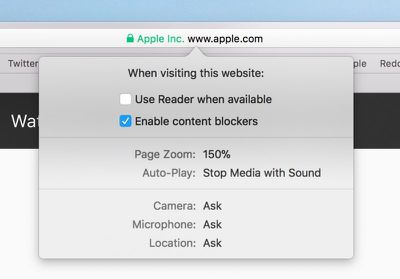
  3. Select your preferences from the drop-down pane that appears below the address bar to control how the website behaves, either by checking the boxes or selecting a setting from the available options.

Safari's built-in Reader mode strips online articles of extraneous web page furniture to make them more readable. Reader is usually enabled by clicking an icon that sometimes appears in the far left of the address bar, but you can check "Use Reader when available" to switch to this by default.

The box next to "Enable content blockers" lets you set whether to activate any ad-blocking extensions you may have installed, while the Page Zoom setting lets you adjust the size that website fonts and images display, allowing you to make them easier to read and navigate.
Screen Shot 5
With the Auto-Play setting, you can prevent websites from playing video the moment you visit a page, which should make browsing a lot less infuriating. The options are Allow All Auto-Play, Stop Media with Sound, and Never Auto-Play.

The last three options in the preferences pane let you choose whether to allow or deny the site access to your Mac's camera and microphone, and whether to enable location detection. If your preference is likely to change from time to time for these, set them to "Ask", and Safari will query you whenever access is requested by the site.

Safari Website Preferences Tab

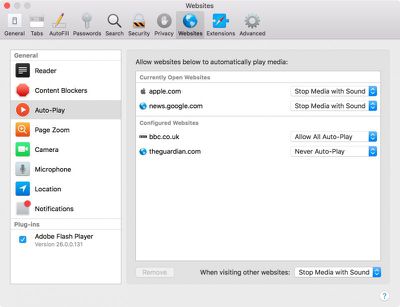
Helpfully, Apple has added a new tab to Safari preferences for you to keep track of your individual website settings. You can access it at any time by clicking "Preferences" In the Safari menu bar and selecting the Websites tab.
Screen Shot 1 2
Here you'll find lists of websites that are currently open as well as ones you've customized in the past, categorized by individual settings, where you easily can adjust them. You'll also see an additional setting in the General column listing your preference for websites you've visited that have prompted you about receiving Notifications.

Intelligent Tracking Prevention

Another new feature Apple has added in the latest Safari is Intelligent Tracking Prevention (ITP). Apple's own testing has found that popular websites can harbor more than 70 cross-site tracking and third-party cookie trackers that all silently collect data on users while making the browsing experience increasingly sluggish.

intelligent tracking prevention
To solve this, ITP uses local machine learning to identify cookie types and partition them or purge the cross-site scripting data of suspect ad trackers, without affecting the functioning of helpful cookies like those containing localized data or login details, for example. The feature should increase user privacy as well as boost overall browsing speed. You don't need to do anything to enjoy the benefits of ITP – it's on by default.


Tag: Safari
Related Forum: macOS High Sierra

Top Rated Comments

118 months ago
So ITP means I can delete ghostery?
Score: 1 Votes (Like | Disagree)

Popular Stories

Switch to Safari

Apple Explains Why Chrome Users Should 'Switch to Safari'

Tuesday October 13, 2026 5:29 am PDT by
Apple has launched a new "Switch to Safari" marketing campaign that encourages Chrome users to switch to Safari as their web browser of choice on the Mac. "Safari is a more powerful and private browser than Chrome," says Apple. Apple has a new "Switch to Safari" page on its website that outlines more than 10 reasons that Chrome users should switch to Safari, including faster performance...
iPhone Duo Trio

Here's What Apple's Apps Look Like on the iPhone Duo

Tuesday October 20, 2026 11:12 am PDT by
With just three days to go until the iPhone Duo is released, Apple is getting ready for the launch. Behind the scenes, the App Store now has screenshots of Apple's built-in apps running on the Duo. We've seen some apps in marketing materials, but images of the ones we haven't seen give us an idea of what it will be like using the iPhone Duo day to day. Many apps are shown in landscape...
Apple Creator Studio iWork suite

Apple Pulls Keynote, Pages and Numbers From App Store [Update: Back]

Thursday October 22, 2026 11:01 am PDT by
Apple has temporarily removed Keynote, Pages, and Numbers from the App Store, just after releasing an update that added iPhone Duo support and a new Intelligent Assistant. It is not clear if the apps were removed intentionally, or if it is a bug. Apple has not said when the apps will be reinstated, but if it was in error, they should return soon. Update: The Mac versions are back without...
Latest Stories
iPhone Duo Launch Begins as First Orders Reach Customers
6 hours ago
1Password for Agents Keeps Your Passwords Hidden From AI
6 hours ago
iPhone Duo 24 Hours Later: Your Questions Answered
7 hours ago
Apple's iWork Apps Get 'Intelligent Assistant' and iPhone Duo Support
8 hours ago
Apple is Apparently Considering a Slightly Larger iPhone Duo
8 hours ago
Giant iPhone Duo Displays Coming to Four Apple Stores
9 hours ago
Apple Pulls Keynote, Pages and Numbers From App Store [Update: Back]
10 hours ago
Apple Updates More Apps With iPhone Duo Support
10 hours ago
Apple Will Label Apps 'Made for iPhone Duo' in App Store
13 hours ago
Amazon Takes $49 Off iPad With Prices Starting at $399.99
14 hours ago
F1 on Apple TV Now Available in Dolby Atmos
14 hours ago
Apple Reveals More Than 50 Apps That Will Be Updated for iPhone Duo
15 hours ago
Apple Blocks Certificates That Could Help Attackers Fake Websites
16 hours ago
Giant iPhone Duo Installations Spotted at Apple Fifth Avenue
17 hours ago
iPhone Duo 2 Prototypes Include Under-Display Face ID
17 hours ago
Tesla App Gains iPad and iPhone Duo Support
21 hours ago
Apple Reportedly Boosts iPhone Duo Orders by 44%
21 hours ago
Fortnite Returning to Australian App Store After Court Ruling
22 hours ago
Apple Ordered to Open iPhone to Rival App Stores in Australia
22 hours ago
Apple Suppliers Face Hurdles Cutting Circuit Board Emissions
23 hours ago
Things Updated for iPhone Duo With Adaptive Layout
23 hours ago
Simplicity and Siri AI Are HomeView's Killer Features, Apple Says
23 hours ago
iPhone Duo Reviewers Really Miss Face ID
1 day ago
Does the iPhone Duo Run Hot? Here's What Reviews Found
1 day ago
Apple Music's New Look is Now Live on Apple's Website
1 day ago
Anthropic Launches Claude Duet, a Proactive AI Agent
1 day ago
What 32,000 Folds Did to the iPhone Duo's Hinge
1 day ago
iPhone Duo's Hidden FaceTime Camera Takes 'Trash' Photos
1 day ago
iPhone Duo Has 'Edge Light' Feature That Debuted on Macs Last Year
1 day ago
Apple Support App Updated for iPhone Duo's Larger Display
1 day ago









































