

On iPhone and iPad, Apple includes a Translate app that can translate several different languages in real-time, and Safari has integrated translation capabilities, too.

Thanks to its webpage Translation feature, Safari will automatically detect if it can translate a foreign webpage you visit based on your Preferred Languages list. Keep reading to learn how it all works.
At the time of writing, supported languages include English, Spanish, French, Italian, German, Russian, Portuguese, Japanese, Chinese, Korean, Ukrainian, Polish, Arabic, Dutch, Indonesian, Thai, Turkish, and Vietnamese.
How Translate a Webpage in Safari
- Launch Safari on your iPhone or iPad, then visit a webpage that's in a language you'd like to translate and watch for the icon in the address bar to indicate that a translation is available.

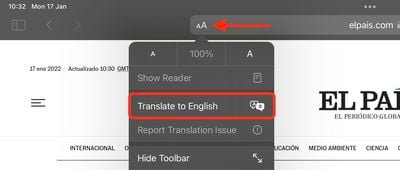
- Tap the aA button in the far-left of the address bar, then select Translate to [Language] in the dropdown menu. If you don't see the option, the webpage either isn't compatible with Safari's translation feature or the language isn't supported.
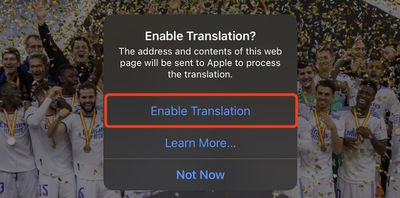
- Tap Enable Translation in the prompt if required.
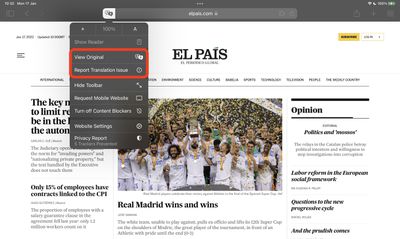
- To view the original non-translated webpage, select View Original in the address bar options panel, which will be highlighted. You also have the option to Report Translation Issue if you see one.

Add More Language Options to Safari Webpage Translation
You can translate web content into additional languages if you add them to your preferred languages list. The following steps show you how it's done.
- Launch the Settings app on your iPhone and iPad.
- Tap General -> Language & Region.
- Tap Add Language....
- Select a language from the list.
- Tap your preferred language to keep the current language that the system is using, thereby confirming this selection as an additional Webpage Translation language option.
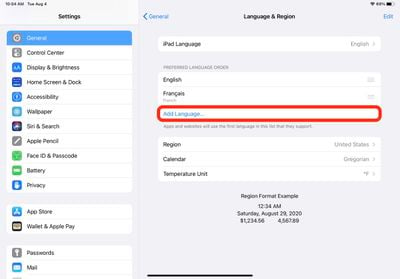
After following the above steps, the next time you visit a compatible webpage in another language you'll see your selected languages available as additional translation options.



























![Apple Pulls Keynote, Pages and Numbers From App Store [Update: Back]](https://images.macrumors.com/t/Okb7kitB_gNr6qe5Pex9nQIysD8=/112x112/article-new/2026/01/Apple-Creator-Studio-iWork-suite.jpg)

















