

The native camera app on iPhone includes functionality that allows you to scan QR codes and access QR code content like URLs without having to download a third-party app.
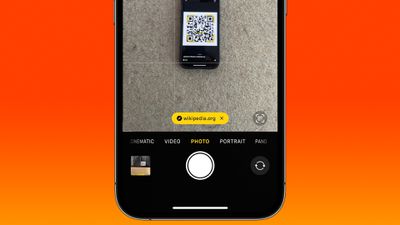
QR codes can include contact information, calendar events, website links, phone numbers, email addresses, Wi-Fi information, and more, so they can be pretty handy. Here's how to scan a QR code when you run into one:
- Open the Camera app on the iPhone or iPad.
- Make sure you have adequate lighting so the camera can pick up the QR code.
- Align the camera with the QR code.
- Tap the yellow link that appears at the bottom of the viewfinder.
That's all there is to it. From there, your iPhone will open the app needed to view the information associated with the code (in most cases, your default browser will open and load a webpage).
Apple first introduced iPhone Camera app support for QR code scanning in iOS 11. Back then, the URL link that the QR code generated would appear as though it was a push notification at the top of the screen.
Perhaps because this implementation was inelegant or confusing for some users, Apple in iOS 13 decided to redesign QR code scanning so that the link appeared as a yellow button within the camera viewfinder itself. However, in doing so, it created a new problem: The button would rove around in the viewfinder if the camera lens was also in motion, which made tapping it even more tricky than before.
Thankfully, in iOS 17 and later, Apple includes a change that improves the situation immeasurably. Now when you scan a QR code, the link button automatically appears at the bottom of the Camera interface. So instead of chasing the dancing link around the viewfinder, you can simply tap its fixed location above the shutter button.




















