

With iOS 16 and iPadOS 16, Apple has made several improvements to its stock Mail app to put it on a similar footing to rival third-party email apps. One of the new features is a scheduled send option. Keep reading to learn how it works.
Apple understands that there may be times when you want to compose an email hours, days, or even weeks in advance before it's actually sent, which is why it has introduced the ability to send an email later based on a custom schedule.
It's simple enough, includes preset options for convenience, and the only requirement is that your iPhone or iPad is on at the time you set for the email to be sent. Here's how you schedule an email for sending later in iOS 16 and iPadOS 16.
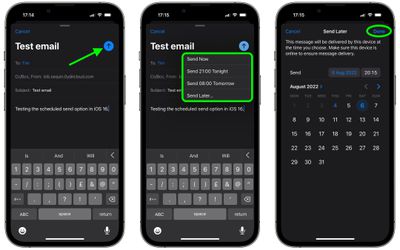
- In the Mail app, compose your email as usual, adding the recipient, sender, subject, and the message contents.
- Long press the Send icon (the blue arrow).
- Either select one of the preset options (Send Now, Send 9:00 PM Tonight, Send 8:00 AM Tomorrow) or tap Send Later... to enter a custom schedule.
- If you opted to Send Later..., use the calendar and time options to schedule when the email should be sent.
- Tap Done in the top-right corner of the screen.
Before the email goes out, it will be listed in a "Send Later" mailbox that's listed under options like Flagged and Unread. Note that you can tap into this email inbox to see the messages you have scheduled and what time they're scheduled for.























![Apple Pulls Keynote, Pages and Numbers From App Store [Update: Back]](https://images.macrumors.com/t/Okb7kitB_gNr6qe5Pex9nQIysD8=/112x112/article-new/2026/01/Apple-Creator-Studio-iWork-suite.jpg)





















