Your iPhone has multiple touch and gesture capabilities that can enhance how you interact with apps. Some, like pinch and zoom, are well known enough to be considered second nature, but others are less obvious, like the one we're about to explain.
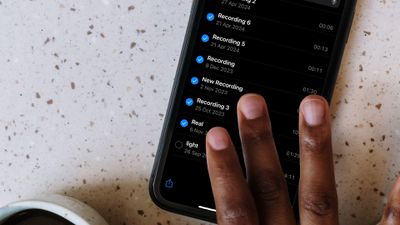
multiple select gesture

Two-Finger Drag to Select Items

If you have apps where you habitually tap on each individual item in a list to select them – emails in your Mail inbox, for example – it's time to dial in some efficiency and embrace this faster method.

This gestural feature allows you to easily select (or deselect) multiple items in apps like Contacts, Mail, Messages, Voice Memos, Notes, and indeed any Apple app that lists multiple items. Here's how it works.

  1. Open an app where multiple item selection is supported.
  2. Touch and hold the screen with two fingers at the same time.
  3. While keeping both fingers on the screen, drag them down (or up) to select multiple items. As you drag, items will be highlighted to indicate they are selected.
  4. Once the desired items are selected, you can perform actions such as moving, deleting, or organizing them.
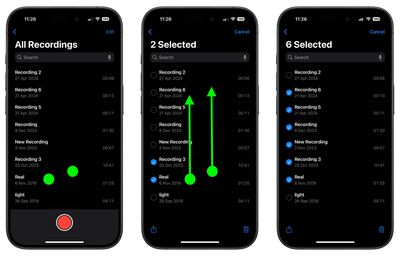
two finger select gesture

That's all there is to it. This simple yet powerful feature streamlines your workflow, saving you time and effort when handling multiple items. Looking to speed up your iPhone text editing skills? Check out our favorite hidden trick by following the link.


Top Rated Comments

CarAnalogy Avatar
11 months ago
Based on this comment thread so far, the actual steps seem to be:

1. Open an App that for some inexplicable reason does not support multi-select

2. Place two fingers on the screen over the items you'd like to select

3. Unpredictable behavior ensues.
Score: 9 Votes (Like | Disagree)
thiscatisfat Avatar
11 months ago
Just imagine that we're on iOS freaking 18. We had at least 100 releases of iOS updates so far! And you still can't select and delete multiple attachments in iMessage. Nice.
Score: 7 Votes (Like | Disagree)
neotint Avatar
11 months ago
If only Apple could make it easy to select all text in iOS. I know it's super advanced and harder to do than fixing Siri. But we can dream of a day that basic high utility features are focused on again instead of chasing hyped up slop generators. Pray to Saint Jobs for us all.
Score: 6 Votes (Like | Disagree)
citysnaps Avatar
11 months ago
Nice feature - thanks for the story!
Score: 5 Votes (Like | Disagree)
t0rqx Avatar
11 months ago

Just imagine that we're on iOS freaking 18. We had at least 100 releases of iOS updates so far! And you still can't select and delete multiple attachments in iMessage. Nice.
You have no idea how much computing power these gestures need. Every new gesture introduced needs a new gen chip that comes out every year.

Its what keeps the upgrade cycle going...
Score: 3 Votes (Like | Disagree)
Biro Avatar
11 months ago
Most of us are familiar with many of these gestures. But too many apps don’t allow them - at least not as we’ve come to use them in iOS or iPadOS. I’m looking at you, New York Times.
Score: 3 Votes (Like | Disagree)

Popular Stories

Apple Logo Zoomed

Tim Cook Teases Plans for Apple's Upcoming 50th Anniversary

Thursday February 5, 2026 12:54 pm PST by
Apple turns 50 this year, and its CEO Tim Cook has promised to celebrate the milestone. The big day falls on April 1, 2026. "I've been unusually reflective lately about Apple because we have been working on what do we do to mark this moment," Cook told employees today, according to Bloomberg's Mark Gurman. "When you really stop and pause and think about the last 50 years, it makes your heart ...
wwdc sans text feature

Apple Rumored to Announce New Product on February 19

Thursday February 5, 2026 12:22 pm PST by
Apple plans to announce the iPhone 17e on Thursday, February 19, according to Macwelt, the German equivalent of Macworld. The report, citing industry sources, is available in English on Macworld. Apple announced the iPhone 16e on Wednesday, February 19 last year, so the iPhone 17e would be unveiled exactly one year later if this rumor is accurate. It is quite uncommon for Apple to unveil...
Finder Siri Feature

Why Apple's iOS 26.4 Siri Upgrade Will Be Bigger Than Originally Promised

Friday February 6, 2026 3:06 pm PST by
In the iOS 26.4 update that's coming this spring, Apple will introduce a new version of Siri that's going to overhaul how we interact with the personal assistant and what it's able to do. The iOS 26.4 version of Siri won't work like ChatGPT or Claude, but it will rely on large language models (LLMs) and has been updated from the ground up. Upgraded Architecture The next-generation...
iOS 26

iOS 26.3 and iOS 26.4 Will Add These New Features to Your iPhone

Tuesday February 3, 2026 7:47 am PST by
While the iOS 26.3 Release Candidate is now available ahead of a public release, the first iOS 26.4 beta is likely still at least a week away. Following beta testing, iOS 26.4 will likely be released to the general public in March or April. Below, we have recapped known or rumored iOS 26.3 and iOS 26.4 features so far. iOS 26.3 iPhone to Android Transfer Tool iOS 26.3 makes it easier...
maxresdefault

Apple Shows Off a Key Reason to Upgrade to the iPhone 17

Saturday February 7, 2026 9:26 am PST by
Apple today shared an ad that shows how the upgraded Center Stage front camera on the latest iPhones improves the process of taking a group selfie. "Watch how the new front facing camera on iPhone 17 Pro takes group selfies that automatically expand and rotate as more people come into frame," says Apple. While the ad is focused on the iPhone 17 Pro and iPhone 17 Pro Max, the regular iPhone...